
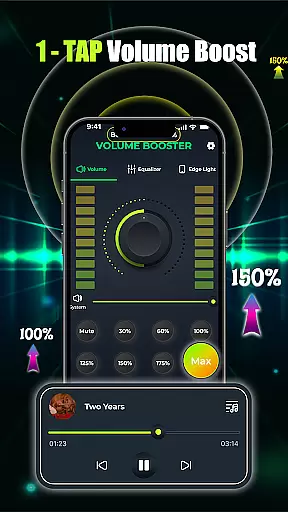
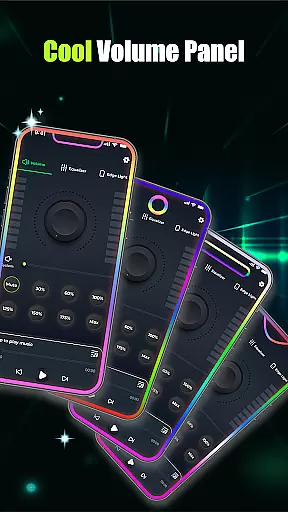
Volume Booster - Music & Sound is a powerful audio enhancement application designed to elevate your listening experience across various devices. This app allows users to amplify volume levels significantly while maintaining sound clarity, making it ideal for music playback, movie streaming, and even voice calls.
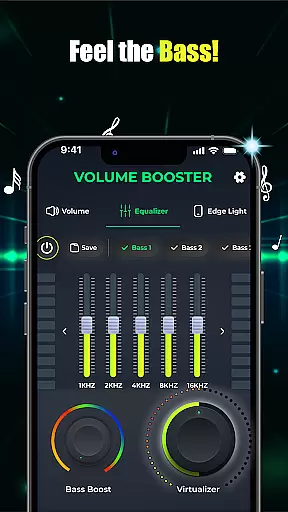
The core functionality includes advanced equalizer controls with customizable presets, bass boost options for deeper sound immersion, and a built-in music player that consolidates multiple audio sources into one interface. Whether you're using Bluetooth headphones or external speakers, this app ensures every sound is optimized for maximum impact.
This application is particularly useful in scenarios where default device volumes are insufficient, such as during parties or outdoor events. By providing studio-quality 3D virtualization and precise volume adjustment features, the app delivers professional-grade audio performance directly to your mobile device.
Volume Booster - Music & Sound offers an impressive range of features that cater to both casual listeners and audio enthusiasts. The app's standout capability is its one-tap volume boost function, which instantly amplifies sound levels without introducing distortion. This feature is complemented by a sophisticated equalizer system that includes both flat and band equalizer presets.
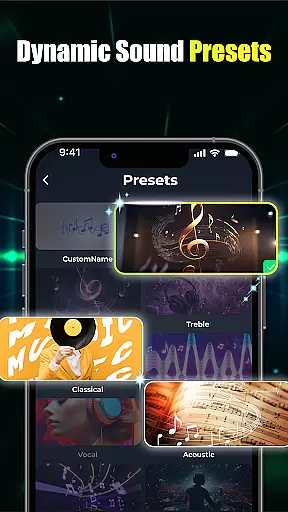
For users seeking more control over their audio experience, the app provides advanced bass boost options and customizable sound presets. These features allow for precise adjustment of audio characteristics, enabling users to create personalized listening profiles. The inclusion of 3D virtualization technology further enhances the audio quality, delivering immersive sound that rivals professional studio equipment.
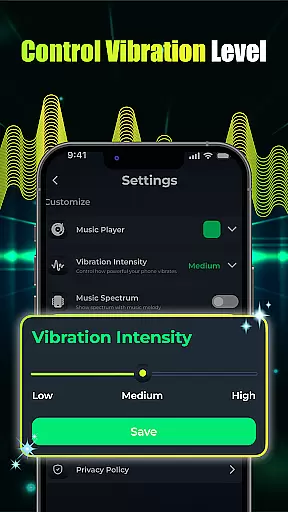
Additional notable features include seamless integration with device music controls, visual effects customization, and support for multiple audio playback applications. These elements combine to create a comprehensive audio solution that addresses various user needs while maintaining an intuitive and user-friendly interface.
When it comes to music and audio applications, the size and authenticity of the music library are crucial factors. Volume Booster - Music & Sound offers an extensive collection of songs and soundtracks, ensuring users have access to a wide variety of audio content. This vast library allows for an immersive experience whether you're listening to music or enhancing audio for movies.
The app places a strong emphasis on copyright authenticity, providing users with peace of mind that all the music and sounds available are legally accessible. By partnering with legitimate music providers and employing rigorous verification processes, the app guarantees that its library remains free from unauthorized content. This commitment not only supports artists but also enhances the credibility of the platform.
Moreover, the application's integration with various audio playback systems ensures seamless access to this rich library. Users can enjoy their favorite tracks without worrying about compatibility issues or legal concerns. The assurance of copyright compliance adds an extra layer of trust, making it a reliable choice for those seeking quality audio experiences.
Audio quality is at the heart of any music and audio app, and Volume Booster - Music & Sound excels in delivering top-notch sound options. With features like advanced bass boosters and customizable equalizer settings, users can fine-tune their audio experience to match their preferences. Whether you're using Bluetooth headphones or loudspeakers, the app ensures every note is crisp and clear.
The inclusion of 3D virtualization technology takes sound quality a step further, offering studio-grade audio right in your pocket. These custom sound presets allow users to immerse themselves in high-definition audio landscapes, bringing depth and richness to every track. The ability to adjust bass levels and apply different equalizer bands means personalizing your sound has never been easier.
Additionally, the built-in music player supports multiple audio formats, catering to audiophiles who demand flexibility and precision. By combining powerful sound enhancement tools with user-friendly controls, the app delivers an unparalleled auditory experience. This focus on superior audio quality ensures that whether you're enjoying a quiet evening with headphones or hosting a lively party, your music will always sound its best.
Powerful volume amplification
Customizable equalizer presets
Advanced bass boost options
Intuitive user interface
Multi-device compatibility
Potential battery drain
Limited free features
Occasional audio glitches
Interface complexity
Device compatibility issues

Make music anywhere. Turn your device into an instrument.
 4.5
4.5
Pay Once, no monthly payment
4.60
Full-featured, High-Quality Groovebox Workstation, perfect for Live Performance!
4.80
Time Trainer: accurate metronome w tools to help you develop your internal time!
4.20
VB-AUDIO Software / VBAN-Receptor allows listening to any VBAN Streams
4.10
More downloads than any other metronome. Includes drum machine & tempo trainer.
4.80
The only true audiophile music player with Hi-Fi audio rendering and DSP engine
3.90
Ultimate Sonos Controller
4.70
The official Sonos app
4.10
Offline Music Player & MP3 Player.Powerful equalizer, Lyrics, Themes, Tag Editor
4.80
Gorgeous UI, Powerful music Search and Equalizer, the great choice for you!
4.70
Listen to live FM radio stations, sports, music and news on global radios online
4.70
SqueezePlayer turns your Android phone or tablet into a SqueezeBox on its own!
4.60
Recording studio w/ 10k beats, pro vocal FX and a network of 20M rappers & fans!
4.60
Formerly known as Spotistats! View your top tracks, artists, albums and more!
4.40
Your HD audio recorder on the go for music, meetings, ambience, animal sounds…
4.30
The alternative folder based music player.
4.20
A sleek, no-frills player designed for true music lovers.
4.20
No wifi music app. Mp3 offline. Tuner radio, young radio music. Music downloader
4.20


User Reviews