
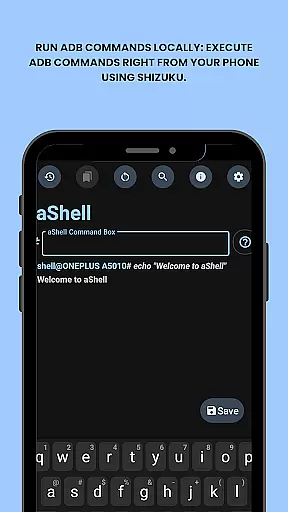
aShell is a specialized Android tool that allows users to execute ADB commands directly from their mobile device without requiring a PC. Designed for developers, power users, and tech enthusiasts, this app provides full control over the device's internals by leveraging a Shizuku environment. It eliminates the traditional barriers of using ADB tools, making advanced device management accessible on the go.
Key features include live command output, preloaded examples for quick execution, and support for continuous commands like logcat or top. Additionally, it offers convenient functionalities such as saving outputs to files, searching within results, and bookmarking frequently used commands. With its open-source nature and compatibility with both dark and light modes, aShell ensures a seamless experience tailored to user preferences.
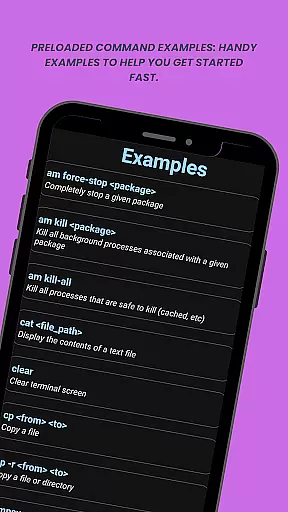
aShell stands out with its unique ability to run ADB commands locally on Android devices through Shizuku integration. This feature empowers users to perform complex operations directly from their phones, offering unparalleled flexibility. The app includes preloaded examples of common ADB commands, which serve as helpful references for beginners while also saving time for experienced users.
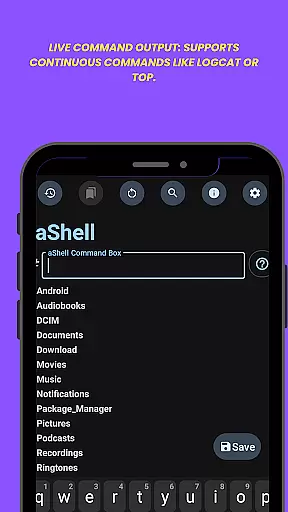
Another notable aspect is its live command output functionality, which supports continuous monitoring of processes such as logcat or top. Users can easily search within the output for specific information and save the results to text files for future reference. Additional highlights include adaptive theming (dark/light mode), bookmarking for frequently used commands, and complete source code availability for those who prefer building the app themselves.
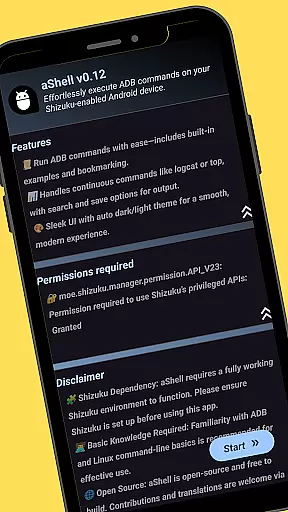
aShell is designed to bring the power of ADB commands directly to Android devices, ensuring precision and reliability in its core functionality. By leveraging a fully functional Shizuku environment, it allows users to execute complex ADB operations with ease.
The app provides preloaded command examples that cater to both beginners and advanced users, ensuring that every command runs as expected. Its ability to support continuous commands like logcat or top showcases its effectiveness in real-time operations, making it an invaluable tool for developers and power users.
With features such as live command output and the ability to search within results, aShell ensures that users can efficiently troubleshoot and analyze their device's internals. This level of accuracy not only enhances productivity but also offers a seamless experience when executing intricate tasks.
Despite its technical nature, aShell maintains an intuitive and user-friendly interface. The app eliminates the need for external devices by allowing users to run ADB commands directly from their phone, streamlining workflows without compromising on usability.
Its adaptive dark/light mode automatically adjusts to the system theme, providing a comfortable viewing experience in any setting. Additionally, the bookmark feature enables quick access to frequently used commands, reducing the learning curve for new users.
By offering clear examples and straightforward navigation, aShell simplifies what could otherwise be a complex process. This balance between advanced functionality and ease of use makes it accessible even to those with basic ADB knowledge, enhancing overall user satisfaction.
Full device control
Live command output
Preloaded examples
Bookmark functionality
Open-source project
Requires Shizuku
ADB knowledge needed
Limited target audience
No standalone use
Potential complexity

pdf merge, word to pdf, jpg to pdf, edit pdf, convert to pdf and much more!
 4.20
4.20
A convenient photo, video, and file recovery tool.
4.00
Use your phone as a webcam on your computer over WiFi or USB.
4.40
Save any video in HD - paste the link, download fast and watch offline.
4.1
Carry a FTP server in your pocket and avoid USB cables for file transfer
4.20
An easy-to-use calculator designed to save time calculating and bending conduit
4.30
The Ultimate Bluetooth Keyboard & Mouse. Securely control your PC, Mac, and more
4.50
Fast Video Downloader, Movie Downloader, Torrent Downloader & Adblock Browser
4.70
Enhance your Beats
3.70
The ultimate tool for network analysis, wifi scanning and problem detection.
4.90
The Ultimate Flex Drivers Utility App - Convenient Tapping & Block Filters
4.70
Connect instantly to a fast, encrypted VPN with one tap
4.60
HD Video player and downloader for all formats, fast & smooth 4K video playback.
4.60
App to pay for FUTO Keyboard
4.60
Remote for Roku, Fire TV, Samsung TV, LG TV, Android TV, Chromecast and VIZIO TV
4.20
Automate everything from settings to photos, SMS to speech. ADC2 prize winner.
4.10
Family Locator, Share location, StayConnect with your family in real time
3.90
Create your own live wallpaper or check out thousands already made presets
3.90
PDF Reader - Document Viewer: Read, Manage & Organize Your Documents
3.10


User Reviews