
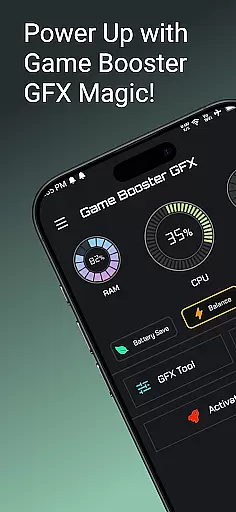
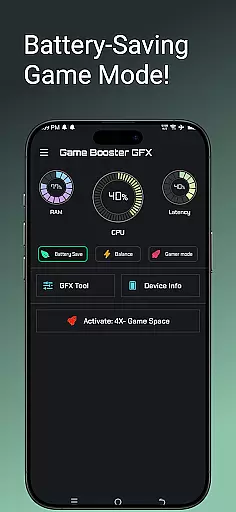
Game Booster GFX 4x is a powerful tool designed to enhance your mobile gaming experience. This app optimizes device performance, enabling smoother gameplay with up to 120 FPS on supported devices. It offers features like 4x Game Space expansion, detailed Device Info, and a specialized Gamer Mode.
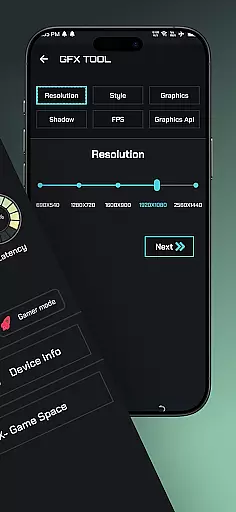
The GFX Tool allows users to customize resolution settings without lag, unlock extreme frame rates, and choose from multiple graphics styles including Realistic, Colorful, Soft, and Classic modes. With support for Ultra HD and HDR graphics, this app ensures an immersive gaming experience while maintaining optimal device performance.
Ideal for competitive gamers, Game Booster GFX 4x helps you enjoy professional-level gaming by reducing lag and improving visual quality. Whether you're playing graphically intensive games or need extra space for game files, this app provides the necessary tools to elevate your gameplay.
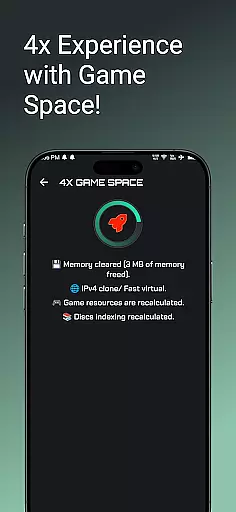
Game Booster GFX 4x stands out with its comprehensive suite of gaming optimization features. The app's 4x Game Space functionality expands storage capacity specifically for games, allowing users to download and save more content without worrying about device limitations.
The GFX Tool is particularly impressive, offering granular control over graphical settings. Users can customize resolutions, unlock higher frame rates up to 120 FPS, and select from various graphics styles that suit their preferences. The app supports multiple rendering options including Ultra HD and HDR, ensuring the best possible visual experience across different device capabilities.
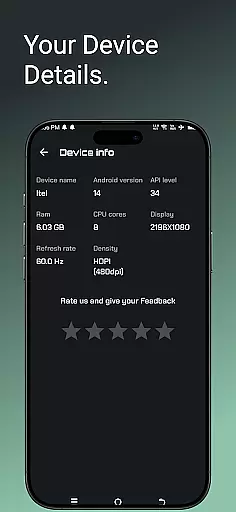
Additional features like detailed Device Information and dedicated Gamer Mode provide users with valuable insights into their device's performance metrics while optimizing system resources for gaming sessions. These tools work together to create a seamless and enhanced gaming experience without compromising device stability or performance.
Game Booster GFX 4x offers a comprehensive suite of features designed to enhance gaming performance. The app includes a 4x Game Space feature that optimizes device resources, ensuring games run smoothly without lag.
One of the standout functionalities is the GFX Tool, which allows users to customize their gaming resolution and unlock extreme frame rates of up to 90 or 120 FPS on supported devices. This tool caters to gamers who demand high-performance graphics and smooth gameplay experiences.
In addition to resolution and frame rate adjustments, the GFX Tool provides options for choosing different graphics styles such as Realistic, Colorful, Soft, and Classic. Gamers can also enjoy Ultra HD and HDR graphics, making their gaming sessions visually stunning.
The app's functionality extends beyond just visual enhancements; it includes a Gamer Mode and Device Info feature. These tools collectively ensure that users have all the necessary information and settings optimized for an immersive gaming experience.
Game Booster GFX 4x focuses on delivering a seamless user experience through its intuitive interface and efficient operations. The app is designed to be user-friendly, allowing gamers to easily navigate and adjust settings to their preference.
With the Gamer Mode feature, users can quickly switch their device into an optimized state for gaming. This mode helps in reducing background activity and prioritizing gaming performance, contributing to overall operational smoothness.
The GFX Tool within the app ensures that any changes made to game settings are applied instantly without requiring cumbersome processes or restarts. This immediacy enhances usability by letting players fine-tune their experience on-the-fly.
Overall, Game Booster GFX 4x combines powerful features with ease of use, ensuring that gamers can focus on enjoying their favorite titles without being bogged down by complex configurations or slow operations.
Smooth gameplay enhancement
Customizable graphics settings
Extreme FPS unlocking
Multiple graphic styles
Device optimization tools
Limited device compatibility
Premium features locked
Battery consumption increase
Occasional stability issues
Third-party app conflicts

Use your Phone as Drone Controller.
 3.70
3.70
Identify securely online
3.10
TV USB connector app provides you a seamless cast option from your phone to tv.
4.70
Block, disable and secure phone camera from secretly taking photos by spyware.
4.50
Zlink Carplay Android a mirror link app with a Carplay interface style
4.1
Enjoy hours of entertainment with our Roblox mobile games app
4.4
DamonSx2 is the open Source LGPL Emulator
3.20
Ps2 plugins for 64 bit artitechture
3.70
Experience virtual reality on your smartphone with Cardboard.
3.50
Tune your game graphics with our GFX optimizer for optimal gaming experience
4.50
Popular mods fnaf mods for melon playground
4.50
Test DPC is a sample device policy controller for use with Android Enterprise.
4.20
Easily evaluate the performance of Scandit's barcode and ID scanning SDK
4.10
A Pydroid Quick Install repository provider.
4.00
The best PS2 games from your childhood come to life in their mobile version!
4.00
With Endoscope Camera Connector you can connect your phone with endoscope cam
3.70
Mobs maker Minecraft help MCPE creators make their own mob by using Blockbench
3.50
Simulator of real black light
3.50
Looking to connect your phone to your car screen? Mirror Link is the solution.
3.20


User Reviews