
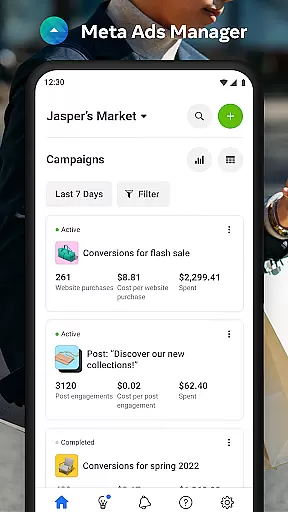

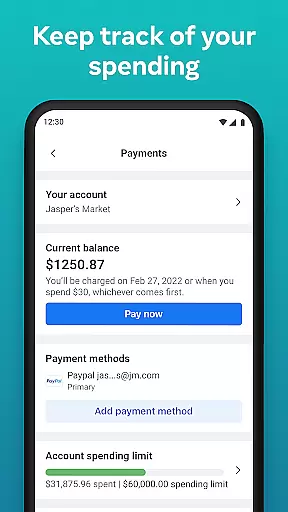
Meta Ads Manager is a comprehensive business tool designed for advertisers managing campaigns across Meta's platforms, including Facebook, Instagram, Messenger, and WhatsApp. The app enables users to create and edit ad campaigns while providing detailed real-time insights into performance metrics. With its robust functionality, advertisers can monitor their campaigns' effectiveness, turn campaigns on or off, and receive instant alerts about important changes. Its side-by-side comparison feature allows users to analyze multiple campaigns and ad sets efficiently. This makes it an essential mobile solution for businesses that need to stay agile and informed while managing ads remotely.
The app also supports seamless navigation between different Pages and ad accounts, ensuring smooth account management. Whether you're running small-scale promotions or handling large advertising portfolios, Meta Ads Manager offers the tools necessary to optimize campaigns and improve ROI. Its intuitive interface and powerful features make it suitable for both novice advertisers and seasoned marketing professionals who require quick access to critical data on the go.
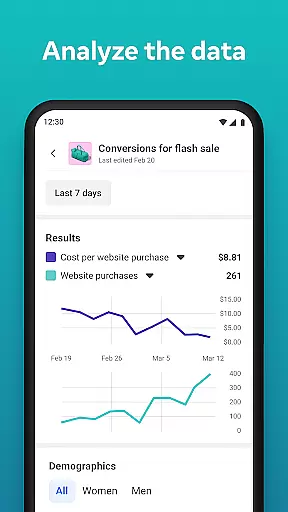
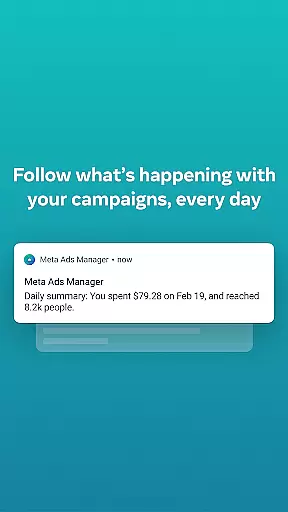
Meta Ads Manager stands out with its diverse set of features tailored for efficient campaign management. One of its core functionalities is the ability to view real-time insights from all active campaigns, giving advertisers a granular understanding of how their ads perform across Meta’s platforms. Users can easily toggle campaigns on or off based on these insights, allowing for rapid adjustments without needing desktop access. Additionally, the app provides quick alerts that notify users of significant events, such as budget exhaustion or sudden performance drops, ensuring timely interventions.
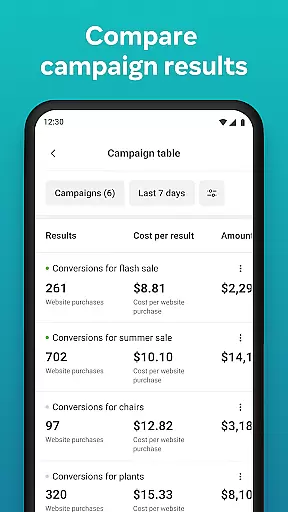
Another key feature is the side-by-side campaign comparison tool, which empowers advertisers to evaluate the effectiveness of different ad sets simultaneously. This comparative analysis helps in making data-driven decisions to allocate budgets more effectively. Furthermore, the app simplifies switching between various Pages and ad accounts, streamlining the workflow for agencies or businesses managing multiple brands. These capabilities collectively enhance productivity and enable marketers to respond swiftly to market dynamics, maximizing their advertising impact.
Collaborative work features are essential for modern business applications, enabling teams to work together efficiently regardless of location. Meta Ads Manager excels in this area by providing a centralized platform where marketing teams can manage campaigns across multiple Meta technologies.
The application allows users to create and edit ad campaigns for platforms like Facebook, Instagram, Messenger, and WhatsApp from a single interface. This unified approach ensures that team members can coordinate their efforts seamlessly, maintaining consistency across different channels while implementing marketing strategies.
One of the key benefits is the real-time access to campaign data and insights. Team members can view detailed analytics, make immediate adjustments, and track the performance of their ads across all platforms simultaneously. The ability to compare campaigns using side-by-side views further enhances collaboration by providing clear visual references for team discussions and decision-making.
This collaborative functionality not only saves time but also improves the overall effectiveness of marketing efforts. Teams can quickly respond to market changes, optimize campaigns on the fly, and ensure that all members are working with the most up-to-date information, leading to better campaign performance and ROI.
Effective task management is crucial for successful advertising campaigns, and Meta Ads Manager provides robust tools to help users stay organized and in control of their marketing efforts. The application's intuitive interface enables users to efficiently manage multiple campaigns across various Meta platforms.
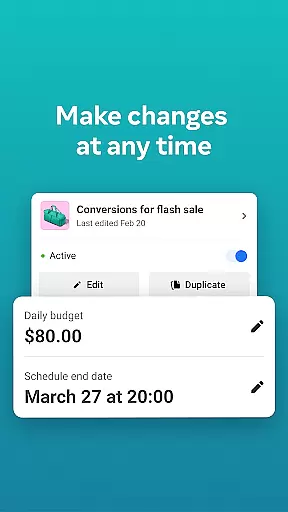
Users can easily turn campaigns on and off, set up quick alerts for important events, and switch between different Pages and ad accounts with minimal effort. These features help streamline daily operations and ensure that no critical tasks are overlooked during busy periods. The ability to receive instant notifications about ad performance keeps marketers informed about their campaigns' status at all times.
The application's organizational tools extend to its comparison features, allowing users to analyze different campaigns and ad sets side by side. This capability helps in identifying top-performing elements and making data-driven decisions about resource allocation and strategy adjustments. Marketers can quickly spot trends, detect potential issues, and implement necessary changes to optimize their campaigns.
By providing comprehensive task management features, Meta Ads Manager empowers users to maintain better control over their advertising activities. This leads to improved efficiency, reduced administrative burden, and ultimately, more successful marketing outcomes across all managed platforms.
User-friendly interface
Real-time campaign insights
Multi-platform support
Quick alerts system
Side-by-side comparisons
Limited advanced tools
Occasional sync delays
Basic reporting options
No offline functionality
Dependent on internet

Measure distances, surfaces and draw plans in seconds with CamToPlan!
 4.40
4.40
The MyWalmart App is available for all associates in stores.
4.70
Your employer must have UKG Ready software configured for Mobile.
4.60
Manage work life on the go
4.50
Find the right fit, faster.
4.70
Find work, shifts and gigs near you. Jobs lasting a few hours to a few months.
4.30
enjoy effortless PDF reading anytime, anywhere
3.90
A secure, all-in-one team collaboration app
4.30
We are a dynamic team of creatives people of design, marketing, web & apps
3.00
Job search app that finds jobs for you! Takes the work out of looking for a job!
4.90
All your team communication in one place
4.70
Paychex Flex - Save Time and Stay Connected
4.60
No more passwords, easier sign-in, and greater protection for your accounts.
4.60
Find jobs near you and temp work in minutes, from your phone.
4.50
Collaborate seamlessly with Google Chat, part of Google Workspace
4.50
On the go? Take FedEx with you.
4.00
Zoom built for Chrome OS
3.90
Quickly open and manage PDF files on your device.
3.80
Take the stress out of storage with the all-in-one app to manage your space.
3.70


User Reviews