

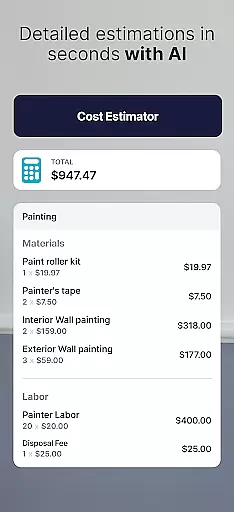

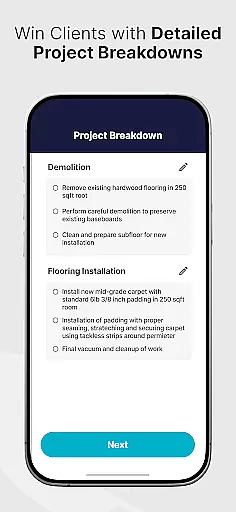

SimplyWise Cost Estimator is a cutting-edge construction cost estimation tool designed for homeowners and contractors. This app provides accurate renovation costs, material estimates, and financial insights within seconds. Whether you're planning a major home renovation or smaller repair projects, the app ensures precise budgeting and helps avoid unexpected expenses.
The app's standout feature is its AI-powered estimation process. Users simply take a photo of their project area and describe the work needed. The app then generates detailed cost breakdowns including labor and materials. Additionally, SimplyWise offers advanced document scanning capabilities that allow users to organize receipts and generate itemized financial reports, making it an all-in-one solution for construction project management.
This application is especially valuable for small contracting businesses and DIY enthusiasts who need reliable cost projections before starting a project. By providing instant estimates and financial tracking features, SimplyWise helps users make informed decisions and maintain better control over their construction budgets.
SimplyWise Cost Estimator distinguishes itself through several innovative features. First is its AI-driven estimation engine that can analyze project photos and descriptions to generate accurate cost breakdowns within seconds. The app considers both material and labor costs, providing comprehensive financial projections for any construction or renovation project.
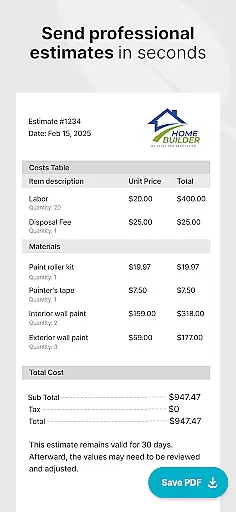
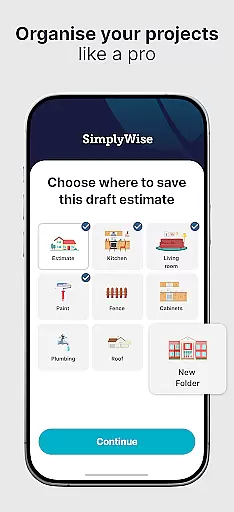
Another key feature is its integrated receipt scanning and document management system. Using advanced OCR technology, the app can automatically categorize and store expense documents. Users can create custom folders to organize their project finances and generate detailed financial reports that help maximize tax returns. The app also allows exporting estimates in PDF format, making client communication more professional and efficient.
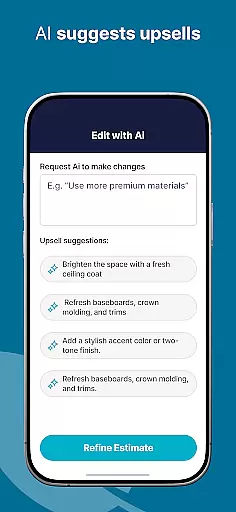
What sets SimplyWise apart is its user-friendly interface combined with powerful functionality. The app guides users through each step of the estimation process, from initial project description to final cost breakdown. Its ability to save and update projects makes it particularly useful for ongoing construction work, while the AI revision system ensures accuracy by flagging potential issues before finalizing estimates.
Collaborative work features are essential for modern business applications, enabling teams to work together efficiently regardless of location. The SimplyWise Cost Estimator app excels in this area by providing tools that facilitate seamless collaboration between homeowners and contractors.
The app allows users to take photos of their project spaces and describe the work needed, such as replacing kitchen tiles. This visual and descriptive input creates a shared understanding among all parties involved, ensuring everyone is on the same page from the start.
Once an estimate is generated, users can review and adjust the construction estimates collaboratively. The AI-powered system revises and flags important details, making it easier for contractors to discuss potential changes with clients before finalizing the quote.
This collaborative approach extends to sharing finalized estimates in PDF format, which can be easily distributed to clients for approval. By streamlining communication and documentation processes, the app significantly enhances team productivity and project transparency.
Effective task management is crucial for successful project execution, especially in the construction industry where multiple elements need to be coordinated simultaneously. The SimplyWise Cost Estimator app offers robust task management capabilities that help users stay organized throughout their renovation projects.
From the initial estimation phase, where users capture images and describe their projects, to reviewing and adjusting cost estimates, the app provides a structured workflow. This ensures that each step of the process is completed systematically, reducing the risk of overlooking important details.
Users can save their projects and update them as work progresses, transforming the app into a comprehensive expense tracker. This feature allows for real-time monitoring of costs against the initial estimate, helping to prevent budget overruns and maintain financial control.
Additionally, the app's document scanning OCR and custom folder organization system enable users to manage receipts and other project-related documents efficiently. These tools contribute to better financial planning and reporting, ultimately leading to more successful project outcomes.
Accurate Estimates
User-Friendly Interface
Advanced OCR Technology
Instant Cost Breakdowns
Professional PDF Exports
Limited Free Features
Occasional AI Errors
Requires Internet
Premium Subscription
Learning Curve

Completed Course Lectures on how to use IBM Maximo in Maintenance issues
 4.5
4.5
Measure distances, surfaces and draw plans in seconds with CamToPlan!
4.40
The All-in-One File Manager for Phone, TV, Watch, Cars, XR / VR, Chromebook
4.10
Amazon A to Z is the place to manage your work-life at Amazon.
4.50
Paychex Flex - Save Time and Stay Connected
4.60
Build a store in minutes with our full suite of AI tools. Start for free!
4.20
Find part-time earning opportunities near you that pay within days.
3.20
Shop, deliver, and earn with the Spark Driver™ App
4.10
The app that lets you deliver with Amazon.
4.50
Earn free swag, G-Cards & food • Enter sweepstakes • Find stores • So much more.
4.70
Use Generative Summary to understand your rental or insurance docs in seconds.
4.70
All your team communication in one place
4.70
AI-powered document scanner with auto enhance for perfect PDFs.
4.60
Drive and earn extra money
4.50
Find work, shifts and gigs near you. Jobs lasting a few hours to a few months.
4.30
Formerly Facebook Ads Manager. Manage and create ads on the go.
4.20
Smarter career moves start here. AI job alerts, insights & the right tools.
4.20
All document reader, pdf viewer app, read docs & excel files
3.80
viewing and sharing PDFs and other files—anytime, anywhere!
4.1


User Reviews