



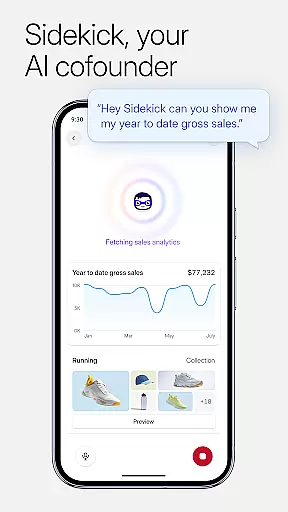

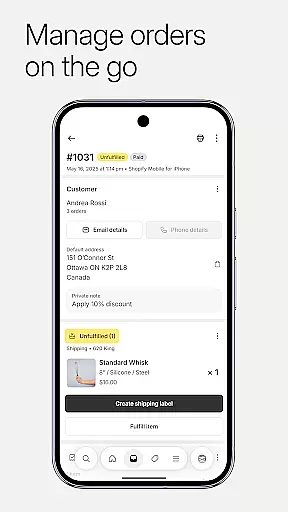
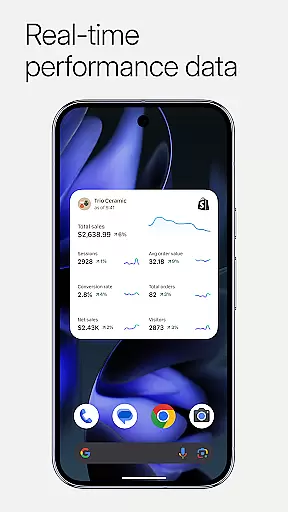

Shopify stands as a comprehensive commerce platform tailored for entrepreneurs looking to establish and manage an online business with ease. It eliminates the need for coding or design expertise, enabling users to operate their ecommerce ventures from any location. The app supports selling both locally and globally, on various platforms including desktop, mobile, and in-person.
One of Shopify's key strengths is its ability to empower users to handle all aspects of their business on-the-go. This includes processing orders, tracking inventory, analyzing sales data, and launching marketing campaigns directly from a mobile device. Its versatility extends to supporting dropshipping, offering tools that streamline inventory management and order automation, thus enhancing operational efficiency and profitability.
The platform also facilitates integration with social media channels like Instagram, Facebook, and Messenger, allowing businesses to synchronize inventory and orders across multiple sales channels. With real-time business insights, users can monitor live sales and visitor traffic, receive instant notifications for new orders, and communicate effectively with their teams. These capabilities make Shopify an indispensable tool for modern entrepreneurs.
Shopify offers a robust suite of features designed to simplify and enhance the ecommerce experience. At its core, the app provides powerful product management tools, enabling users to upload product photos, set pricing, organize items into collections, and adjust inventory by scanning barcodes. This ensures that product listings are always up-to-date and accurately reflect available stock levels.
Order processing is streamlined through intuitive functionalities that allow users to fulfill, refund, or archive orders with minimal effort. The app also supports purchasing and printing shipping labels, while providing conversion tracking details to help optimize business performance. Additionally, Shopify's marketing tools enable users to launch Google Smart Shopping campaigns, create social media ads, and track campaign results for continuous improvement.
Customer relationship management is another standout feature, allowing users to view and manage customer segments, edit details, and maintain direct communication. The app further enhances user experience by offering customization options such as accessing Shopify apps, browsing free themes, and updating store appearance dynamically. Financial management tools provide up to six Balance accounts, facilitate funding applications, and enable real-time monitoring of account balances and cash flow.
Collaborative work features are essential for modern businesses that require seamless communication and coordination among team members. Shopify excels in this area by providing tools that allow entrepreneurs to manage their entire business on the go. Through the app, users can process orders, track inventory, and launch marketing campaigns from their mobile devices.
The platform supports real-time interaction, ensuring that all team members have access to the latest data and can communicate effectively. This is particularly beneficial for teams that operate across different locations or time zones. With instant order notifications and the ability to add timeline comments to orders, Shopify enhances transparency and accountability within teams.
Moreover, Shopify integrates with popular social media platforms like Instagram, Facebook, and Messenger, allowing businesses to synchronize their operations across multiple channels effortlessly. This ensures that all team members are on the same page, regardless of where they are working from. The result is a more cohesive and efficient workflow that empowers businesses to scale and adapt quickly.
Effective task management is crucial for maintaining productivity and ensuring that all aspects of a business run smoothly. Shopify offers robust tools that enable users to handle various tasks efficiently, from fulfilling orders to managing customer relationships. With just a few taps, users can fulfill, refund, or archive orders, streamlining the entire order processing workflow.
In addition to order management, Shopify provides real-time business insights that help entrepreneurs make informed decisions. Users can watch live sales and visitor traffic as they happen, which allows for quick adjustments to marketing strategies or inventory levels. These insights ensure that businesses can respond promptly to market changes and customer demands.
Shopify also includes powerful marketing tools that simplify the creation and tracking of ad campaigns. Users can launch Google Smart Shopping campaigns and create Facebook and Instagram ads directly from the app. By monitoring campaign performance, businesses can optimize their marketing efforts for better results. Overall, Shopify's comprehensive task management capabilities empower entrepreneurs to run their businesses more efficiently and effectively.
User-friendly interface
Extensive integration options
Real-time business analytics
Comprehensive marketing tools
Robust financial management
Subscription costs may be high
Limited free theme selection
Transaction fees apply
Steep learning curve for beginners
Occasional app stability issues

Quickly open and manage PDF files on your device.
 3.80
3.80
The All-in-One File Manager for Phone, TV, Watch, Cars, XR / VR, Chromebook
4.10
Windows App allows you to connect to remote PCs and virtual apps.
3.70
Find work, shifts and gigs near you. Jobs lasting a few hours to a few months.
4.30
A secure, all-in-one team collaboration app
4.30
Use Generative Summary to understand your rental or insurance docs in seconds.
4.70
We are a dynamic team of creatives people of design, marketing, web & apps
3.00
Find part-time earning opportunities near you that pay within days.
3.20
Job search app that finds jobs for you! Takes the work out of looking for a job!
4.90
FaxCover - Create fax cover pages. Works with any app or fax machine.
4.90
GoTo Mobile is a simple & secure calling, messaging & meetings solution
4.80
Recover what matters — quickly and easily.
4.70
All your team communication in one place
4.70
AI-powered document scanner with auto enhance for perfect PDFs.
4.60
From Gone to Back Again — In Just a Few Taps
4.50
Scan Business Cards & Conference Badges - Capture Leads at Events & Tradeshows
4.20
Smarter career moves start here. AI job alerts, insights & the right tools.
4.20
Work happy with AI Companion
4.10
All document reader, pdf viewer app, read docs & excel files
3.80


User Reviews