
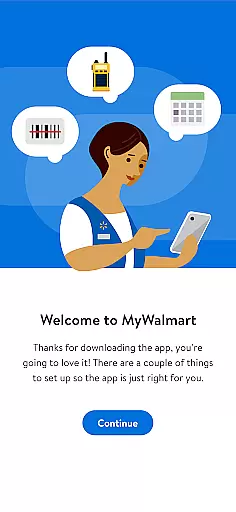
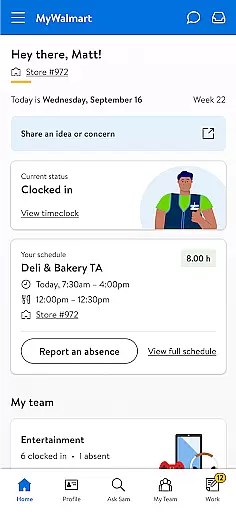
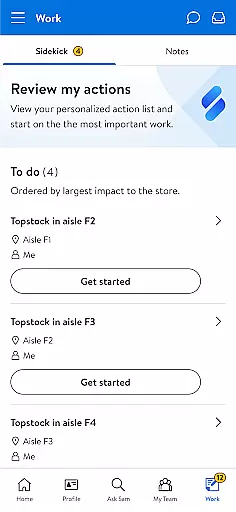
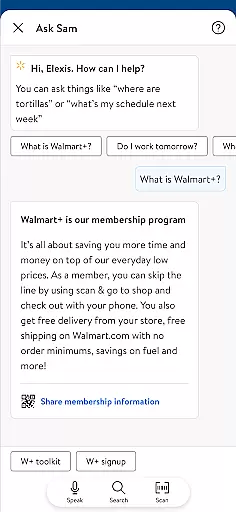
MyWalmart is a comprehensive business application designed to enhance the work experience for Walmart associates while providing potential candidates with essential information about career opportunities. The app serves as a one-stop solution for both employees and job seekers, offering features that streamline daily operations and provide valuable insights into Walmart's corporate culture.
Key functionalities include schedule management, allowing associates to view work schedules, request time off, and swap shifts seamlessly. The innovative Ask Sam feature acts as a personal assistant, answering product-related queries and improving through use. Additionally, the My Team section facilitates communication among team members through an integrated walkie-talkie function, promoting better collaboration in the workplace.
This application proves particularly useful in retail environments where efficient scheduling and quick access to information are crucial. By consolidating these tools into a single platform, MyWalmart significantly enhances productivity and streamlines communication channels within Walmart's workforce.
The MyWalmart app boasts several distinctive features that set it apart from other business applications. Its most prominent characteristic is the Ask Sam voice assistant, which utilizes advanced search algorithms to provide instant answers to product-related questions and operational metrics. This intelligent assistant learns from each interaction, becoming more accurate and helpful over time.
Another significant feature is the comprehensive scheduling system that enables associates to manage their work-life balance effectively. Users can view their upcoming shifts, request time off, and even pick up additional hours directly through the app. The My Team functionality further enhances workplace communication by providing a roster view of team members and incorporating a unique walkie-talkie feature for instant communication.
The app also includes an integrated notification system called Inbox, which keeps users informed about important updates regarding scheduling changes, time-off requests, and other crucial workplace communications. While some advanced features require two-step verification for security purposes, this ensures that sensitive employee information remains protected.
Collaboration is at the heart of MyWalmart, designed to streamline teamwork among associates. The app offers a comprehensive suite of tools that foster seamless communication and coordination within teams.
One standout feature is 'My Team,' which provides a roster view of all team members on duty. This functionality allows users to see who is working at any given time, facilitating better task delegation and team organization. Additionally, the in-app walkie-talkie feature ensures that associates can stay connected in real-time, enhancing responsiveness and collaboration.
Another collaborative tool is 'Ask Sam,' a voice assistant that helps answer questions related to products, metrics, and more. As users interact with it, the assistant becomes smarter, offering increasingly accurate information. This not only aids individual productivity but also ensures that all team members have access to consistent and reliable data.
These collaborative features significantly improve operational efficiency by keeping everyone aligned and informed, ultimately leading to a more cohesive work environment.
Effective task management is crucial for maintaining productivity, and MyWalmart excels in this area by providing robust scheduling and notification tools. These features ensure that both associates and managers can efficiently manage their time and responsibilities.
The 'Schedule' feature allows associates to view their work schedules, request time off, and even swap or pick up unfilled shifts. This flexibility empowers employees to manage their work-life balance while ensuring that staffing levels remain optimal. Managers benefit from streamlined scheduling processes, reducing administrative overhead.
In addition to scheduling, the 'Inbox' feature consolidates notifications and actions related to scheduling, time-off requests, and other essential tasks. This centralized hub ensures that no critical action is missed, helping maintain smooth operations. By integrating these functionalities, MyWalmart simplifies task management, allowing users to focus on their primary responsibilities.
Overall, these task management capabilities enhance productivity and accountability, making daily operations more efficient and manageable for everyone involved.
User-friendly interface
Comprehensive scheduling tools
Integrated communication features
Smart voice assistant functionality
Secure authentication system
Limited to Walmart employees
Feature restrictions by location
Requires verification process
Occasional connectivity issues
Learning curve for new users

VSD Viewer - Visio Drawings Viewer for Android Preview VSD, VDX, VSDX drawings
 4.10
4.10
Earn crypto with secure cloud mining. Monitor, track & withdraw easily
4.40
Manage Your Shop
4.70
Use Generative Summary to understand your rental or insurance docs in seconds.
4.70
Deliver and earn money
4.30
Delivery Track App - Tracking with Fedex, USPS, UPS, DHL. Monitor your Orders.
3.20
Find part-time earning opportunities near you that pay within days.
3.20
From Gone to Back Again — In Just a Few Taps
4.50
Access All PDF Files
3.40
BuildCalc - the easiest AND the most advanced construction calculator app.
4.80
Earn free swag, G-Cards & food • Enter sweepstakes • Find stores • So much more.
4.70
All your team communication in one place
4.70
USPS Mobile®Access USPS.com’s most popular tools on-the-go.
4.70
Make invoices, bills, receipts & estimates on the go with Invoice Generator.
4.70
No more passwords, easier sign-in, and greater protection for your accounts.
4.60
ANDROID'S TOP MOBILE OFFICE - Word, Excel, PowerPoint and PDF at your fingertips
4.50
Measure distances, surfaces and draw plans in seconds with CamToPlan!
4.40
Make money as a delivery driver with DoorDash and work when you want as a Dasher
4.30
Smarter career moves start here. AI job alerts, insights & the right tools.
4.20


User Reviews