
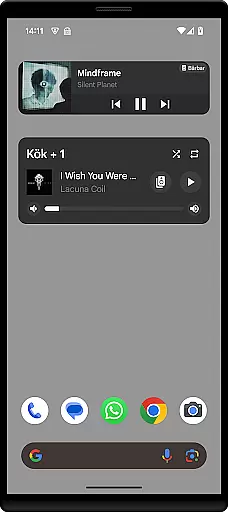
Sonos Widget is a powerful tool designed for music enthusiasts who want seamless control over their Sonos system directly from their smartphone's home screen. This app offers two distinct widget options - Compact and Enhanced, allowing users to choose based on their preference for information density and control features.
With capabilities ranging from displaying relevant metadata, volume adjustments, grouping speakers, to playback controls such as play, pause, next, and previous, the Sonos Widget ensures you have complete command over your audio experience without needing to open the app itself. Whether you're at home or entertaining guests, this widget provides quick access to essential functions, enhancing convenience and user interaction with your Sonos devices.
The Sonos Widget stands out due to its comprehensive feature set tailored for both casual listeners and audiophiles alike. The application provides two types of widgets: Compact, which is perfect for minimalistic interfaces, and Enhanced, offering more detailed information and control options.
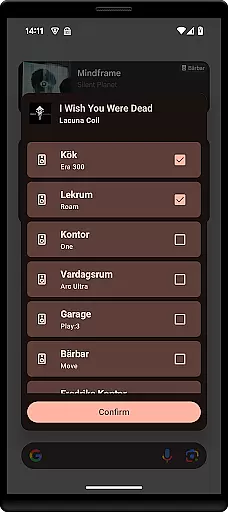
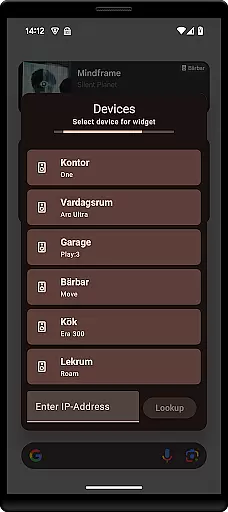
Users can easily manage their listening experience through intuitive playback controls including shuffle and repeat modes, adjust volumes across different rooms or grouped speakers, and view important track details like album art and song titles. These functionalities are seamlessly integrated into the home screen, ensuring that all essential controls are just a tap away. Additionally, setting up the widget is straightforward; simply select it from your 'Widget'-drawer and follow the on-screen instructions to connect to your Sonos system.
When it comes to managing your music experience, the Sonos Widget app offers a unique approach by allowing users to control their Sonos system directly from their home screen. While the app itself does not host a music library, its seamless integration with your existing Sonos setup ensures that all your music content is readily accessible. This includes tracks and playlists from various streaming services, each of which comes with its own set of copyrights and licensing agreements.
The app's ability to display relevant metadata such as song titles, artists, and album art underscores its commitment to providing an authentic music experience. By ensuring that this information is accurate and properly attributed, the Sonos Widget app respects the intellectual property rights of artists and content creators. This attention to detail enhances the overall user experience, making it both enjoyable and legally compliant.
Moreover, the app supports essential playback controls like play, pause, next, and previous, enabling users to navigate their extensive music libraries effortlessly. These features are designed to work in harmony with the Sonos ecosystem, ensuring that users can enjoy their favorite tunes without any interruptions or legal concerns. The inclusion of modes such as shuffle and repeat further enriches the listening experience, offering users a high degree of customization and control over how they interact with their music library.
Audio quality is paramount when enjoying music, and the Sonos Widget app excels in delivering a superior auditory experience. By integrating directly with your Sonos system, the app ensures that all audio settings configured within the main Sonos app are preserved and applied consistently. This means that whether you're streaming high-resolution audio files or standard-quality tracks, the Sonos Widget maintains the integrity of the sound output, providing listeners with the best possible quality.
In addition to supporting various audio formats, the Sonos Widget app also offers volume control functionality, allowing users to adjust the sound level directly from their home screen. This feature is particularly useful for maintaining optimal audio quality across different environments and listening scenarios. Whether you're hosting a party or enjoying a quiet evening at home, the ability to fine-tune the volume ensures that your music always sounds perfect.
Furthermore, the app's support for grouping speakers adds another layer of flexibility to the audio experience. Users can easily create speaker groups and manage playback settings for each group, ensuring that every room in their home enjoys the same high-quality sound. With these advanced audio options, the Sonos Widget app empowers users to tailor their listening experience to their specific preferences, enhancing both convenience and enjoyment.
User-friendly interface
Comprehensive playback controls
Volume management across rooms
Quick access from home screen
Two widget styles available
Limited to Android devices
No official Sonos endorsement
Potential connectivity issues
Requires Sonos system setup
Basic design aesthetics

Fun & Easy Voice Changer – Record, Edit & Add Hilarious Effects!
 4.50
4.50
Remove ads permanently from Music Visualizer
4.0
JBL PartyBox APP works with 110/310/710/120/320/520/Encore/Encore 2/Encore Ess 2
4.80
Powerful beat maker & DJ mixer to remix tracks, make music, & perform DJ mix
3.70
Ultimate Sonos Controller
4.70
Music Streaming suite for Ampache, Nextcloud Music and compatible backends.
4.1
AI Music Maker: Generate And Compose AI Tunes & AI Songs & AI Music & AI Melody!
4.60
Enjoy singing any song, no matter how high or low it is
4.30
Ringtone Maker is free app create ringtone from music files or your recording.
4.40
Play your hearts out on TouchTunes jukeboxes & connect with fellow music lovers.
4.80
Your song collections with lyrics and chords on Android smartphones and tablets.
4.80
Listen radio AM / FM Stations. Live AM / FM Radio App Station. Radio Com.
4.70
SqueezePlayer turns your Android phone or tablet into a SqueezeBox on its own!
4.60
Super Sound Editor, Song Maker & Mixer, Vocal Remover, Voice Recorder & Changer!
4.60
Your HD audio recorder on the go for music, meetings, ambience, animal sounds…
4.30
Bass Booster Pro takes auto-equalizing to the next level!
4.30
Next generation modular control surface
4.10
Background pads for your band
3.80
Simple mp3 and mp4 player with advanced features.
3.40


User Reviews