
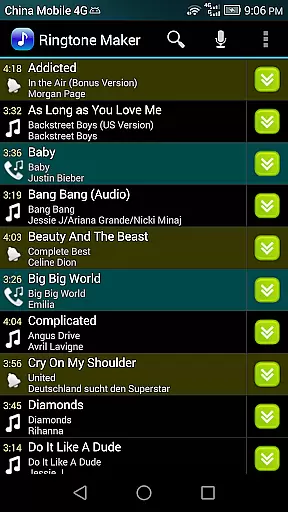
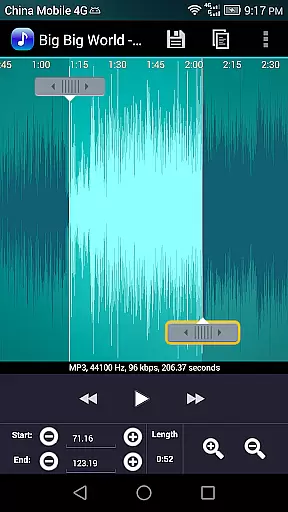
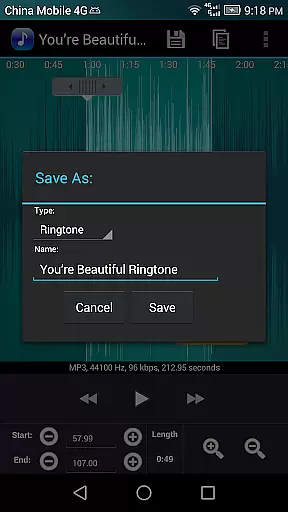
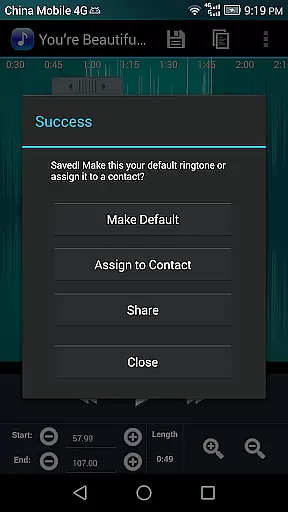
Ringtone Maker Pro is a versatile audio editing application designed for creating personalized ringtones, alarms, and notifications. The app supports multiple audio formats including MP3, WAV, AAC/MP4, and 3GPP/AMR files, allowing users to customize their audio experience on Android devices.
One of the standout features is its intuitive timeline interface that lets users precisely set start and end points for audio clips. Whether you're looking to create a short notification sound or a full-length ringtone, this app provides all the necessary tools in a user-friendly package. Its ability to preview edits in real-time makes it an essential tool for anyone wanting to personalize their device's audio output.
The app also offers advanced functionalities such as fade in/out effects, volume adjustments, and waveform visualization at various zoom levels. These features make Ringtone Maker Pro not just a simple ringtone creator but a complete audio editing suite suitable for both casual users and audio enthusiasts alike.
Ringtone Maker Pro stands out with its comprehensive feature set tailored for detailed audio editing. The app allows users to perform essential editing functions like copy, cut, and paste operations directly within the audio track. This level of control ensures that users can fine-tune their audio clips exactly how they want.
For music producers and audiophiles, the app offers advanced capabilities such as fade in/out effects specifically for MP3 files and precise volume adjustment options. Users can also preview their creations before finalizing them, ensuring that the output meets their expectations. Additionally, the app provides a scrollable waveform representation of the audio file at five different zoom levels, giving users a detailed view of their audio tracks.
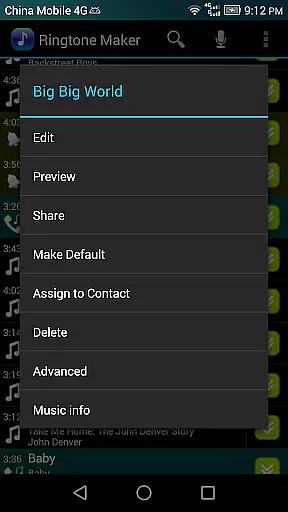
Another notable feature is the ability to assign custom ringtones directly to contacts from within the app. This seamless integration with the device's contact list simplifies the process of personalizing ringtones for individual contacts. With support for sorting by tracks, albums, and artists, managing your audio library has never been easier.
Ringtone Maker Pro offers a comprehensive music library that allows users to create ringtones, alarms, and notifications from a variety of audio file formats including MP3, WAV, AAC/MP4, and 3GPP/AMR. This extensive compatibility ensures that users can work with their preferred audio tracks without limitations.
The app's commitment to copyright authenticity is evident in its transparent handling of audio files. Users can be confident that the ringtones they create are derived from legally obtained audio files, thus respecting intellectual property rights while enjoying creative freedom.
With Ringtone Maker Pro, users have the ability to manage their audio content effectively by sorting it into categories such as Tracks, Albums, and Artists. This organizational feature not only enhances accessibility but also streamlines the process of assigning custom ringtones to contacts or saving new audio clips for various uses.
One of the standout features of Ringtone Maker Pro is its advanced audio quality options. The app provides users with tools to adjust volume levels specifically for MP3 files, ensuring that the outputted ringtones maintain high-quality sound even after editing.
In addition to volume control, Ringtone Maker Pro includes fade-in and fade-out effects for MP3 files. These effects contribute to seamless transitions within the ringtone, enhancing the listening experience and providing a professional touch to user-created audio clips.
Users can preview their edited Ringtone files before finalizing them, allowing for real-time feedback on audio quality adjustments. This feature ensures that the end product meets personal expectations and maintains the integrity of the original audio track.
User-friendly interface
Wide format compatibility
Advanced editing tools
Real-time previews
Direct contact assignment
Limited free version
Occasional bugs
Ads in free version
Complex for beginners
Storage permissions required

Over 100 million tracks available for high quality streaming and download
 4.60
4.60
Tune in to the greatest hits on UK Radio | The home of Capital, Smooth & Heart.
4.90
Pay Once, no monthly payment
4.60
Your song collections with lyrics and chords on Android smartphones and tablets.
4.80
More downloads than any other metronome. Includes drum machine & tempo trainer.
4.80
Offline Music Player&MP3 Player with themes, equalizer, lyrics, music play mode
4.60
MilkDrop for Android TV
3.00
Listen to offline music and sounds from all categories
4.70
Be a true music maker: create beats, mix and make music like a real DJ!
4.30
The best music and audio player, with beautiful UI, music search and equalizer.
4.60
A complete sound package for the sound engineer or enthusiast
4.60
DJ Music Mixer Pro is a real DJ controllers and DJ Music Studio to remix DJ.
4.40
DJ Music Mixer - DJ Remix: remix songs, make beat music & record mix of DJ.
4.40
Manage your Sonos system directly from your home-screen!
4.40
Your HD audio recorder on the go for music, meetings, ambience, animal sounds…
4.30
The Music Journey in Your Hands
4.30
Slow music down without changing pitch.
3.70
Simple mp3 and mp4 player with advanced features.
3.40
Music Streaming suite for Ampache, Nextcloud Music and compatible backends.
4.3


User Reviews