
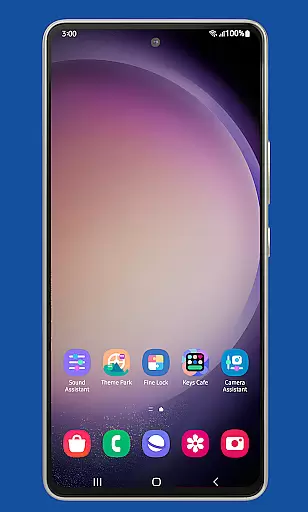
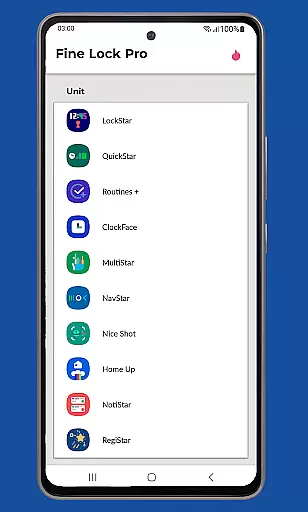
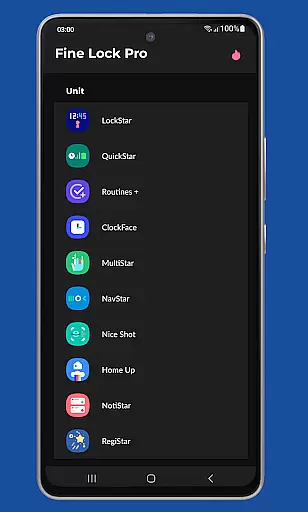
Fine Lock is a specialized launcher designed exclusively for Samsung devices running official One UI and Android versions 8 or later. It enables users to access and utilize Good Lock and Galaxy Labs modules, which are otherwise restricted to specific markets on the Galaxy Store. The app acts as a bridge, allowing users to customize and optimize their Android experience without regional limitations.
One of its standout features is the support for PRO functionalities such as module app shortcuts, background update checks, and dynamic wallpapers that adapt to Dark/Night modes. Fine Lock does not provide the modules themselves but offers a seamless way to integrate and manage them on supported devices. This makes it an essential tool for power users seeking advanced customization options on their Samsung smartphones.
The app targets tech-savvy individuals who want to unlock the full potential of their Samsung devices while ensuring compatibility with official firmware builds. By streamlining access to powerful customization tools, Fine Lock enhances both functionality and personalization, making it a valuable asset for Samsung enthusiasts.
Fine Lock distinguishes itself through its unique ability to act as a launcher for Good Lock and Galaxy Labs modules, which are renowned for their customization capabilities. These modules allow users to tweak various aspects of their device's interface, from lock screens to task managers. Fine Lock simplifies this process by providing a centralized platform where users can manage these tools efficiently.
Among its notable features is the dynamic wallpaper functionality, which automatically adjusts based on the device’s Dark or Night mode settings. This feature requires Android 9 or higher and scheduled Dark/Night mode enabled. Additionally, Fine Lock supports background checks for updates, ensuring users always have the latest versions of their installed modules. Users can also hide uninstalled modules for a cleaner interface.
PRO features enhance usability further by introducing module app shortcuts directly on the home screen. While Fine Lock doesn’t host the APK files due to Google Play policy restrictions, it guides users to trusted sources like APKMirror or Sammobile for downloading the necessary modules. This approach ensures compliance while maintaining user convenience and system integrity.
Fine Lock offers a unique approach to personalizing Samsung devices by acting as a launcher for Good Lock and Galaxy Labs modules. These modules provide an extensive range of customization options, allowing users to tailor their Android experience on Samsung devices with official Oreo and One UI.
With Fine Lock, users can access features such as module app shortcuts on the home screen and dynamic wallpapers that adapt to the device's Dark/Night modes. This level of customization ensures that each user's device can reflect their personal preferences and style.
The app is specifically crafted for Samsung devices running official Samsung's Android 8 and Android 9+ with One UI, ensuring optimal compatibility and functionality. Users should note that Fine Lock does not support devices running AOSP OS builds like LineageOS, maintaining focus on the Samsung ecosystem.
Theme compatibility is at the heart of Fine Lock's design, ensuring that all visual customizations are seamlessly integrated into the Samsung deviceu2019s existing One UI framework. The app supports dynamic wallpapers that change based on the device's Dark/Night mode settings, offering a cohesive look that adapts to user preferences and environmental lighting.
By providing a platform for Good Lock and Galaxy Labs modules, Fine Lock enables users to enjoy a wide array of themes and aesthetics that are fully compatible with their Samsung devices. This compatibility extends to scheduled Dark/Night mode changes, which require Android 9 or later.
It is important to download the latest APK modules from trusted sources to ensure maximum theme compatibility and the best user experience. Fine Lock's dedication to theme compatibility ensures that users enjoy a visually consistent and personalized interface across their Samsung device.
User-friendly interface
Dynamic wallpaper support
Background update checks
Customizable home screen
Advanced module management
Limited to Samsung devices
No direct module downloads
Regional restrictions apply
Potential compatibility issues
Requires manual setup

A light in the dark, a unique style and an andless cutomization!
 4.30
4.30
A retro cartoon style watch face and a punch right in the face of the copyright
4.60
3D, live, and moving wallpapers & themes in 4K and HD for your device.
4.50
AI-powered Copilot. Personalized keyboard with gifs, stickers & themes
4.40
Ultimate widget creator. Design custom widgets for a truly unique home screen!
3.90
Wallpaper HD 4K Live - Thousands of high-quality Anime backgrounds for you.
4.80
Transfer your live wallpapers from Windows to Android using Wallpaper Engine!
4.00
Turn text & photos into stunning AI videos, art, and creative visual stories.
4.50
Transform your phone with stylish zipper lock themes and 4D live wallpaper
4.10
Sparkle your screen with Glitter Wallpapers For Girls and Cute Backgrounds!
4.80
100+ Stylish Fonts, Emojis, Symbols keyboard for Instagram & TikTok!
4.80
300+ Stunning and well-designed widgets inspired by NOTHING.
4.70
A minimalist productivity launcher. One-hand-friendly. Zero ads.
4.70
Make your phone look simple & luxury, like iDevice
4.60
Beautiful realistic hybrid watch face with numerous customization options.
4.50
Transform your phone with Launcher iOS 26 - Smooth & elegant iOS experience
4.50
Vibrant Adaptive Icons with Material You and Enhanced Monet Colors.
4.50
Wear Os Watch Face - Seasonal - Animated Snow Effect - 9 Animals
4.20
Transform your phone with stunning video wallpapers and a unique, personal touch
3.80


User Reviews