
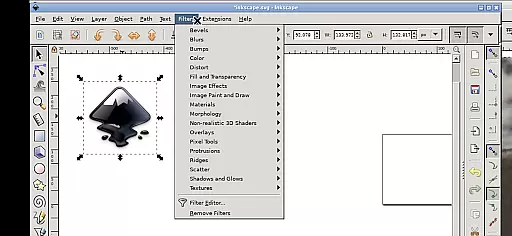
Inky is a powerful vector graphics editor that brings the full functionality of Inkscape to your mobile device. This app allows users to create and edit vector images in Scalable Vector Graphics (SVG) format, with support for importing and exporting other formats. It offers professional-grade tools for rendering primitive shapes, text manipulation, and raster image tracing.
The application supports advanced features such as adjustable transparency, color gradients, and various transformations including moving, rotating, and scaling objects. Its intuitive Android-specific interface enables users to perform complex design tasks through simple touch gestures. Whether you're a professional designer or an amateur artist, Inky provides a complete solution for creating high-quality vector graphics on the go.
Inky stands out with its comprehensive set of vector editing tools specifically optimized for mobile devices. The app implements a unique touch-based interface that translates common desktop actions into intuitive gestures. Users can perform left clicks by tapping with one finger, zoom using pinch gestures, and pan by pressing and holding then sliding one finger.
One of the key innovations is its seamless integration with Android's file system. Through useful links in the home directory, users can directly access their Documents, Pictures, and other files without needing to import or export. The app also maintains compatibility with the original Inkscape's features while running on Android through UserLAnd technology. This combination of professional-grade tools and mobile optimization makes Inky a versatile choice for designers who need desktop-level functionality on their mobile devices.
Inky offers a comprehensive suite of creative tools that cater to both professional designers and hobbyists. The app provides full-featured vector graphics editing capabilities, enabling users to create intricate designs with shapes such as rectangles, ellipses, polygons, arcs, spirals, stars, and even 3D boxes.
Users can fill these shapes with solid colors, patterns, or gradients and adjust the transparency for unique visual effects. Inky also supports text manipulation, allowing creators to integrate typography seamlessly into their artwork.
One of the standout features is the ability to trace raster graphics, converting them into scalable vector images. This functionality opens up possibilities for creating vector graphics from photos and other raster sources, expanding the creative potential significantly.
The canvas and format flexibility in Inky ensures that artists are not constrained by size or format limitations. Users can manipulate their creations with ease, applying transformations like moving, rotating, scaling, and skewing to achieve the desired effect.
Inky allows direct access to files across Android devices, providing useful links in the home directory to locations such as Documents and Pictures. This seamless integration eliminates the need for cumbersome file imports or exports, streamlining the workflow.
Additionally, the app supports various file formats beyond SVG, accommodating different project requirements. Whether you're designing on a tablet with a stylus or using your finger on a phone, Inky's interface adapts to your needs, ensuring precision and control regardless of the device.
User-friendly interface
Full-featured vector editor
Professional support available
Seamless file integration
Open-source and free
Steep learning curve
Complex for beginners
Requires powerful hardware
Limited stylus support
Interface may feel cramped

Download now for a stylish and functional timepiece
 4.3
4.3
Apply cartoon, caricature, and portrait effects to make your photos stand out!
3.60
Paint with oils and sketch with natural tools on a realistic virtual canvas.
3.80
Convert image to JPG PNG HEIC PDF, support almost all kinds of image formats
4.70
Digital, Abstract, Classic - all types of color wheels in one app!
4.60
Novices can also easily complete diamond painting masters
4.70
Experience next-gen icons with a modern liquid glass look.
3.60
AI Tattoo Generator: Create Tattoo Designs & Get Ideas! Ink & Stencil Maker
4.50
How to draw anime step by step for beginner easily by AR drawing sketch & paint.
3.60
Learn how to draw with step-by-step tutorials, fun lessons & multiplayer drawing
4.70
Draw beautiful mandala's very easily
4.60
Photo editor for art, avatars, filters & fun transformations.
4.60
Create color palette from Image, RGB & RYB Color wheel harmonies, Color Scheme
4.50
Painting, drawing, & sketching
4.50
Share the joy of painting with ibis Paint! Drawing anime and manga art.
4.50
Everything you need to create hand drawn animation, anywhere you go!
4.40
Nano Banana AI Image Generator, Anime Filter, AI Portrait, AI Photo Generator
4.30
Bring One UI 8.5 Icons to life -elegant dark icons with a modern, premium touch.
4.30
Vidu is an AI video generator made for creators and aspiring makers.
3.30


User Reviews