
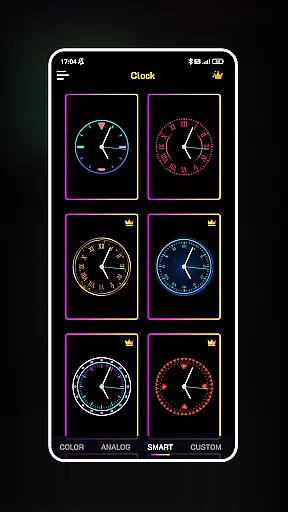
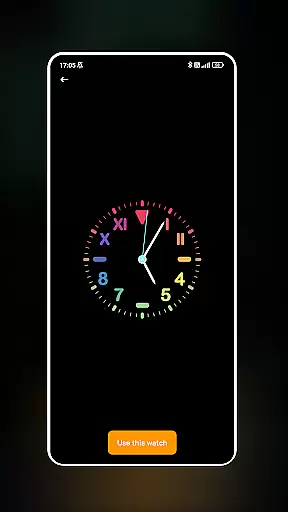
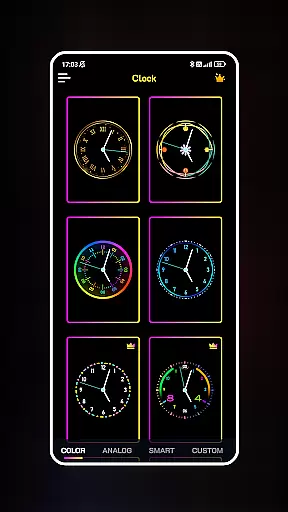
Neon Clock Wallpaper is a dynamic personalization app that allows users to design and customize unique clock wallpapers for both home screens and lock screens. The app offers diverse pre-made templates alongside powerful customization features, enabling users to express their individual styles through creative clock designs.
With its intuitive interface, users can choose from various templates or build custom clocks by adjusting colors, sizes, and styles. The standout neon effects add a vibrant touch, making any device visually captivating. Whether you're looking to enhance aesthetics or create functional art, this app delivers both utility and personal expression in one sleek package.
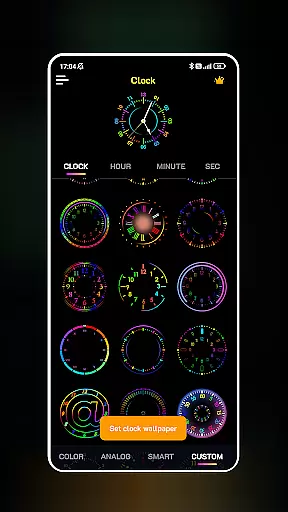
Neon Clock Wallpaper stands out with its robust feature set tailored for creativity and personalization. Users can select from an extensive library of clock templates, each offering unique designs and color schemes to suit different tastes. For those seeking more control, the app provides tools to craft fully customized clocks by combining components like hands, frames, and backgrounds.
The app's neon effects are a highlight, giving clocks a glowing, artistic appearance. Additionally, seamless integration with both home screens and lock screens ensures maximum visibility and usability. These features collectively empower users to transform their devices into personalized works of art while maintaining practical timekeeping functionality.
Customization is at the heart of Neon Clock Wallpaper, allowing users to express their unique style through diverse clock designs. The app offers a wide array of customization options that cater to personal preferences, ensuring each user can craft a clock that truly stands out.
With Neon Clock Wallpaper, you have access to numerous pre-made templates that come in various designs and colors. These templates serve as a starting point for creativity, enabling users to modify elements such as colors, sizes, and styles with ease. This flexibility ensures that whether you prefer minimalist designs or vibrant displays, there's something for everyone.
The ability to create custom clocks from scratch is another highlight of this application. Users can combine different components and tailor every aspect of their clock's appearance. This feature not only enhances personal expression but also provides an engaging experience in designing oneu2019s digital space.
Ultimately, these extensive customization options empower users to transform their devices into personalized works of art. By offering both ready-to-use templates and advanced customization features, Neon Clock Wallpaper ensures your device reflects your individuality while maintaining functionality and aesthetic appeal.
Theme compatibility is crucial for any personalization app, ensuring seamless integration across various device themes and settings. Neon Clock Wallpaper excels in this area by providing designs that harmonize beautifully with different themes on your device.
The app supports a range of color schemes and design elements that adapt well to both light and dark modes. Whether you prefer the sleekness of dark themes or the brightness of light ones, Neon Clock Wallpaper adjusts accordingly to maintain visual consistency and comfort.
Moreover, the stunning neon effects featured in the app are designed to be visually striking yet compatible with various screen types and resolutions. This ensures that no matter what device you're using, the clocks will look sharp and vibrant without compromising performance or battery life.
By focusing on theme compatibility, Neon Clock Wallpaper guarantees a cohesive and visually pleasing experience. Users can enjoy their customized clocks knowing they will integrate smoothly with their overall device aesthetics, enhancing both usability and enjoyment.
User-friendly interface
Vibrant neon effects
Customizable templates
Wide design variety
Lock screen support
Limited free options
High battery usage
Premium feature cost
Occasional glitches
Ads in free version

Classic analogue watch face. For wear os devices.
 4.60
4.60
A retro cartoon style watch face and a punch right in the face of the copyright
4.60
Adult video chat, dating, making friends, random matching
4.20
Ultimate widget creator. Design custom widgets for a truly unique home screen!
3.90
Customizable screen pets that play, climb, and keep you company.
4.50
The definitive Icon pack maker and editor
4.30
Customize glowing edges, wallpapers, and caller screen with EdgeAura.
3.50
set a new experience for the Android mobile phone
4.20
Install amazing sticker packs: endless styles, always cool.
4.70
Sparkle your screen with Glitter Wallpapers For Girls and Cute Backgrounds!
4.80
Customizable Glass widgets. Over 360+ stunning widgets and more!
4.70
350+ widgets with a premium glass-style finish, perfect for home & lock screens.
4.70
Stunningly Different look with Line Icons and Neon Colors
4.60
Add cute Shimeji pets to screen, interact with them and relax with cute motions
4.60
Icons made of colorful linear lines
4.60
Yandex Browser — stylish and secure, with voice search and data compression
4.40
A light in the dark, a unique style and an andless cutomization!
4.30 4.10
4.10
Transform your phone with stunning video wallpapers and a unique, personal touch
3.80


User Reviews