


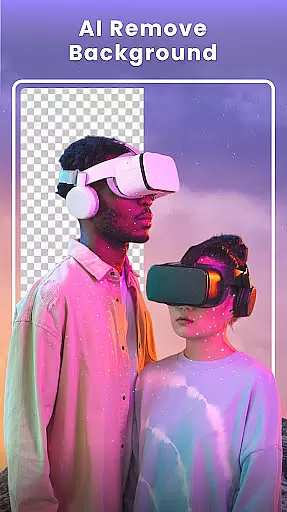



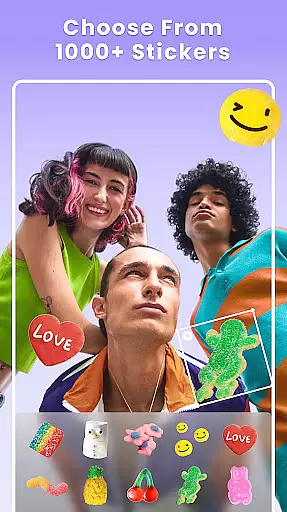

Photo Collage Maker - FunPic is a versatile photography app designed to help users create stunning photo collages and video stories. With over 300 layouts, users can combine photos into eye-catching arrangements while utilizing features like filters, text, stickers, and AI-powered tools for background removal and object erasure.
The app also offers creative templates, doodle options, and music integration, making it suitable for crafting Instagram feeds, photo slideshows, and themed collages. Whether you're looking to journal your life through pictures or produce professional-quality designs, this app provides all the necessary tools in one place.
FunPic stands out with its comprehensive set of features tailored for creative photo editing. The app includes an AI photo editor that allows users to remove unwanted objects and change backgrounds seamlessly. Additionally, its Video Collage Maker lets users merge videos and photos into engaging stories, complete with music and decorative elements.
Users can explore over 1000 stickers, apply artistic filters, and use freestyle collage options to customize their creations. The app supports advanced editing tools such as blur effects, precise cropping, and rotation, ensuring every project achieves professional-grade quality.
Real-time capture and preview functionality is essential for ensuring that users can see exactly what they are capturing before finalizing their photo collages. This feature allows users to make instant adjustments, ensuring the best possible composition and quality.
Photo Collage Maker - FunPic offers an intuitive real-time preview option, enabling users to experiment with different layouts, filters, stickers, and text overlays while seeing immediate results. This interactive approach helps in crafting visually appealing collages effortlessly.
The app's advanced AI photo editor enhances this experience by providing tools like background removal and object erasure, which work in real time. Users can instantly see the effects of these edits, allowing them to fine-tune their creations until they achieve the desired outcome.
By offering a seamless real-time capture and preview feature, Photo Collage Maker - FunPic ensures that users can create professional-quality collages with confidence, knowing exactly how the final product will look before sharing it on social media platforms like Instagram or WhatsApp.
AI beauty and enhancement features have become a staple in modern photography apps, allowing users to enhance their photos naturally without over-processing. The emphasis on naturalness ensures that edits improve the image while maintaining its authenticity.
Photo Collage Maker - FunPic incorporates sophisticated AI algorithms that provide users with tools to beautify their images subtly. These include artistic filters, unique blur effects, and precise editing options that keep the focus on the subject while enhancing the overall aesthetic.
In addition to beautification, the app offers AI-powered tools like automatic background removal and replacement, which ensure that enhancements blend seamlessly with the original image. This attention to detail preserves the natural look of photos, making edits appear effortless and genuine.
With these AI-driven enhancements, Photo Collage Maker - FunPic empowers users to elevate their photography with natural-looking improvements, ensuring their collages stand out with polished yet authentic visuals.
User-friendly interface
Extensive layout options
AI-powered editing tools
Versatile design features
Regular content updates
Premium features locked
Ads may interrupt workflow
Occasional bugs reported
Learning curve for new users
Limited free resources

Natural Beauty, Selfie Retouch
 4.30
4.30
AI photo editor with hair editor, retouch tools, hair color changer & filters!
4.50
Create AI Photos, Improve and restore quality of blurry, old or damaged pics.
4.20
HD Camera Pro with HD Video shooting, Panorama, Photo editor , Beauty Camera.
4.50
Amazing Photo Effects - The most fun you can have with your photos!
4.70
Professional quality photo edits with the new Snapseed.
4.00
Unblur, enhance & restore photos with powerful AI photo enhancer tools.
4.60
RAW video capture with advanced controls
4.40
Discover How to Plan any Sun, Moon and Milky Way Photo You Imagine in Seconds
4.70
Pro version: AR sun/moon tracker for any date. Tool for photographers & planners
4.90
Photo prints, cards, & gifts at Walgreens. Easy ordering & fast local pickup !
4.80
Discover & download millions of art for The Frame TV or Hisense CanvasTV
4.60
Movie camera, supports pro recording settings for filming. Try it and be amazed!
4.50
Effortlessly organize, view and share your photos & videos with Gallery app!
4.40
AI portrait generator and polaroid AI selfie, fun AI generated AI photo creator!
4.30
How would you look like with a differently shaped nose, chin or lips?
3.90
Remote control the phone camera shutter from your smartwatch and take a picture
1.60
Over 800 film simulation recipes for Fujifilm. Black Friday Offer!
4.0
Add a dreamy vibe to your selfies and videos with soft style filters
4.2


User Reviews