





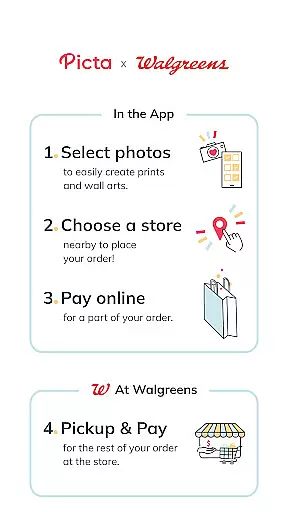
Picta is a photo printing app that allows users to print their mobile photos at Walgreens stores. With this app, you can select your photos, choose the print size and quantity, and pick up your prints in just one hour. The app offers professional-quality photo printing services on Kodak paper in multiple sizes, including 4x6, 5x7, and 8x10 enlargements. Additionally, it provides options for creating personalized gifts like magnets, posters, and photobooks.
One of the key features of Picta is its user-friendly interface, which makes it easy to crop and zoom pictures within the app. It also includes a gallery that organizes your photos by date taken. The app's enhanced store locator helps you find the nearest Walgreens or Duane Reade store for quick pickup. Moreover, Picta offers special deals and coupons exclusively for its users, enhancing the overall value proposition.
This app is particularly useful for individuals who want to transform their digital memories into tangible keepsakes without the hassle of waiting in line or using home printers. By leveraging Walgreens' extensive network of stores, Picta ensures fast and convenient access to high-quality photo prints.
Picta stands out with its comprehensive set of features designed to enhance the photo printing experience. Firstly, the app supports various print sizes, from standard 4x6 prints to larger 8x10 enlargements, catering to different needs and preferences. Users can also create custom products such as magnets, cards, and photobooks, adding a personal touch to their memories.
The app's editing tools are another highlight, allowing users to crop and zoom images easily before printing. This ensures that the final prints meet their exact specifications. Furthermore, Picta's gallery function automatically organizes photos by date, making it simple to locate specific images. The inclusion of an enhanced store locator feature enables users to find nearby Walgreens or Duane Reade locations quickly, streamlining the pickup process.
Picta also emphasizes convenience and quality assurance. Orders can be tracked in real-time, and users have the opportunity to inspect prints in-store before paying. If not satisfied, they can request a free reprint. These features collectively contribute to a seamless and satisfying user experience, setting Picta apart from other photo printing apps.
Real-time capture and preview functionality is essential for ensuring that users can accurately select and edit their photos before printing. The Picta app excels in this area by providing a seamless experience where users can instantly see the results of their photo selections and edits.
The app allows users to choose photos directly from their Android device, offering multiple print sizes such as 4x6, 5x7, and square formats. This immediate preview capability ensures that users can make informed decisions about their photo prints, enhancing satisfaction with the final product.
Additionally, Picta offers easy cropping and zooming features within the app, allowing users to adjust their images precisely. This real-time editing feature helps users create perfectly customized prints, whether they are standard photo sizes or unique formats like magnets and photobooks.
By integrating these real-time functionalities, Picta not only simplifies the photo printing process but also empowers users to produce high-quality prints that meet their exact specifications, all while enjoying the convenience of one-hour pickup at their nearest Walgreens store.
AI beauty and enhancement features have become increasingly important in photography apps, allowing users to improve their photos with natural-looking results. Picta incorporates advanced AI technology to enhance photo quality without compromising the authenticity of the original image.
Users can take advantage of professional-quality photo printing services offered by Picta, which utilizes Kodak paper for superior print quality. The AI enhancements ensure that every photo, whether it's a standard 4x6 print or a larger 8x10 enlargement, maintains its natural appearance and vibrant colors.
In addition to basic photo prints, Picta provides options for creating personalized gifts such as magnets, posters, and photobooks. The AI-driven enhancements automatically adjust elements like brightness, contrast, and color balance, resulting in beautifully enhanced photos that still look genuine and unaltered.
This focus on natural enhancement ensures that users receive prints that not only meet their aesthetic preferences but also preserve the integrity of their cherished memories, making Picta a top choice for those seeking both convenience and quality in photo printing.
User-friendly interface
Wide range of print sizes
Fast one-hour pickup
Exclusive deals and coupons
High-quality photo prints
Limited to Walgreens stores
No direct payment option
Requires physical store visit
Occasional delays in processing
Geographical limitations

A collection of tools and reference tables for DPs, ACs, DITs and Operators.
 4.70
4.70
Shooting photos and records video easily and efficient with professional Camera
4.30
Application for remote controlling DSLR
3.00
Viewfinder, Light meter, Reciprocity failure time, DOF & Bellows Extension
4.60
Light-weight Media Gallery app for Android made with Jetpack Compose
4.60
Enhance, retouch & create your story - Share the moment with Photoshop Express.
4.60
Easily create custom gifts, cards, photo books & more on the Shutterfly app!
4.60
Unblur, enhance & restore photos with powerful AI photo enhancer tools.
4.60
Astrophotography with your smartphone, photo live stacking and much more!
3.90
Pro version: AR sun/moon tracker for any date. Tool for photographers & planners
4.90
Android Native system HD camera app. Never been so simple and faster.
4.70
Cartoon and artistic effects for your photos and videos
4.70
Photo editor & gallery. Crop pictures & edit photos offline, no wifi!
4.50
Natural Beauty, Selfie Retouch
4.30
All-in-One Editor & AI Photo Enhancer, Beautify & Retouch, Collage, Cartoonify
4.20
Professional photography on your mobile phone
4.20
Remote control of the phone camera from your Wear OS smartwatch
3.70
Be your best in every shot! Fix, edit and retouch your face in selfies & photos.
3.70
Add a dreamy vibe to your selfies and videos with soft style filters
4.1


User Reviews