
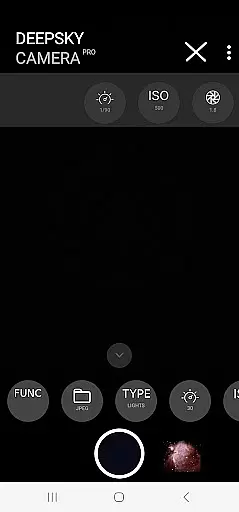
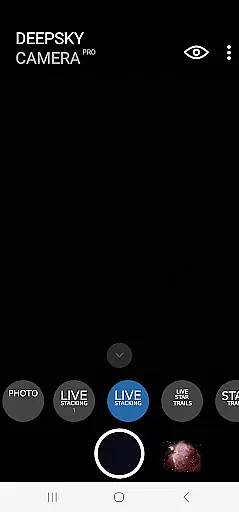
DeepSkyCamera Pro is an advanced astrophotography app designed for smartphone users who want to capture stunning images of the night sky. The app offers professional-grade features such as photo live stacking in both RAW and JPEG formats, star trail creation, and timelapse video production with codecs like AVC and HEVC. It supports long exposure photography similar to DSLR cameras, allowing users to take high-quality RAW format pictures that can be processed using popular stacking software.
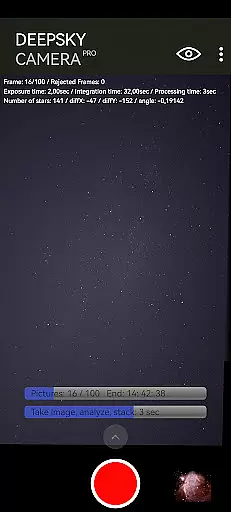
The application provides essential tools for astrophotographers including viewfinder live stacking with extended shutter speeds up to 10 seconds, breaking typical mobile limitations. During photo live stacking, it displays critical information on-screen, aiding precise image alignment and stacking. While primarily aimed at capturing celestial objects, DeepSkyCamera Pro also accommodates daylight photography with appropriate settings adjustments. To use this app effectively, a basic understanding of astronomy and post-processing techniques is recommended.
For optimal performance, DeepSkyCamera Pro requires Android 6 or higher, at least 3 GB RAM, and 64 GB flash storage, though 8 GB RAM and 128 GB flash are recommended for best results. Users should ensure their device meets these specifications before installation. With its comprehensive feature set, this app serves as a powerful tool for experienced astronomers looking to expand their astrophotography capabilities directly from their smartphones.
DeepSkyCamera Pro stands out with its specialized features tailored for astrophotography enthusiasts. One of its core functionalities is photo live stacking, which works seamlessly with tracked and untracked images. This feature allows users to stack multiple images taken through a telescope or simply on a tripod, aligning them precisely to create detailed composite images. The stacked results are saved in TIFF when using RAW format and in JPEG when using JPEG format, providing flexibility for further post-processing.
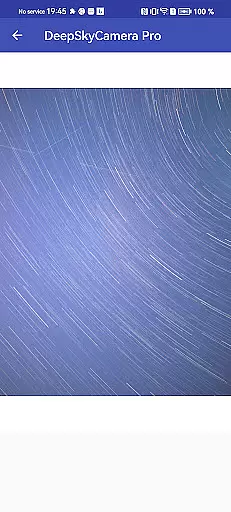
In addition to photo stacking, the app includes a unique viewfinder live stacking function that supports shutter speeds up to 10 seconds, overcoming the usual one-second limitation found in most smartphone cameras. This capability is crucial for capturing faint astronomical objects. Moreover, the app enables the creation of animated star trails and timelapse videos in mp4 format, utilizing advanced codecs like AVC and HEVC for high-quality output. These features collectively enhance the visual storytelling potential of astrophotography projects.
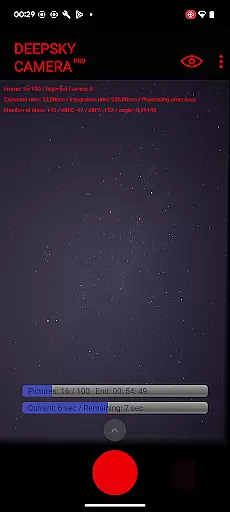
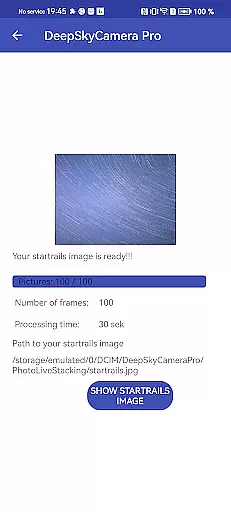
Another significant aspect of DeepSkyCamera Pro is its detailed on-screen display during photo live stacking sessions. Users receive real-time feedback on various parameters such as frame count, exposure time, integration time, processing duration, and image shift details. Such transparency empowers photographers to fine-tune their setups for optimal results. Although the app demands technical knowledge and may not suit beginners, it remains an invaluable asset for seasoned astronomers seeking to leverage modern technology for their celestial pursuits.
Real-time capture and preview functionality is essential for astrophotography, allowing users to see the night sky as it is being captured. DeepSkyCamera Pro excels in this area by offering live stacking features that enable photographers to view their images with extended exposure times.
The app supports live stacking in both RAW and JPEG formats, providing flexibility for different post-processing needs. This feature helps overcome the limitations of smartphone cameras, particularly when attached to telescopes, by enabling shutter speeds of up to 10 seconds for the viewfinder.
With real-time feedback on critical parameters such as exposure time, integration time, and frame alignment, users can make informed adjustments while capturing. This ensures optimal image quality and maximizes the potential for successful astrophotography sessions.
By breaking the typical one-second shutter speed barrier for smartphone viewfinders, DeepSkyCamera Pro empowers astronomers to capture faint celestial objects more effectively. The ability to visualize star trails and create timelapse videos enhances the overall astrophotography experience.
While primarily focused on astrophotography, DeepSkyCamera Pro incorporates advanced image processing techniques that enhance the natural beauty of celestial objects. The app's AI-powered enhancement features work to preserve the authenticity of astronomical images while improving their overall quality.
The photo live stacking function analyzes and aligns multiple images, creating a final composite that reveals intricate details of deep-sky objects. This process maintains the natural appearance of stars and nebulae, avoiding artificial enhancements that could compromise scientific accuracy.
DeepSkyCamera Pro saves stacked results in high-quality TIFF or JPEG formats, depending on the input format. These files retain the natural characteristics of astronomical phenomena while benefiting from noise reduction and detail enhancement through sophisticated algorithms.
Although not traditional 'beauty' enhancements, these AI-driven processes help amateur astronomers produce professional-grade images. The app strikes a balance between technological enhancement and maintaining the genuine nature of astronomical observations, making it an invaluable tool for serious astrophotographers.
User-friendly interface
Advanced photo stacking
High-quality video codecs
Extended shutter speeds
Detailed on-screen metrics
Steep learning curve
Memory-intensive operations
Limited beginner support
Potential stability issues
Requires compatible hardware

Effortlessly organize, view and share your photos & videos with Gallery app!
 4.40
4.40
[3DSteroid Pro] is a stereoscopic application for Android.
4.30
How old age camera Gender Swap App Face Shape Hairstyle App Hair Styler App fun!
4.00
The #1 app for B&W film developing featuring an advanced darkroom timer.
4.10
A must-have app for landscape photographers
4.60
Gallery Slideshow is slideshow maker app for slideshow from your gallery photos.
3.90
Effortlessly make high-quality GIFs from images & videos without any watermarks.
4.70
Welcome to ProShot, the most powerful camera app on Android.
4.20
Edit photos with the picture generator: PS2 & AI Clay filters, cartoon effects.
4.50
Perfect body tune & face app - photo retouch, makeup, slim body & beautify face.
4.80
See your baby AI baby face generator AI baby maker Face generator babymaker fun!
4.70
Create collages easily! Nice pic collage maker & background eraser for Instagram
4.50
Photo editor & gallery. Crop pictures & edit photos offline, no wifi!
4.50
Easily stitch panoramas from multiple photos or video.
4.40
All-in-One Editor & AI Photo Enhancer, Beautify & Retouch, Collage, Cartoonify
4.20
USB Storage Access for Photos, Videos, Music and Documents
3.80
Remote control of the phone camera from your Wear OS smartwatch
3.70
GCamera allows all GCam features on all phone models! Better photos with GCamera
3.30
Professional video recording application with manual controls for filmmakers!
2.80


User Reviews