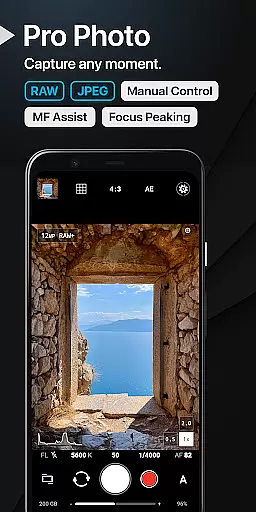
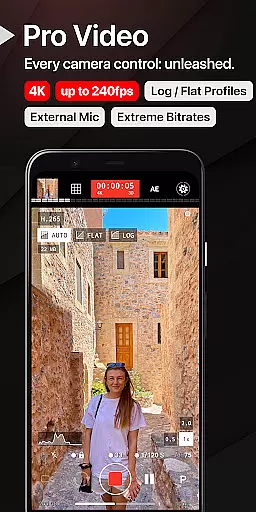
ProShot is a professional-grade photography and filmmaking application designed for Android users who demand full creative control over their mobile photography experience. This app offers an extensive suite of manual controls comparable to DSLR cameras, including shutter speed, ISO, white balance, and focus adjustments. With support for RAW (DNG) and JPEG formats, ProShot caters to both amateur enthusiasts and seasoned professionals.
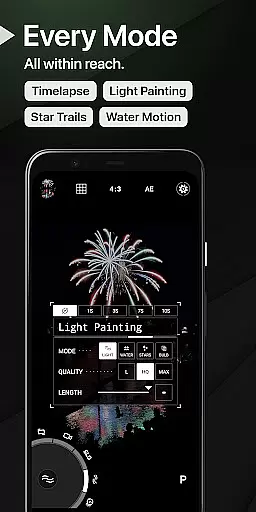
The app's innovative features such as Dual Dial system, Light Painting modes, and Bulb mode provide limitless possibilities for creative expression. Additionally, its video capabilities are equally impressive, supporting resolutions up to 8K with advanced options like LOG/FLAT color profiles and real-time audio monitoring. The emphasis on privacy ensures that no personal data is collected or transmitted, making it a secure choice for capturing and storing precious moments.
ProShot stands out with its comprehensive set of photographic tools that rival professional equipment. The app leverages the camera2 API to deliver precise manual controls across various shooting modes including Auto, Program, Manual, and two Custom settings. Users can fine-tune exposure settings, experiment with specialized modes like Light Painting and Timelapse, and capture images in multiple formats such as RAW, JPEG, or HEIC on supported devices.
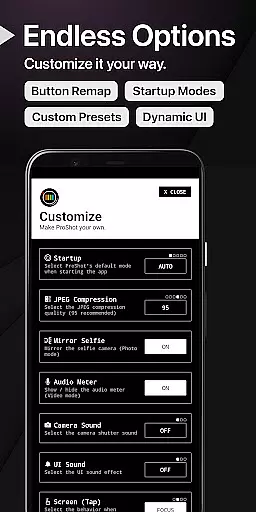
Video functionality is robust, offering up to 8K recording with extreme bitrate options and frame rates ranging from 24 FPS to 240 FPS. Advanced video features include LOG/FLAT color profiles for enhanced dynamic range, support for external microphones, and simultaneous audio playback during recording. The intuitive interface incorporates useful tools like histogram display, focus peaking, and a customizable accent color scheme, ensuring a personalized and efficient shooting experience.
Real-time capture and preview functionality is essential for photographers who need to see exactly what their camera is capturing before taking the shot. ProShot offers a sophisticated real-time preview system that ensures every detail is captured as seen on the screen.
The app leverages advanced processing capabilities to provide an accurate representation of the scene, including exposure, white balance, and focus adjustments. This allows users to make precise modifications in manual mode, ensuring the final image matches their creative vision.
With features like zero-lag bracket exposure and manual focus assist, ProShot enhances the real-time experience by offering tools that DSLR users would appreciate. These functionalities ensure that photographers can achieve professional-grade results without the need for bulky equipment.
Ultimately, ProShot's real-time capture and preview empower users to leave their heavy DSLRs at home, knowing they can rely on their mobile device to deliver exceptional image quality with complete creative control.
While ProShot focuses primarily on delivering professional-grade manual controls, it also incorporates AI beauty and enhancement features that maintain naturalness in post-processing. This ensures that images retain their authenticity while benefiting from subtle enhancements.
The AI-powered editing tools within ProShot are designed to enhance specific aspects of an image without over-processing. For instance, skin tones remain true-to-life, and details such as hair and textures are preserved, providing a balanced enhancement that respects the original photo.
Users can adjust settings like noise reduction quality, sharpness, and tone mapping to fine-tune their images further. These options allow for personalized enhancements that cater to individual preferences while maintaining the integrity of the photograph.
By integrating these AI-driven enhancements, ProShot not only meets the needs of professional photographers but also appeals to casual users seeking to elevate their photography with minimal effort, all while ensuring the final output looks naturally stunning.
Full manual camera controls
RAW and JPEG support
Privacy-focused design
Advanced video capabilities
Innovative Light Painting modes
Complex for beginners
High system requirements
Limited free features
No built-in editing tools
Occasional performance issues
Perfect photos with body shaping, BG changer and object remover.
 3.70
3.70
Application for remote controlling DSLR
3.00
AI photo editor with hair editor, retouch tools, hair color changer & filters!
4.50
A reflected light meter with spot metering and incident light metering.
4.40
Add a dreamy vibe to your selfies and videos with soft style filters
4.3
GCamera allows all GCam features on all phone models! Better photos with GCamera
3.30
Easily view, share, delete photos with Gallery.
4.70
Professional camera app that brings DSLR manual photography controls to Android.
4.20
Catch sunlight, sunrise sunset times and sun phases with the AR sun tracker.
4.10
Find time and duration of different sunlight phases at any location
4.90
Gallery show photo, video, slideshow, is perfect 3D effect private photo albums.
4.80
Cartoon and artistic effects for your photos and videos
4.70
The original Rarevision VHS look seen everywhere!
4.70
HD Camera Pro with HD Video shooting, Panorama, Photo editor , Beauty Camera.
4.50
A light meter for true photographers.
4.20
All-in-One Editor & AI Photo Enhancer, Collage, Cartoonify, Funny Stickers & BGS
4.10
Hair color changer, AI haircut app, fun hair editor and buzz cut filter for all!
3.80
Photo Album Watch Face shows your favorite pictures as a Watchface.
1.90
HD Photo gallery and photo manager to edit, hide private photos, videos & albums
4.1


User Reviews