



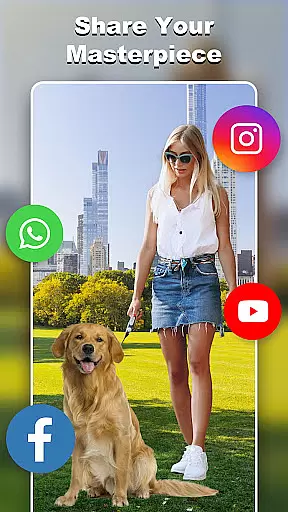
Cut and Paste Photo Editor is an advanced photography app that offers users the ability to effortlessly cut, paste, and edit images with precision. The app utilizes AI-powered tools to make photo editing simple, fast, and enjoyable. Users can create high-quality cutouts, perform face swaps, and remove backgrounds with ease.
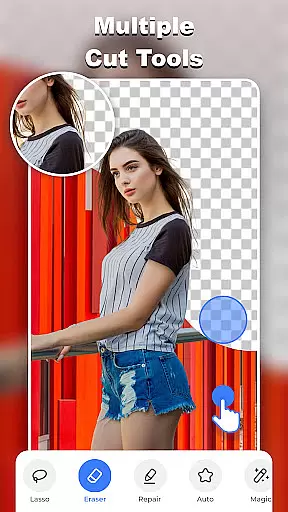
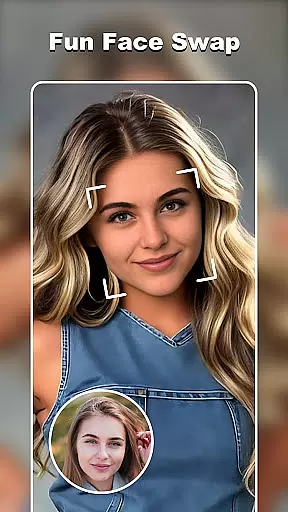
One of the standout features is the Fun Face Swap, which allows users to transform their selfies into various artistic styles, from professional profiles to futuristic cyberpunk looks. Additionally, the Magic Cutting tool provides multiple options like a background eraser, lasso, and auto-cut, ensuring pixel-perfect edits every time.
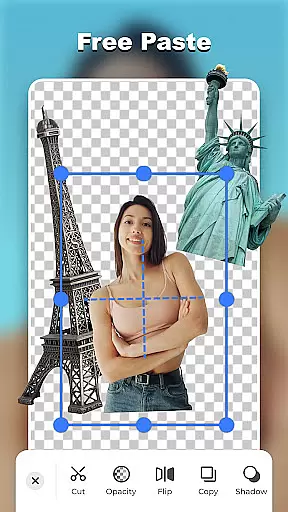
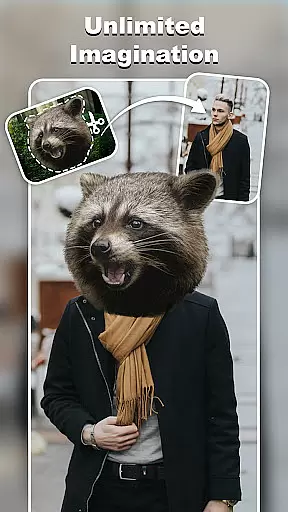
The Smooth Pasting feature enables users to merge elements seamlessly, creating imaginative collages by placing objects in unexpected settings. With an online background library, ready-made templates, and colorful decorations, this app unleashes limitless creativity for both casual users and e-commerce professionals.
Cut and Paste Photo Editor stands out with its comprehensive suite of editing tools designed for all levels of expertise. The app's AI-driven technology simplifies complex tasks such as background removal and face swapping, making professional-quality edits accessible to everyone.
Users benefit from precise cutting tools including lasso, smooth, repair, and magic cut, allowing for detailed selections and edits. The app also includes powerful features like the Pixel-level Cut and Paste, Fast Background Eraser, and High-Quality Results, enabling users to create stunning visuals without any hassle.
Beyond basic editing, the app offers creative functionalities such as Fun Face Swap, Online Background Library, and ready-made templates. These features cater to diverse needs, whether it's enhancing personal photos or preparing product images for online sales on platforms like Amazon and Etsy.
Real-time capture and preview functionality is essential for any photography app, allowing users to see exactly what their final image will look like before taking the shot. Cut and Paste Photo Editor excels in this area by providing a seamless experience where users can instantly visualize their edits.
The app's advanced AI technology enables real-time previews of complex edits such as background removal, face swaps, and object cutouts. This means that as soon as you make an edit, you can see the results immediately, ensuring that your creative vision is accurately captured.
For users, this feature translates into significant time savings and increased creative control. Instead of going through the tedious process of editing after capturing, they can fine-tune their images on the fly, making the entire photo editing process more intuitive and enjoyable.
Ultimately, the real-time capture and preview capability of Cut and Paste Photo Editor empowers users to produce high-quality images with confidence, knowing exactly how their final work will appear. This feature sets the app apart in the Photography category, offering a professional-grade tool for both amateur and seasoned photographers.
AI beauty and enhancement features are increasingly important in photography apps, aiming to improve images while maintaining a natural look. Cut and Paste Photo Editor incorporates sophisticated AI algorithms that enhance photos without making them appear overly processed or artificial.
The app provides various tools such as skin smoothing, blemish removal, and color correction, all powered by AI to ensure enhancements are subtle and lifelike. These tools help users achieve polished yet authentic results, preserving the original essence of the photograph.
Users benefit from this feature by being able to quickly enhance their photos with just a few taps, achieving professional-looking outcomes without needing extensive editing skills. The natural effect maintained by the AI ensures that portraits retain their unique characteristics and do not look plastic or overly retouched.
In summary, the AI beauty and enhancement capabilities of Cut and Paste Photo Editor offer a perfect balance between improving image quality and maintaining realism. This makes the app a valuable tool for anyone looking to enhance their photos while keeping them looking genuine and true to life.
User-friendly interface
AI-powered editing tools
Versatile template options
High-quality results
Fun and creative features
May require premium purchase
Occasional ads
Learning curve for new users
Limited offline functionality
Resource-intensive

Search, tag and rate your way to an organized image gallery
 4.40
4.40
Android Native system HD camera app. Never been so simple and faster.
4.70
Pet Camera
3.70
Gallery Slideshow is slideshow maker app for slideshow from your gallery photos.
3.90
Create AI photos & videos with Enhancer; restore, fix, beautify, enhance photos
4.50
Professional quality photo edits with the new Snapseed.
4.00
A light meter for true photographers.
4.20
PhotoSync Bundle Add-On License. Enables all features and services in PhotoSync.
4.60
A unique animation app. Powerful, easy to use, and lots of fun.
4.30
Pro version: AR sun/moon tracker for any date. Tool for photographers & planners
4.90
Find time and duration of different sunlight phases at any location
4.90
Add Watermark - Sign your pictures with a text or logo. Effective, quick, easy!
4.50
Movie camera, supports pro recording settings for filming. Try it and be amazed!
4.50
Trendy TikTok time warp scan funny filter app brings you unique photos & videos.
4.40
Future baby face generator: AI kids generator, kid face! What my baby look like?
4.40
Turn your phone into a professional camera - full DSLR manual photography
4.30
Professional camera app that brings DSLR manual photography controls to Android.
4.20
Create & Edit with AI: AI Remove, Enhance, Retouch, Filter
4.10
Add a dreamy vibe to your selfies and videos with soft style filters
4.4


User Reviews