






Shazam is a powerful music recognition app designed specifically for Android Wear devices, allowing users to instantly identify songs playing around them. With over 2 billion installs and 300 million users worldwide, this app has earned its reputation as a magical tool for music discovery. Whether you're listening through headphones or hearing a song in public, Shazam can detect the track in seconds and provide detailed information such as artist names, lyrics, and even upcoming concerts.
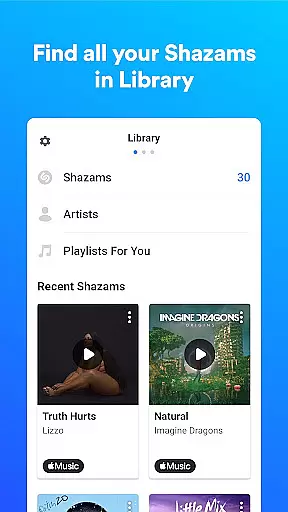
Beyond just identifying music, Shazam offers seamless integration with popular streaming platforms like Apple Music, Spotify, and YouTube Music. Users can save their identified songs, explore time-synced lyrics, watch music videos, and discover new recommendations tailored to their preferences. Its offline functionality and Auto Shazam feature ensure that users never miss a moment of music, making it an essential companion for any music enthusiast on the go.
Shazam stands out with its advanced music recognition technology optimized for Android Wear. The app allows users to quickly identify songs directly from their smartwatch, even without an active internet connection. Its intuitive widget and Notification Bar integration make it easy to Shazam songs while using other apps like Instagram, YouTube, or TikTok. Additionally, features like Auto Shazam enable continuous song detection, even when the app runs in the background.
For those who love exploring music trends, Shazam provides localized charts showcasing popular tracks in specific regions or cities. Users can also enjoy time-synced lyrics, curated playlists, and personalized recommendations. Integration with social media platforms like Snapchat and Facebook allows effortless sharing of discovered tracks. Moreover, optional permissions like location services enhance user experience by recommending nearby concerts and events, ensuring Shazam remains a versatile and indispensable tool for modern music lovers.
Shazam offers seamless companion app integration, allowing users to identify songs across various platforms and apps. Whether you're on Instagram, YouTube, or TikTok, the app works efficiently through your Notification Bar.
The Shazam Widget on your Home Screen provides quick access for identifying music instantly. This ensures that no matter where you are or what you're doing, Shazam is readily available to discover music with minimal effort.
Auto Shazam enhances this experience by enabling continuous song identification even when you leave the app. This feature allows users to capture multiple songs without needing to manually activate the app each time, making it an invaluable tool for music discovery.
Shazam extends its functionality to Wear OS, ensuring comprehensive device compatibility. Users can enjoy the convenience of identifying songs directly from their smartwatches, which is particularly useful when your phone isn't readily accessible.
This compatibility ensures that whether you're working out, commuting, or in any situation where handling your phone is impractical, Shazam remains a reliable tool for music recognition. The app's offline capabilities further enhance its utility on wearable devices.
By integrating with Wear OS, Shazam delivers a consistent and efficient user experience across different devices. This compatibility underscores Shazam's commitment to accessibility and convenience, allowing users to enjoy its features without being tethered to their smartphones.
Instant song identification
Offline functionality
Auto Shazam feature
Seamless streaming integrations
Localized music charts
Limited offline lyrics
Requires account setup
Ads in free version
Occasional recognition errors
Feature restrictions by region

Walking app for weight loss: walk & step tracker, pedometer, indoor treadmill
 4.60
4.60
Embrace the holiday spirit with this magical animated watch face!
4.40
Rose gold watch face with festive lights & customizable features.
4.60
Wear Os Watch Face - Animated Snow Effect & Magic Spark - 6 Scenes
4.10
Sleek, highly customizable watch face inspired by Galaxy Watch Circle Dashboard.
4.3
Digital watch face with big numbers and many customization for Wear OS devices
4.40
Hybrid Vibrant Health Watch Face for Wear OS
4.0
A white realistic classic analog watch face with many customization options.
4.40
Fast and smart typing with Emojis, GIFs, and more
4.50
Your second brain for organizing your life: to-do, calendar, reminder.
4.70
Highly customizable hybrid watch face for Wear OS, perfect for everyday use.
4.60
Christmas watch face. For Wear OS devices.
4.30
Find EV charging stations
4.30
The ultimate destination for kids ages 3-8 to explore the Marvel Universe!
4.30
A customizable Christmas watch face for Wear OS with a countdown.
4.20
Watch face for Wear OS.
4.20
Viewer for Wyze/Yi/Eufy/Arlo/ONVIF/RTSP/P2P IP cams w/ adv. features & DIY DVR
4.00
Your local weather forecast, storm tracker, radar maps & live weather news
3.40
Stunning modern digital watch face with 7 complications and strong contrast
4.1


User Reviews