
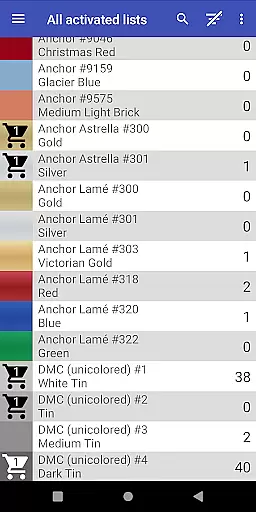
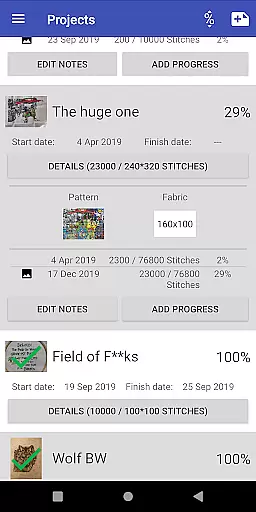
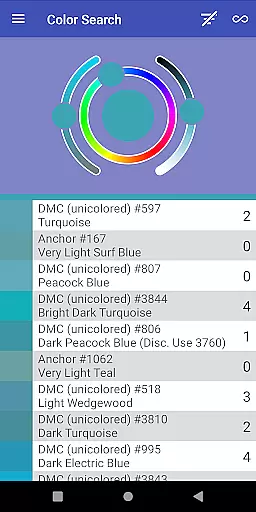
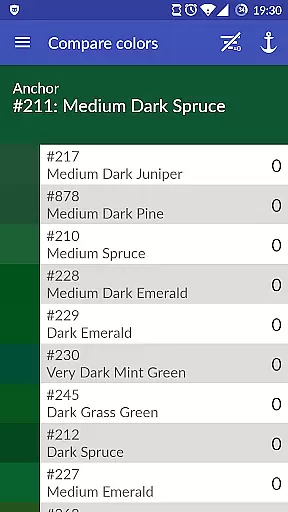
Cross Stitch Thread Organizer is a comprehensive tool designed for cross-stitch enthusiasts, providing an efficient way to manage thread collections on the go. With support for approximately 160 thread vendors, users can easily navigate through extensive lists of threads, fabrics, and patterns.
The app allows users to track inventory, search for specific colors, calculate project sizes, and even add custom lists for missing vendors. Its ad-free, high-performance design ensures a seamless experience for artists and crafters who need reliable organization for their materials.
This Art & Design app offers rich functionalities tailored for embroidery artists. Users can save thread amounts in inventory or shopping carts, search by color, and find substitutes when supplies run low.
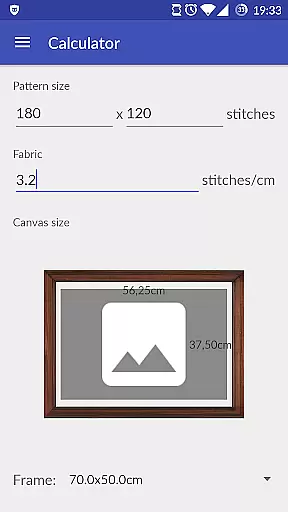
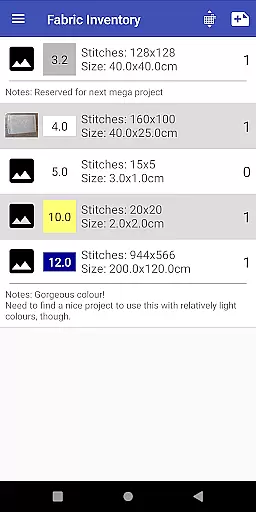
Additional features include managing fabrics and patterns, tracking daily project progress, assigning required threads, and calculating final piece sizes with compatible frame suggestions. The inclusion of custom lists empowers users to add unsupported vendors themselves, making it highly versatile.
Cross Stitch Thread Organizer offers an extensive suite of creative tools tailored for cross-stitch enthusiasts. The app supports a wide array of thread vendors, including popular names like DMC, Anchor, and many others, totaling approximately 160 individual lists. This vast selection ensures that users have access to full-color displays and various thread types such as cotton, silk, and metallic.
One of the standout features is the ability to manage all aspects of your cross-stitch projects within a single platform. Users can track their daily progress, assign required threads, and even calculate the final size of their piece to choose a matching frame from a list of standard sizes. These capabilities make it an indispensable tool for both amateur and professional stitchers.
The inclusion of custom lists adds another layer of versatility, allowing users to add missing vendors or unique thread collections they love. With no ads and optimized performance, the app provides a seamless experience focused purely on enhancing the user's creative process.
Flexibility in canvas and format options is crucial for any design application, and Cross Stitch Thread Organizer excels in this area. The app allows users to manage not only threads but also fabrics and patterns, providing a comprehensive toolkit for cross-stitch projects. This ensures that whether you're working on a small piece or a large tapestry, the app can accommodate your needs.
Users can easily search for threads that match a specific color or find substitutions for threads they've run out of. This feature is particularly useful when working on complex designs that require precise color matching. Additionally, the app supports different thread types, including variegated colors and special effects, giving users the freedom to experiment with diverse textures and finishes.
Another notable aspect is the ability to save the amount of different threads in your inventory or add them to your shopping cart. This helps in maintaining an organized collection and planning future purchases efficiently. Overall, the app's flexible canvas and format options empower users to bring their creative visions to life without constraints.
User-friendly navigation
Extensive vendor support
Customizable thread lists
No ads or bloatware
Comprehensive project tools
Limited to embroidery arts
Occasional bugs reported
Some vendors still missing
Premium features may cost extra
Learning curve for beginners

Stylish letters, Stylish Keyboard, Symbols, Emojis, Cool nickname
 4.40
4.40
Create color palette from Image, RGB & RYB Color wheel harmonies, Color Scheme
4.50
Passport size photo maker, create ID photo and visa photo in seconds
4.80
AI Art Generator transforms your words into AI generated art & paintings.
3.70
Draw Trace image sketch by, AR art projector app, Easy to trace any image.
4.50
A luxurious gold watch face for an elegant and refined look.
4.4
Unleash the artist in you with our AR drawing and tracing tool for photo drawing
4.10
Photo stitcher for automatically screenshot stitching into a long screenshot
4.70
Multiplayer Drawing game, Coloring, Painting・Sketch, Handwriting・Paint, draw
4.30
Mobile pixel art editor. Simple. Fast. Portable.
4.80
Your AI soulmate — meaningful chats, and unique emotional moments
4.70
Digital illustration drawing & painting pad app to paint Anime and Manga art
4.50
Share the joy of painting with ibis Paint! Drawing anime and manga art.
4.50
Kling AI is an image and video generation and editing studio powered by AI.
4.50
Photo blender app to create overlay photos & double exposure.
4.40
AI generated images & photos, turn your words into drawing, painting & pictures.
4.30
800+ Drawing, Painting Lessons App to Practice, Sketch & Paint Art.
4.30
Design unique, funny and adorable cat stickers that reflect your own style!
3.80
AI Assistant, powered by ChatGPT GPT-4 & GPT-4o. Your intelligent companion.
3.50


User Reviews