

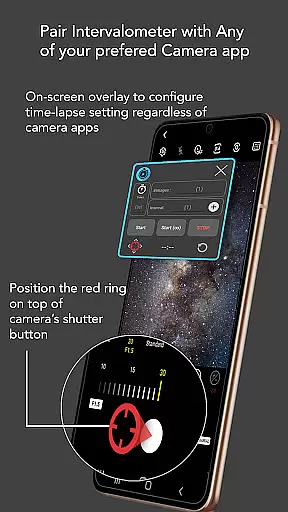
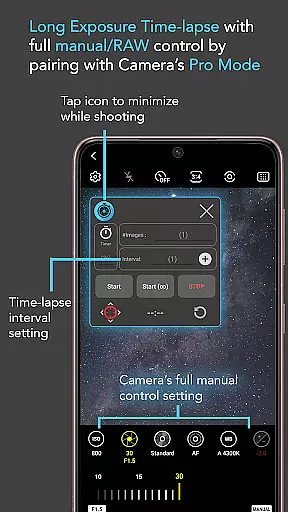
Intervalometer for TimeLapse is a powerful photography tool designed to automate the process of capturing time-lapse sequences. This app allows photographers to configure specific time intervals for triggering the camera shutter, enabling greater creative control over exposure settings and image formats.
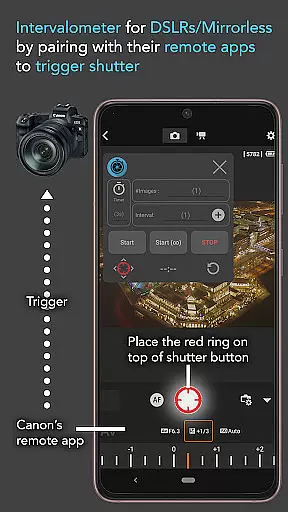
The application works seamlessly with any camera app on Android devices (version 7 and above), including advanced modes such as HDR, night mode, and manual settings. It also supports dedicated camera remote apps from brands like Canon, Sony, and Nikon, making it versatile for both smartphone and professional-grade cameras.
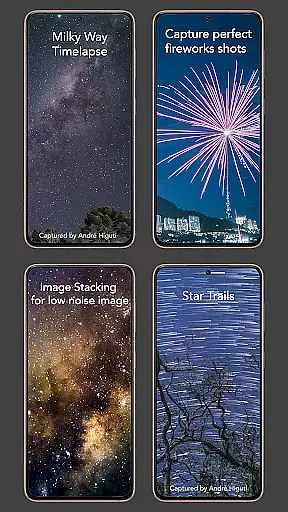
With its precise automation capabilities, Intervalometer is ideal for creating stunning low-light time-lapses, star trails, and even complex transitions like day-to-night sequences. Its flexibility extends beyond time-lapse photography, supporting techniques like image stacking and lightning stacking for enhanced post-processing results.
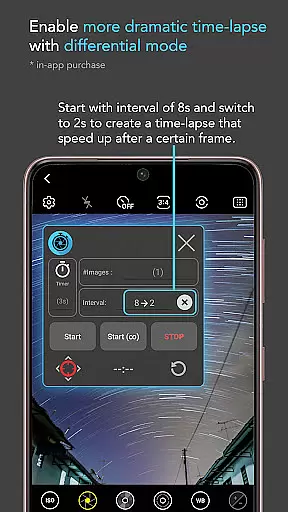
Intervalometer stands out with its robust feature set tailored for both amateur and professional photographers. The app provides full control over time-lapse configurations, allowing users to customize delay timers, interval durations, and the number of shots. This level of customization ensures that every project can be fine-tuned to meet specific creative needs.
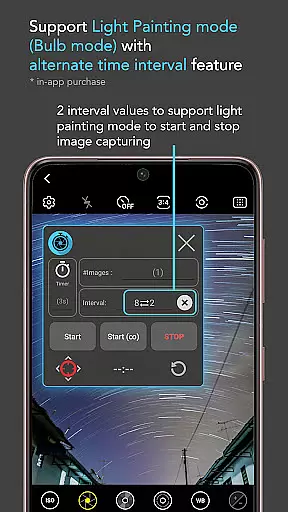
In addition to standard time-lapse modes, the app includes specialized features like Infinite Mode and Bulb Mode. These options cater to long-exposure photography and extended shooting sessions, which are essential for capturing intricate details in challenging lighting conditions. The app's compatibility with any camera app further enhances its versatility.
One of the standout innovations is its ability to integrate with dedicated camera remote apps. By automating the shutter button press in these apps, Intervalometer effectively transforms into a universal intervalometer for professional cameras. This dual functionality makes it an indispensable tool for photographers seeking both convenience and precision in their work.
Real-time capture and preview functionality is essential for photographers who need to ensure their time-lapse sequences are executed flawlessly. Intervalometer for TimeLapse offers this by integrating seamlessly with any camera app, allowing users to configure and trigger the shutter at precise intervals.
This app utilizes Android's AccessibilityService API to automate the photo-taking process across different camera modes, including manual, HDR, and night mode. This ensures that every shot is taken exactly as planned, without missing a moment.
Users benefit from the ability to execute complex time-lapse projects such as low light, long exposure, or even the challenging Holy Grail of time-lapses (day to night transitions). The real-time aspect ensures that each frame is captured in the correct sequence and settings, providing consistent results.
The value of this feature lies in its flexibility and reliability, making it possible to create professional-quality time-lapses using just a smartphone and the Intervalometer app.
While primarily focused on time-lapse photography, Intervalometer for TimeLapse also indirectly supports image enhancement through precise control over the capture process. Although it doesn't directly apply AI beauty or enhancement filters, its meticulous timing allows for post-process techniques like image stacking and star trail creation.
By automating the camera shutter with exact intervals, the app enables photographers to gather a series of images under consistent conditions. These can then be processed using other apps to enhance quality, reduce noise, or create stunning visual effects like lightning stacks or star trails.
The app's bulb mode and infinite shooting capabilities provide the foundation for advanced techniques, ensuring that each frame is captured with the intended exposure. This level of control translates into higher quality raw materials for post-processing.
Photographers seeking natural-looking enhancements will appreciate how Intervalometer maintains authenticity while enabling creative freedom in post-production, resulting in images that retain their original character while benefiting from modern editing techniques.
User-friendly interface
Wide camera compatibility
Customizable time-lapse settings
Supports professional workflows
Enhances creative possibilities
Requires AccessibilityService API
Limited on some devices
No built-in camera functionality
Dependent on third-party apps
May need device restarts

Safe & smart flight with Go Fly drone controller for 40+ drone camera, zone map
 4.50
4.50
Cut and paste photo editor & eraser to customize photos easy and swap faces fun
4.50
Over 800 film simulation recipes for Fujifilm. Black Friday Offer!
4.4
Cartoon and artistic effects for your photos and videos
4.70
Create AI photos & videos with Enhancer; restore, fix, beautify, enhance photos
4.50
AI photo enhancer with Sora 2! Enhance, descratch, and colorize your old photos.
4.50
Enhance, retouch & create your story - Share the moment with Photoshop Express.
4.60
Use AI Video Generator to turn your words to ai generated videos.
4.50
The original Rarevision VHS look seen everywhere!
4.70
AI Photo Editor with 100+ Filters, Effects! Remove BG, Retouch & Photo Enhancer.
4.80
Photo prints, cards, & gifts at Walgreens. Easy ordering & fast local pickup !
4.80
Android Native system HD camera app. Never been so simple and faster.
4.70
Discover & download millions of art for The Frame TV or Hisense CanvasTV
4.60
Future baby face generator: AI kids generator, kid face! What my baby look like?
4.40
AI portrait generator and polaroid AI selfie, fun AI generated AI photo creator!
4.30
[3DSteroid Pro] is a stereoscopic application for Android.
4.30
Professional camera app that brings DSLR manual photography controls to Android.
4.20
Hair color changer, AI haircut app, fun hair editor and buzz cut filter for all!
3.80
Add a dreamy vibe to your selfies and videos with soft style filters
4.5


User Reviews