
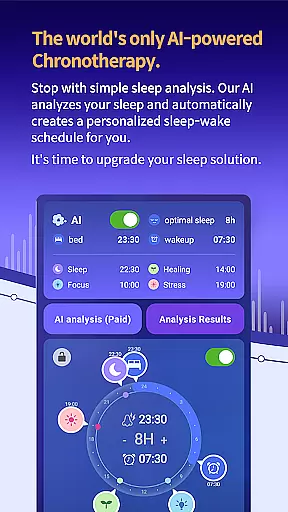
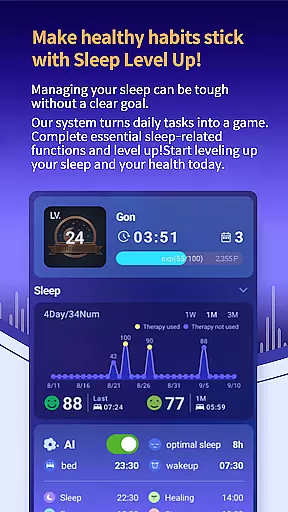
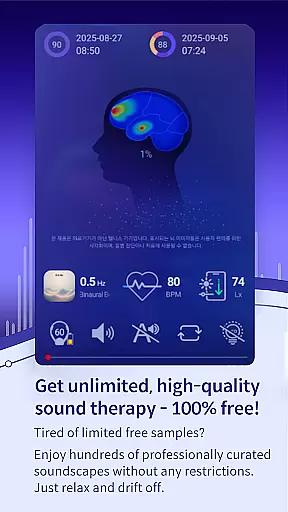
SleepisolBio is a pioneering sleep management application designed specifically for Android Wear users. This app focuses on personalized sleep solutions based on circadian rhythms, aiming to improve overall sleep quality through advanced AI analysis. The core functionality revolves around analyzing sleep patterns, circadian rhythms, and snoring to generate detailed reports and recommend optimal sleep schedules.
What sets SleepisolBio apart is its integration of various sound-based therapy services and real-time biofeedback mechanisms. Users can access 48 different sound therapies and mindfulness content while benefiting from personalized chronotherapy recommendations. The app also features a comprehensive alarm system with 68 different options and special occasion alarms, ensuring a pleasant waking experience every morning.
The app's value extends beyond just sleep tracking. It provides a complete sleep ecosystem that includes bedtime stories, brainwave therapies, and daily missions to gently awaken the user. All these features are presented in high-quality stereo sound at 320kbps, 48kHz, making it an ideal solution for those seeking a sophisticated sleep management tool on their wearable devices.
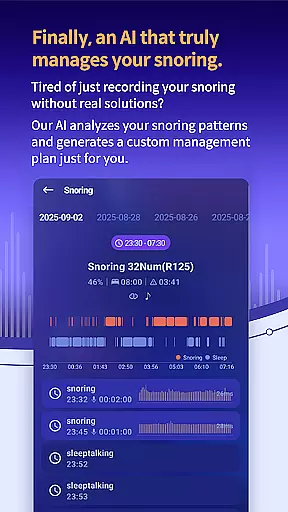
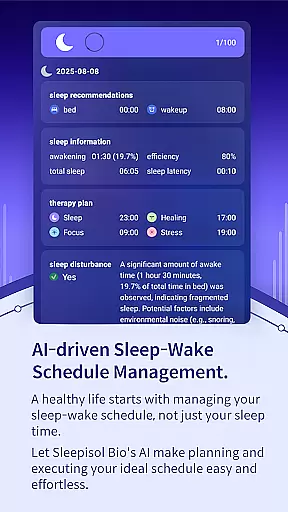
SleepisolBio offers an impressive array of features that cater to various aspects of sleep management. The app's primary feature is its AI-driven sleep analysis system, which evaluates multiple factors including sleep cycles, circadian rhythms, and snoring patterns. This analysis results in personalized recommendations for optimal sleep times and chronotherapy schedules, helping users establish healthier sleep routines.
A standout feature is the extensive library of sound-based therapies, comprising 48 specialized audio tracks across four categories: Sleep, Focus, Healing, and Stress. These are complemented by additional mindfulness content and brainwave therapies, including Theta, Alpha, Beta, and Gamma waves. The app also incorporates real-time biofeedback through heart rate monitoring, enabling dynamic adjustment of therapy sessions based on the user's current physiological state.
Additional notable features include a sophisticated alarm system with 68 variations, real-time generated sound therapies using monaural beats, binaural beats, and isochronic tones, plus various wake-up missions that engage both mind and body. The app's interface prioritizes essential sleep information, displaying crucial data prominently on the main screen while maintaining all records locally on the device for enhanced privacy.
Companion app integration is crucial for wearable devices as it ensures seamless data synchronization and feature coordination between the smartphone and wearable. SleepisolBio excels in this area by offering a comprehensive connection between its mobile app and Wear OS devices.
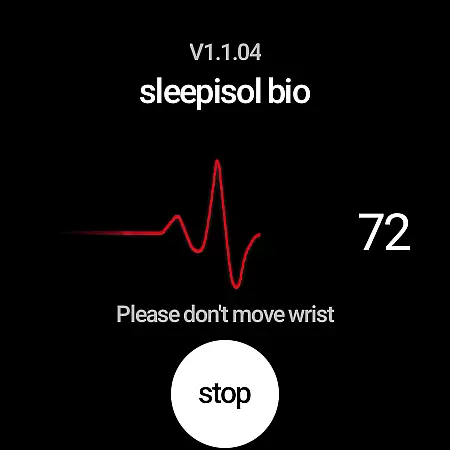
The app provides real-time heart rate monitoring during therapy sessions, utilizing the capabilities of Samsung Galaxy Watch to enhance personalized treatment. This integration allows users to receive biofeedback instantly, making their therapy more effective and tailored to their current state.
Users benefit from having their sleep data, circadian rhythm information, and therapy recommendations synchronized across devices. This means whether they are viewing their sleep reports or engaging in sound-based therapies, the experience remains consistent and up-to-date on both platforms.
This level of companion app integration not only improves usability but also enhances the overall effectiveness of the sleep management system. By leveraging the strengths of both mobile and wearable technologies, SleepisolBio delivers a cohesive and optimized user experience that supports better sleep health management.
Device compatibility is essential for ensuring that applications run smoothly across different hardware configurations. For SleepisolBio, its compatibility with Wear OS devices expands its functionality and accessibility, providing users with more options to manage their sleep health.
SleepisolBio's Wear OS app works in tandem with the main application, focusing on delivering real-time heart rate data during therapy sessions. This specialized use case demonstrates how the app leverages the unique capabilities of Wear OS devices to enhance user experience without duplicating features unnecessarily.
While the core functionalities remain accessible through the primary mobile app, the addition of Wear OS support offers advanced features that require continuous physiological monitoring. Users with compatible devices can enjoy enhanced personalization and immediate feedback during their therapy sessions.
By maintaining robust compatibility with Wear OS, SleepisolBio ensures that users can choose the most convenient way to engage with their sleep management routines. This flexibility not only broadens the app's appeal but also reinforces its position as a versatile tool in promoting healthy sleep habits.
Advanced AI analysis
Extensive sound therapy library
Real-time biofeedback
Comprehensive alarm system
Local data storage
Premium features require payment
Limited without Samsung Galaxy Watch
Complex for beginners
Not medical software
Dependent on Google Health Connect

an Analog Watch Face for winter season with freeze winter background for Wear OS
 4.2
4.2
Artistic Digital Watchface
4.3
Watch face designed for Thanksgiving Day. 7 Background Styles included.
3.20
Ideal for surviving in the wasteland left after nuclear fallout
4.50
Find EV charging stations
4.30
Get helpful reminders, take progress photos and find answers to your questions.
3.90
Premium hybrid watch face with many customizations for Wear OS devices.
4.40
Your local weather forecast, storm tracker, radar maps & live weather news
3.40
Control your Samsung Smart TVs, appliances, and SmartThings-compatible devices
4.60
Beautiful, colorful and practical watch face. For Wear OS devices.
5.00
Real-time weather radar with temperatures, warnings, hurricanes, and widgets
4.80
Hybrid watch face for Wear OS with customizable complications by Matteo Dini MD
4.70
Rose gold watch face with festive lights & customizable features.
4.60
Gym & home workout plans with strength training, exercise tracking, HIIT & more.
4.60
Reliable phone calls with spam protection, caller ID and more helpful features
4.40
Bold, Modern Hybrid Watch Face for Wear OS. 10 Colors, Rich Info Display.
4.30
Embrace the festive spirit with our Christmas Countdown watchface for Wear OS
4.10
The #1 source of faces for your smartwatch!
4.00
Sleek, highly customizable watch face inspired by Galaxy Watch Circle Dashboard.
4.0


User Reviews