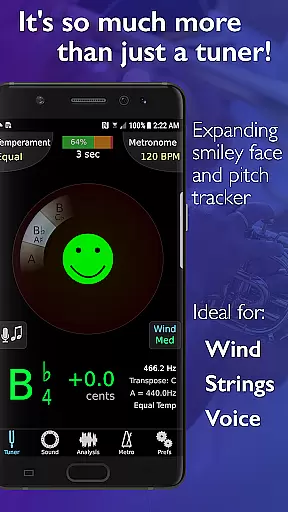
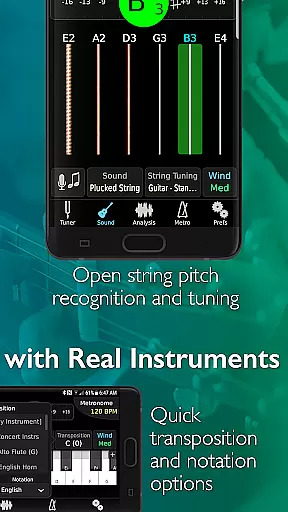
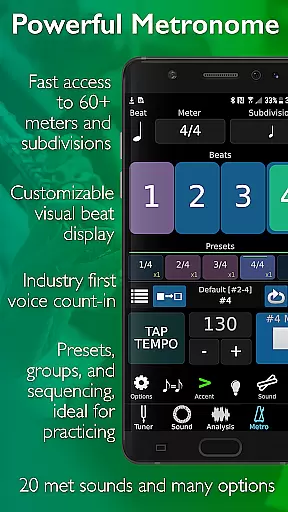
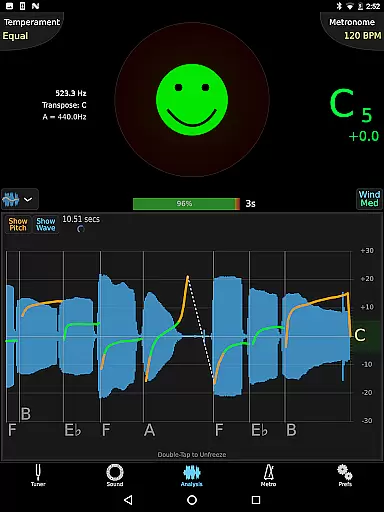
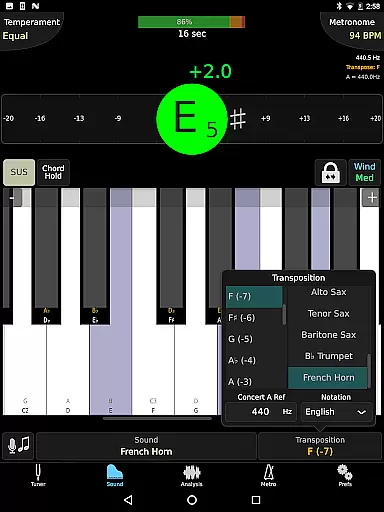
TonalEnergy Tuner & Metronome is a comprehensive music practice tool designed for musicians of all levels, from beginners to professionals. This app goes beyond basic tuning by integrating a state-of-the-art tuner, advanced metronome, orchestral strings and guitar tuning pages, a piano keyboard, sound analysis tools, and audio recording capabilities into one solution.
What sets TonalEnergy apart is its user-friendly interface and feature-rich environment. The app provides rewarding feedback through colorful analysis data pages and flexible practice options. Its cutting-edge metronome offers unmatched flexibility in tempo settings, meters, subdivisions, and visual displays, while the high-quality multi-sampled instrument sounds enhance ear training. Additionally, the app fosters connectivity by allowing users to collect, review, edit, and share practice data with others.
Whether you're practicing alone or in a group, TonalEnergy supports a wide range of instruments, including brass, woodwinds, strings, and guitars. It’s an ideal companion for musicians seeking precision, versatility, and fun during practice sessions.
TonalEnergy Tuner & Metronome boasts an impressive array of features tailored to meet the needs of musicians. One standout aspect is its ability to recognize pitches across an extensive range (C0 - C8), making it highly responsive to wind, acoustic, and electric string instruments. The adjustable A=440 Hz reference and automatic/manual transposing options ensure accurate tuning for various instruments.
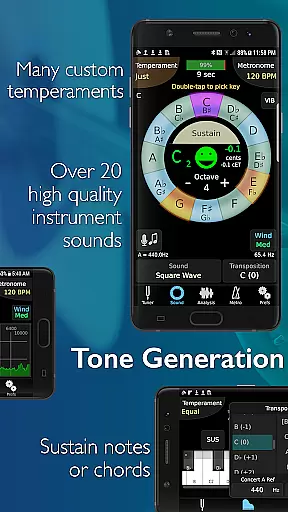
The app also excels in customization and adaptability. Users can instantly switch between equal temperament, just intonation, and custom temperaments, including user-defined ones. The chromatic wheel tone generator, eight-octave piano keyboard, and frequency/harmonic energy graphs provide detailed sound analysis. Additionally, the dedicated metronome page rivals standalone metronome apps with features like tempo flexibility, subdivision patterns, and visual displays.
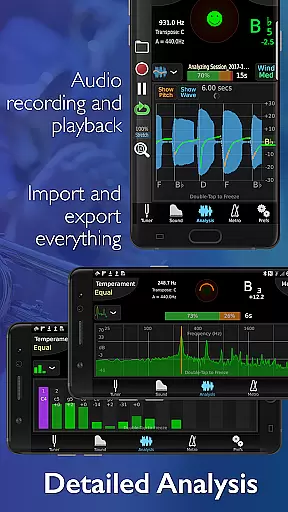
TonalEnergy further enhances learning with its audio recording capabilities, which include editing, looping, and time-stretching functions—all exportable for sharing. Compatibility with external microphones, MIDI keyboards, and clip-on vibration sensors ensures seamless integration into any setup. These robust features make TonalEnergy an indispensable tool for serious musicians.
The TonalEnergy Tuner & Metronome app offers an extensive music library that caters to a wide range of instruments, making it versatile for various musicians. With support for symphonic instruments, stringed instruments, and even unique waveforms like square, sawtooth, and sine, the app provides a rich selection that is hard to match.
Copyright authenticity is assured as the app includes high-quality multi-sampled instrument sounds that are unique among tuning applications. These sounds are not only legally licensed but also enhance the ear training experience, allowing users to develop their listening skills with accurate and diverse audio feedback.
For musicians from beginners to professionals, this vast and authentic music library means access to true-to-life soundscapes that can be used in practice sessions. This feature ensures that users receive the most realistic and beneficial rehearsal experience possible.
Ultimately, the combination of a comprehensive music library and verified copyright compliance makes TonalEnergy stand out. Users can trust that they are engaging with a legitimate product that respects intellectual property while providing unparalleled resources for musical development.
Audio quality is paramount when tuning musical instruments, and the TonalEnergy Tuner & Metronome app excels in delivering pristine sound. The app supports external microphones and clip-on vibration sensor devices, ensuring that the highest fidelity is achieved during tuning sessions.
Furthermore, the inclusion of advanced audio recording capabilities enhances the user's ability to review performances. Features such as editing, looping, and timestretch functionalities allow musicians to dissect their practice sessions thoroughly, all while maintaining exceptional audio clarity.
The app also provides MIDI keyboard control support, which opens up additional possibilities for sound manipulation and output. This compatibility ensures that digital audio workstations or external devices can interact seamlessly with the app, offering a broader spectrum of audio quality options.
By prioritizing superior audio quality options, TonalEnergy empowers musicians to fine-tune their craft with confidence. Whether performing alone or with an ensemble, users can rely on precise and clear audio feedback to elevate their musical expression.
Comprehensive all-in-one design
Highly responsive pitch recognition
Advanced metronome functionality
Unique multi-sampled instrument sounds
Extensive customization options
May overwhelm beginners
Requires learning curve
Premium pricing model
Heavy on system resources
Limited free version availability

SqueezePlayer turns your Android phone or tablet into a SqueezeBox on its own!
 4.60
4.60
Simply convert wav to mp3. Clear. Reliable. Safe.
4.2
DJ Music Mixer Pro is a real DJ controllers and DJ Music Studio to remix DJ.
4.40
Time Trainer: accurate metronome w tools to help you develop your internal time!
4.20
Super Sound Editor, Song Maker & Mixer, Vocal Remover, Voice Recorder & Changer!
4.60
Recording studio w/ 10k beats, pro vocal FX and a network of 20M rappers & fans!
4.60
Smart piano keyboard, Classical to Pop, Real-time multiplayer connection!
4.20
Travel To The Music Universe
3.40
Be a true music maker: create beats, mix and make music like a real DJ!
4.30
Tune in to the greatest hits on UK Radio | The home of Capital, Smooth & Heart.
4.90
Full-featured, High-Quality Groovebox Workstation, perfect for Live Performance!
4.80
Performance-Synthesizer & Multi-Track-Sequencer, polyphonic + multi timbral!
4.70
The best music and audio player, with beautiful UI, music search and equalizer.
4.60
Advanced 10-Band Audio Graphic Equalizer Sound Booster Pro
4.30
The official Sonos app
4.10
Versatile MP3 recorder with auto-backup to Dropbox and Google Drive
4.10
The ultimate media player for Android devices
3.90
Sheet music reader, piano & music note player. Play music score & learn to read.
3.90
Music Streaming suite for Ampache, Nextcloud Music and compatible backends.
4.0


User Reviews