





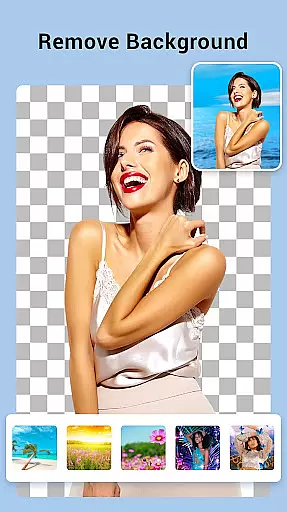
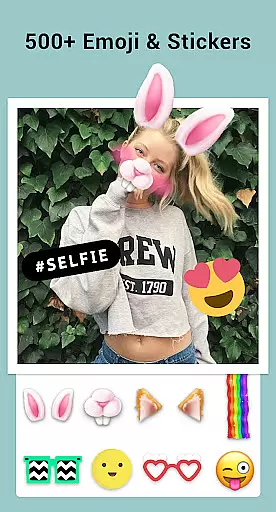

Collage Maker is a versatile photo collage and editing application designed for creative enthusiasts. The app allows users to instantly combine multiple photos into stunning collages using over 100 customizable layouts, making it ideal for social media content creation. With advanced features like AI Photo Enhancer, users can transform low-quality images into high-definition masterpieces with a single tap.
Beyond basic collage creation, the app offers extensive editing tools including filters, stickers, text overlays, and doodles. It supports both grid-style and freeform designs, catering to various artistic preferences. Whether you're designing Instagram posts, YouTube thumbnails, or personalized scrapbooks, Collage Maker provides all necessary tools in one place. Its multi-fit functionality ensures perfect formatting for different platforms, while high-resolution saving guarantees professional-quality output.
Collage Maker distinguishes itself through its comprehensive feature set tailored for modern digital creators. The app's standout capability is its support for combining up to 100 photos simultaneously, offering unprecedented creative freedom. Users can choose from hundreds of layout options, customize borders, and select from diverse background patterns to create unique compositions that suit their artistic vision.
The application incorporates professional-grade editing tools including advanced cropping, filter application, and text customization. Its freestyle mode enables users to create digital scrapbooks with full-screen backgrounds, while the story template feature provides 100+ stylized designs for creating engaging Instagram stories. The AI-powered photo enhancement tool addresses common image quality issues, automatically improving resolution and clarity. Additionally, the app's multi-fit functionality caters specifically to Instagram users, supporting various aspect ratios and background options for optimal social media presentation.
Real-time capture and preview functionality is essential for photography apps like Collage Maker. This feature allows users to see exactly what their final collage or edited photo will look like as they make adjustments.
Collage Maker excels in this area by providing instant feedback on layout changes, filter applications, and text additions. As users modify their collages, the app updates the preview in real time, ensuring that the final output matches their creative vision.
The benefit to users is significant - they can experiment with different design elements without committing to any single choice. This immediate visual feedback empowers users to create more polished and professional-looking collages.
Furthermore, the app's real-time processing capabilities demonstrate its technical efficiency, handling multiple image manipulations simultaneously without noticeable lag or performance issues, making the creative process both enjoyable and efficient.
AI-powered beauty and enhancement features have become crucial in modern photo editing applications. These tools help users improve their photos while maintaining a natural appearance, avoiding the over-processed look common in many editing apps.
Collage Maker incorporates advanced AI technology that can transform low-quality images into stunning HD versions with just one tap. The app intelligently enhances details, removes imperfections, and optimizes colors while preserving the original character of the photographs.
This approach benefits users by delivering professional-grade results without requiring expert knowledge of photo editing techniques. Whether enhancing old family photos or improving recent snapshots, users can achieve impressive results that look authentic and natural.
The implementation of AI enhancement demonstrates the app's commitment to quality and user satisfaction, offering sophisticated editing capabilities that cater to both casual users and photography enthusiasts seeking high-quality results.
User-friendly interface
Extensive customization options
Powerful AI enhancement
Versatile layout choices
High-quality output
Contains in-app purchases
May overwhelm beginners
Storage space required
Limited advanced editing
Occasional ads

Photo Album Watch Face shows your favorite pictures as a Watchface.
 1.90
1.90
Perfect photos with body shaping, BG changer and object remover.
3.70
Professional video recording application with manual controls for filmmakers!
2.80
Create & Edit with AI: AI Remove, Enhance, Retouch, Filter
4.10
Photo prints, cards, & gifts at Walgreens. Easy ordering & fast local pickup !
4.80
Create collages easily! Nice pic collage maker & background eraser for Instagram
4.50
HD Camera Pro with HD Video shooting, Panorama, Photo editor , Beauty Camera.
4.50
Create amazing frames with up to five photos. Rounded corners, effects and more!
3.60
Future baby face generator: AI kids generator, kid face! What my baby look like?
4.40
Cartoon and artistic effects for your photos and videos
4.70
A must-have app for landscape photographers
4.60
Easily create custom gifts, cards, photo books & more on the Shutterfly app!
4.60
Add Watermark - Sign your pictures with a text or logo. Effective, quick, easy!
4.50
Movie camera, supports pro recording settings for filming. Try it and be amazed!
4.50
AI-powered video creator by MiniMax - Where ideas meet cinema
4.20
Photobooth mini FULL app will allow you to add more fun to your parties
4.00
Remote control of the phone camera from your Wear OS smartwatch
3.70
Pet Camera
3.70
Application for remote controlling DSLR
3.00


User Reviews