


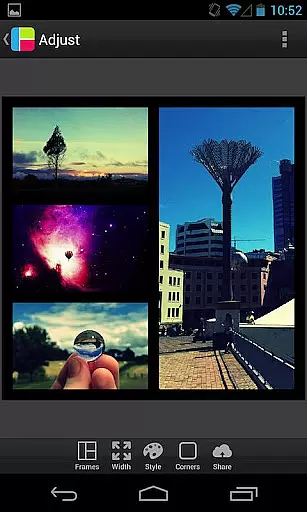
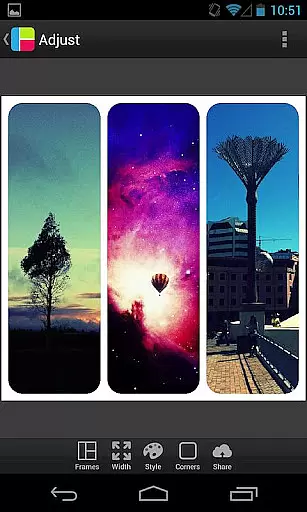

PicFrame is a versatile photography app that allows users to create stunning photo collages by combining multiple images into customizable frames. With 36 adjustable frame layouts, users can include up to five photos in a single composition, offering endless creative possibilities. The app provides advanced editing tools such as rounded corners, shape customization, and precise control over borders, colors, and patterns.
Designed for both casual users and photography enthusiasts, PicFrame supports various aspect ratios including square format, making it ideal for social media sharing. Its intuitive interface ensures ease of use while delivering professional-quality results. Whether you're looking to enhance your Instagram feed or create personalized gifts, PicFrame offers the tools to bring your vision to life.
PicFrame stands out with its extensive range of features tailored for creative expression. Users can customize every aspect of their photo frames, from adjusting border widths and corner styles to applying unique shapes like hearts and hexagons. The app includes 52 background patterns and an easy-to-use color picker, enabling users to match their designs with any theme or mood.
Each photo within a frame can be individually edited for brightness, contrast, and saturation, ensuring optimal visual balance. Additional functionalities such as zooming, rotating, and dragging photos provide precise control over composition. With support for high-resolution outputs and seamless sharing to platforms like Instagram, Facebook, and Twitter, PicFrame empowers users to showcase their creativity effortlessly.
Real-time capture and preview functionality is essential for photography apps as it allows users to see exactly what the camera sees before taking a shot. PicFrame offers this feature by enabling users to adjust their photos with various effects and settings in real time.
The app provides an intuitive interface where users can pinch to zoom, drag to move photos, and rotate images effortlessly. This ensures that every adjustment is immediately visible, giving users precise control over the final composition of their frames.
With PicFrame, you have access to 36 fully adjustable frames, rounded corners, and customizable borders. These features allow for endless customization options, ensuring that each photo frame looks unique and tailored to your preferences.
Ultimately, the real-time capture and preview capabilities of PicFrame enhance user experience by providing immediate feedback and allowing for quick adjustments, resulting in perfectly framed photos ready to be shared with friends and family.
AI beauty and enhancement features are becoming increasingly popular in photography apps, offering users the ability to enhance their photos naturally. PicFrame incorporates these features by providing adjustable photo effects such as brightness, contrast, and saturation for each photo within the frame.
Users can also change the shape of their photos to circles, hearts, hexagons, and more, adding a creative touch to their compositions. The app includes 52 patterns for the frame backgrounds, further enhancing the aesthetic appeal of the final image.
PicFrame's AI-driven tools ensure that all enhancements look natural and do not distort the original quality of the photos. This is particularly important for users who want to maintain authenticity while still improving the visual impact of their images.
By leveraging advanced AI algorithms, PicFrame delivers a seamless and natural enhancement experience, empowering users to create stunning and professional-looking photo frames with ease.
User-friendly interface
Extensive customization options
High-quality output resolution
Versatile frame designs
Excellent social media integration
Limited free features
Occasional ads in free version
Advanced tools require learning
Some design assets are premium
Interface may feel cluttered

A collection of tools and reference tables for DPs, ACs, DITs and Operators.
 4.70
4.70
Add Watermark - Sign your pictures with a text or logo. Effective, quick, easy!
4.50
Viewfinder, Light meter, Reciprocity failure time, DOF & Bellows Extension
4.60
Automatically backup your photos and videos to computer, NAS and Cloud services
4.60
Create AI photos & videos with Enhancer; restore, fix, beautify, enhance photos
4.50
GCamera allows all GCam features on all phone models! Better photos with GCamera
3.30
RAW video capture with advanced controls
4.40
Remote control the phone camera shutter from your smartwatch and take a picture
1.60
Edit photos with the picture generator: PS2 & AI Clay filters, cartoon effects.
4.50
Photo editor: AI filters, photo enhancer, pic collage maker, AI art generator.
4.80
Enhance, upscale, and transform your images — on your device, without limits
4.70
Unblur, enhance & restore photos with powerful AI photo enhancer tools.
4.60
Cut and paste photo editor & eraser to customize photos easy and swap faces fun
4.50
Fit multiple photos on one post. Create carousels & scroll layouts for Instagram
4.50
[3DSteroid Pro] is a stereoscopic application for Android.
4.30
Catch sunlight, sunrise sunset times and sun phases with the AR sun tracker.
4.10
Turn photos into cartoons & avatars! - Photo Editor, Cartoon Face!
3.90
Application for remote controlling DSLR
3.00
Over 800 film simulation recipes for Fujifilm. Black Friday Offer!
4.1


User Reviews