
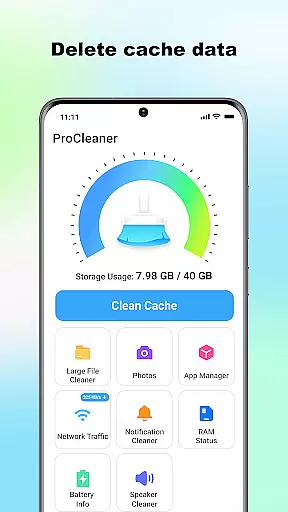
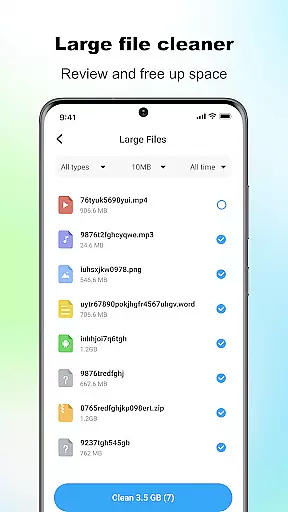
ProCleaner is a comprehensive device optimization tool designed to help users efficiently manage their smartphone storage. The app's core functionality revolves around scanning and cleaning various types of unnecessary files, including cache, residual, and junk files that accumulate over time.
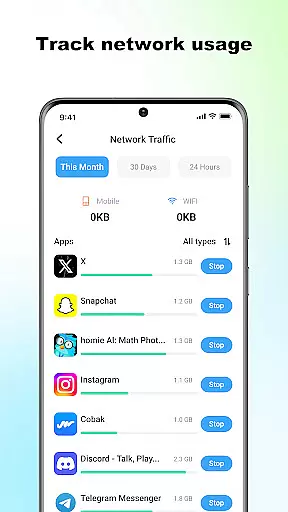
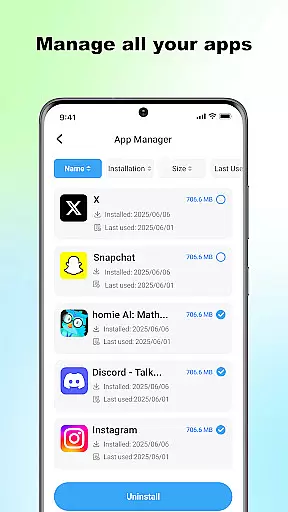
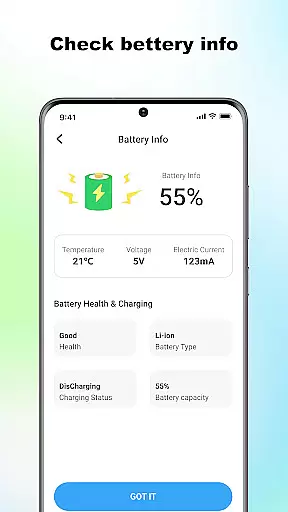
Beyond basic cleaning capabilities, ProCleaner offers advanced features for managing large files and uninstalling multiple applications simultaneously. Users can also monitor their network speed and check battery status, providing a complete solution for device maintenance and performance optimization.
This application is particularly useful for individuals who frequently encounter storage issues or wish to maintain optimal device performance. By offering both basic and advanced management tools, ProCleaner delivers significant value to users looking to streamline their device maintenance process.
ProCleaner distinguishes itself through its comprehensive suite of device management features. The application's primary strength lies in its robust file scanning and cleaning capabilities, which can detect and remove various types of unnecessary files, including cache, residual, and junk files.
The app's advanced features include a powerful large file manager that helps users identify and remove space-consuming files. Its multi-application uninstallation function allows for efficient app management, while the network speed monitor and battery status checker provide valuable insights into device performance.
What sets ProCleaner apart is its technical implementation - all operations are performed locally on the device, ensuring user privacy and data security. The app requires only necessary permissions for storage access and app management, maintaining a balance between functionality and user privacy.
ProCleaner excels in delivering accurate and effective core functions that are essential for device optimization. The app's scanning engine thoroughly examines your device, identifying cache files, residual data, and junk files that can be safely removed.
With its intuitive interface, users can easily locate and manage large files that consume valuable storage space. This feature not only declutters your device but also enhances its performance by freeing up system resources.
The app allows the uninstallation of multiple applications simultaneously, streamlining the process of removing unwanted apps. Additionally, real-time network speed monitoring and battery status checks provide users with crucial insights into their device's health and connectivity.
All these functions are performed locally, ensuring user privacy while maintaining high operational standards. ProCleaner's commitment to accuracy ensures that only unnecessary files are targeted, preserving important data and system integrity.
A hallmark of ProCleaner is its simple and intuitive interface, designed to make device management accessible to users of all technical backgrounds. Upon launching the app, users are greeted with a clean layout that organizes its powerful features into easily navigable sections.
Each tool is represented by clear icons and labels, allowing users to quickly identify and utilize the functions they need. Whether it's scanning for junk files or monitoring network speed, every action can be completed within a few taps.
The app minimizes learning curves by employing familiar design patterns and logical workflows. Users can initiate comprehensive scans or manage large files without needing extensive technical knowledge.
This focus on usability extends to its permission system, where requests for storage and app usage permissions are explained in a straightforward manner. By prioritizing interface simplicity, ProCleaner empowers users to maintain their devices efficiently and effectively.
Comprehensive cleaning tools
Local data processing
Multi-app management
Network monitoring
Battery optimization
Basic UI design
Limited customization
No cloud backup
Manual operation required
Feature overlap with OS

A powerful, easy-to-use flight computer on your phone or tablet!
 3.80
3.80
Transfer Files, APK from Phone to Watch & Install.
4.3
A recovery soft,it features photo recovery, video recovery, file recovery.
3.40
Unlock your Essential Key. Create custom shortcuts to your favorite apps!
4.4
Safely recover deleted photos, videos, and files with a single easy tap.
3.70
An easy-to-use calculator designed to save time calculating and bending conduit
4.30
Remote Play with FSR upscaling, low latency & full controller support
4.80
Automate everything from settings to photos, SMS to speech. ADC2 prize winner.
4.10
Button mapper, mouse toggle, sleep timer and a lot of another features
4.50
ADB support Android 4.X-Android 13(Support wireless pair mode).No root required!
4.70
The Ultimate Flex Drivers Utility App - Convenient Tapping & Block Filters
4.70
Creation, Learning, Entertainment & More — The All-in-One AI Search Engine
4.70
FV File Manager Pro, Fast and powerful file manager for Android
4.60
Keep track of your Palia friendships, tasks, and inventory with Palia Notebook
4.60
Quickly switch to an encrypted DNS server on Android TV
4.50
Universal TV remote control all TVs, Roku, LG, Samsung, Fire, Vizio, Sony, TCL.
4.40
Mirror your screen to Fire TV - Super fast and simple
4.40
Amateur Radio app for APRS: Track friends, exchange messages, get tactical info.
3.90
Download any file easily and quickly with Downloader
4.4


User Reviews