
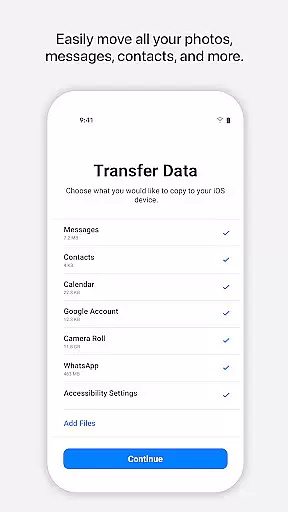
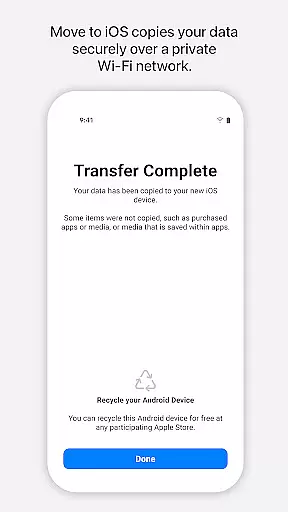
Move to iOS is a powerful migration tool designed to simplify the process of switching from Android to iPhone or iPad. This application enables users to transfer all essential content securely and automatically, including contacts, photos, videos, message history, mail accounts, calendars, and even WhatsApp data. The app creates a private Wi-Fi network between devices, ensuring a seamless and secure transition without the need for third-party storage solutions.
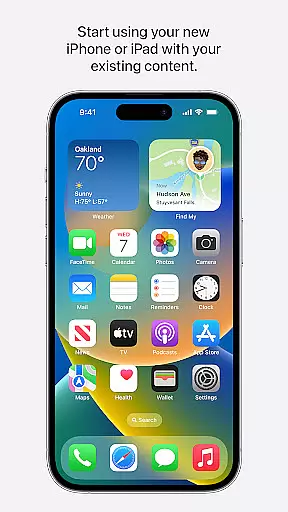
One of the standout features of Move to iOS is its ease of use. By following a few simple steps and entering a security code, users can migrate their data effortlessly. The app ensures that all transferred content is organized correctly on the new device, allowing users to start using their iPhone or iPad immediately after the process is complete. This makes it an ideal solution for anyone looking to switch platforms without losing valuable personal information.
Move to iOS offers a comprehensive set of features tailored to make the transition from Android to iOS as smooth as possible. The app supports the migration of various types of data, such as apps, call logs, camera photos and videos, mail accounts, and voice memos. Additionally, it provides optional permissions for SMS, photos, notifications, contacts, music, phone details, calendar events, and call logs, giving users flexibility in choosing what to transfer.
A key feature of Move to iOS is its ability to establish a private Wi-Fi connection between devices, which eliminates the need for external networks or cables. This ensures that the data transfer process remains secure and uninterrupted. Furthermore, the app's intuitive interface guides users through each step, making it accessible even for those who may not be tech-savvy. With Move to iOS, Apple has created a reliable tool that enhances user experience during platform transitions.
Move to iOS offers a seamless transition experience for users switching from Android to iOS devices. The app's core functionality lies in its ability to automatically and securely transfer a wide array of content data.
This includes essential information such as contacts, message history, mail accounts, calendars, camera photos and videos, voice memos, WhatsApp content, call logs, and even apps. By creating a private Wi-Fi network between devices, the app ensures that all data migration occurs without the need for external storage solutions.
The effectiveness of Move to iOS is evident in its straightforward process. Users simply need to keep their devices connected and enter a security code to initiate the transfer. This streamlined approach saves time and effort while maintaining data integrity throughout the migration process.
By handling all content types and placing them in appropriate locations on the new iOS device, the app demonstrates exceptional functional accuracy. This comprehensive solution makes switching to iOS both easy and reliable, delivering on its promise of a hassle-free transition.
The user interface of Move to iOS has been carefully designed to provide an intuitive and simple migration experience. From the moment users launch the app, they are guided through a clear series of steps that require minimal technical knowledge.
A key aspect of this simplicity is the automatic nature of the data transfer process. Without needing to manually select individual files or worry about complex settings, users can migrate their content with just a few taps. The app handles all the technical details behind the scenes.
Visual indicators and progress updates keep users informed throughout the migration process. These interface elements help maintain user confidence by showing exactly what is being transferred and when it will complete.
Optional permissions are presented in a straightforward manner, allowing users to make informed decisions about which data types to transfer. This combination of automation and clear communication creates an interface that is both powerful and easy to navigate, making device switching accessible to users of all technical skill levels.
User-friendly interface
Secure data transfer
Comprehensive content migration
Private Wi-Fi network
Optional permission settings
Limited to Android-iOS transfers
Requires both devices nearby
Dependent on Wi-Fi stability
No backup functionality
Optional features may lack completeness

 4.10
4.10
Just swipe the edge to do something!
4.40
Complete kernel toolbox with features to manage and tweak your rooted device
4.30
Learn the vast amount of system information about device and monitor it's state
4.70
Clean the junk files on your device
3.40
Universal TV remote control all TVs, Roku, LG, Samsung, Fire, Vizio, Sony, TCL.
4.40
The ultimate tool for network analysis, wifi scanning and problem detection.
4.90
Clean up large files and similar photos, fast and easy to use
4.40
Fast VPN USA for any country. Super secure VPN for calls, streaming, games, TV.
4.40
Navigate with Ease and Style
4.90
Change your GPS location instantly. Simulate routes anywhere in the world.
4.90
Extremely fast, secure, and protects your privacy
4.80
The one-and-only remote control for PC, Mac, and Linux
4.70
With videos, electrical calculators, and built-in ebook, Ugly’s has your answer.
4.50
Pro Emulator is an easy to use game console emulator for a range of consoles.
4.40
pdf merge, word to pdf, jpg to pdf, edit pdf, convert to pdf and much more!
4.20
VESC Tool can monitor and configure VESC-compatible devices over BLE and Wifi
4.20
A non-root local ADB shell client. READ BELOW!
3.40
Transfer Files, APK from Phone to Watch & Install.
4.1


User Reviews