
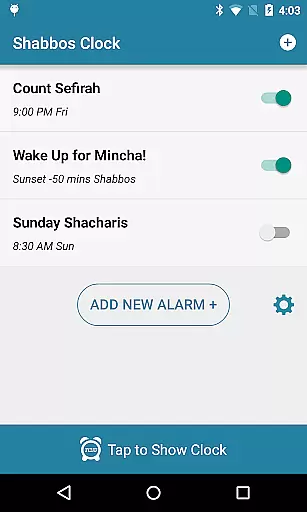
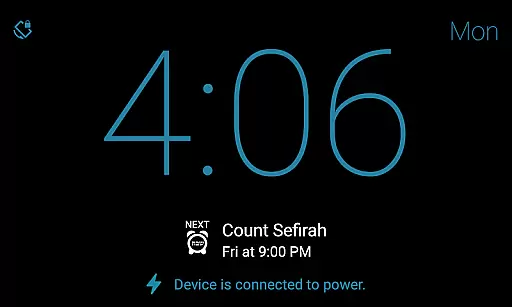
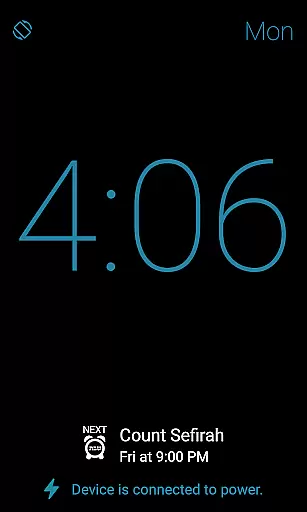
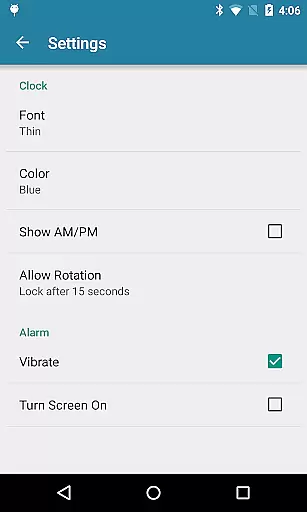
Shabbos Clock is a specialized productivity app designed to assist users in managing their time while adhering to religious practices, particularly on the Jewish Sabbath. The app's primary function is to display the current time prominently on the screen, ensuring that users can keep track of time without direct interaction. This feature is crucial for those who observe Shabbat and wish to avoid using technology in a way that conflicts with their beliefs.
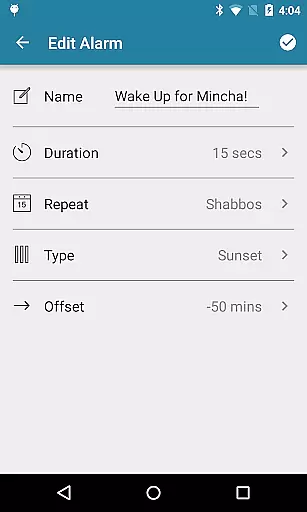
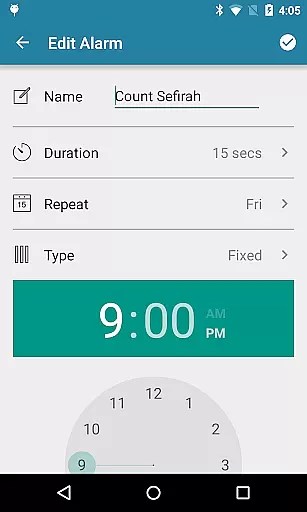
In addition to time display, Shabbos Clock offers advanced alarm functionalities tailored to Shabbat observance. Users can set unlimited alarms with specific durations (10-50 seconds) after which they automatically shut off. The absence of a snooze button aligns with Shabbat rules, providing a seamless experience. Alarms can be configured based on weekly patterns or even set according to local sunrise and sunset times, offering flexibility and precision in time management.
This app is especially useful for individuals seeking to maintain their spiritual practices while staying organized. By eliminating the need for manual adjustments and interactions during Shabbat, Shabbos Clock helps users focus on their religious observance without compromising on modern conveniences. Its thoughtful design ensures that technology serves as a supportive tool rather than a distraction.
Shabbos Clock stands out with its unique set of features designed specifically for Shabbat observance. One of its key attributes is the ability to display the current time continuously on the screen, allowing users to check the time at a glance without needing to interact with their devices. This hands-off approach respects the sanctity of Shabbat while keeping users informed about the passage of time.
The app also excels in its alarm system, which includes unlimited alarm options that cater to various scheduling needs. Each alarm can be set to turn off automatically after a specified duration, ranging from 10 to 50 seconds, ensuring minimal disruption. Notably, there is no snooze button, which aligns perfectly with Shabbat guidelines that discourage device manipulation. Furthermore, alarms can be programmed to repeat based on weekly patterns, accommodating regular routines seamlessly.
Another innovative feature is the ability to set alarms relative to local sunrise and sunset times. This functionality allows users to synchronize their schedules with natural daylight cycles, enhancing their connection to both time and nature. Overall, these features collectively create an environment where technology supports spiritual practices, making Shabbos Clock an indispensable tool for productivity-minded individuals observing Shabbat.
Shabbos Clock excels in core task management by providing users with essential timekeeping and alarm features tailored for Shabbat observance.
The app displays the current time prominently on the screen, ensuring users can keep track of time without interacting with their devices. With unlimited alarm options, users can set multiple alarms to suit their needs, whether it's for prayer times or other important events.
Alarms are designed to automatically shut off after a specified duration, ranging from 10 to 50 seconds, which aligns with Shabbat rules that prohibit device interaction. This feature ensures that users are not disturbed by prolonged alarm sounds while maintaining adherence to tradition.
Additionally, the lack of a snooze button prevents any unnecessary interaction with the device during Shabbat, further respecting religious guidelines. The ability to set repeatable alarms based on weekly patterns and local sunrise and sunset offsets adds another layer of customization, making this app an indispensable tool for managing tasks on Shabbat.
While Shabbos Clock focuses primarily on standalone functionality, its reliability in managing tasks across different scenarios is noteworthy.
Although cross-device synchronization isn't a primary feature, the app ensures consistent performance on the user's Android device, which is crucial for those who rely on it during Shabbat. Users can trust that once they have configured their alarms and settings, the app will perform reliably throughout the day without needing adjustments.
Testing the setup before Shabbat is recommended to confirm everything works as expected. This preparation step enhances the app's reliability, ensuring that users won't encounter issues when they need the app most.
By focusing on simplicity and consistency, Shabbos Clock provides peace of mind, knowing that your scheduling needs are met without requiring ongoing management or intervention. This reliability makes it a valuable tool for anyone seeking to maintain productivity while honoring their religious practices.
User-friendly interface
Customizable alarms
Automatic shut-off
Sunrise-based timing
Religious compliance
Limited non-Shabbat features
No snooze option
Specific user base
Requires pre-testing
Basic visual design

AI Video AI Image Private LLM AI Browser Llama Gemma Ollama Connect LLM Studio
 4.2
4.2
Client for Nextcloud Deck
4.60
⏰ Finally a timer app which can run multiple timers simultaneously on your watch
3.90
PDF scanner & converter for files, photos, lottery, QR codes. One swipe away!
4.50
A simple Whisper AI keyboard for reliable speech transcription and rewording
4.60
This small app MUST BE INSTALLED after purchase, else license won't work
4.40
AT&T Internet customers can use this app to personalize their Wi-Fi network.
4.40
Browse and view your photos and videos from the phone with photo & video hide.
4.10
Note taking, handwriting, record audio, PDF annotation, planner & journal
4.20
Native client for Forgejo and Gitea
5.00
Secure, fast, open-source, VNC and SSH Remote Desktop for Windows, Linux and Mac
4.70
The long-awaited modern gallery app for your Nextcloud server
4.70
Docker, Kubernetes management over Portainer Mobile
4.40
Enjoy classic gameplay with customizable features and retro-style graphics.
4.30
Professional calendar app for Google Calendar, MS Outlook & Exchange
4.20
All in One PDF Reader: Manage, Read and Edit your Documents
4.20
Customizable calendar widget for seamless event sync, planning & scheduling.
4.00
Find and delete junk files & block unwanted notifications & manage files
3.70
Make your handwriting beautiful, even more than pen on paper.
3.60


User Reviews