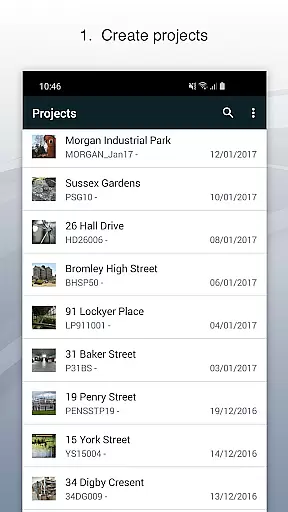
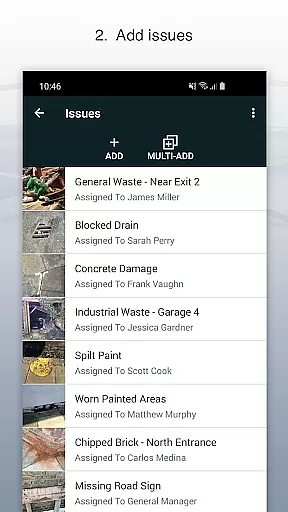
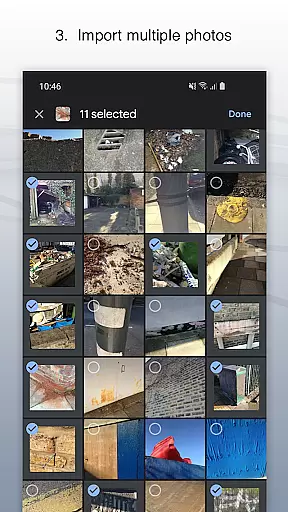
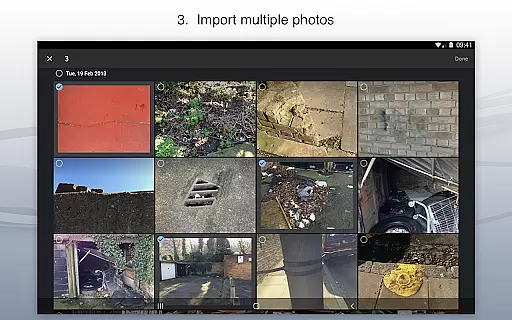
Site Audit Pro is a powerful productivity tool designed to streamline the auditing and inspection process for businesses across various industries. This mobile application allows users to efficiently record issues by capturing photos, annotating them to highlight critical details, and assigning tasks with comments. The app's intuitive interface makes it easy to organize findings into projects, complete with site and client information.
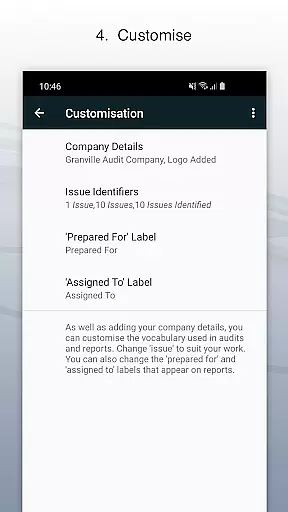
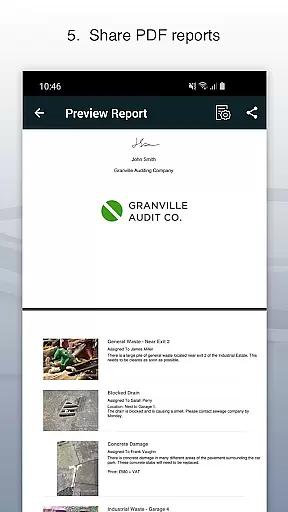
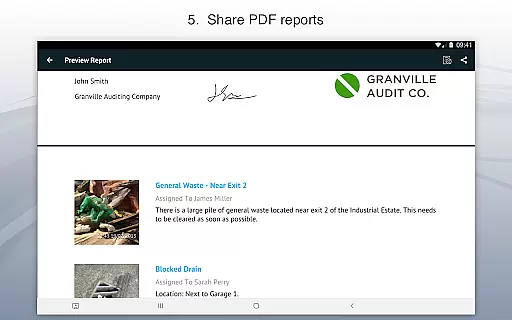
One of the standout features of Site Audit Pro is its ability to generate professional, customizable audit reports instantly. Users can share these reports as PDFs via email or cloud services like Dropbox without needing to return to the office. This functionality significantly reduces turnaround time and enhances overall productivity. Whether conducting safety inspections, creating punch lists, or providing quotations, this app ensures that all necessary data is captured and presented in a polished format.
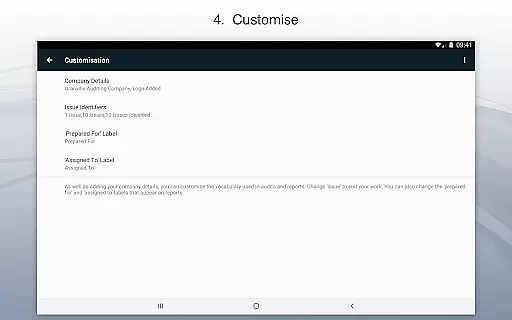
The app is particularly valuable for professionals who need to perform audits on the go. With support for custom branding elements such as company logos and auditor signatures, Site Audit Pro adds a personal touch to every report. Its adaptability to different industries through customizable terminology makes it an indispensable tool for improving operational efficiency and ensuring compliance.
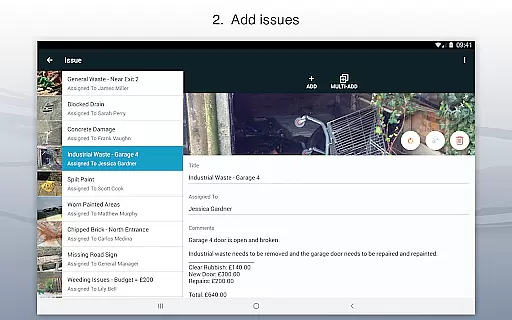
Site Audit Pro offers a comprehensive set of features that cater to the diverse needs of auditors and inspectors. At its core, the app enables users to document issues effectively by attaching photos, adding descriptive titles, assigning tasks to team members, and including relevant comments. The photo annotation feature allows users to draw attention to specific areas within images, ensuring that no critical detail is overlooked during the review process.
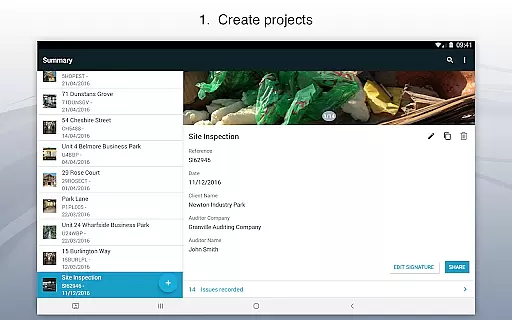
Organization is made simple with the app's project management capabilities. Users can categorize issues under distinct projects, each with its own set of site and client details. This structured approach helps maintain clarity and context when dealing with multiple audits simultaneously. Additionally, the app provides eight professionally designed report templates that can be further customized to match individual preferences or corporate branding guidelines.
Another notable aspect of Site Audit Pro is its flexibility in adapting to different industry terminologies. For instance, users can modify standard phrases to better align with their specific field, whether it's construction, manufacturing, or healthcare. This level of customization ensures that the app remains relevant and useful across various sectors, ultimately contributing to more accurate and meaningful audit outcomes.
Site Audit Pro excels in core task management by providing a comprehensive suite of tools designed to streamline the auditing process. The app allows users to record issues with ease, attaching photos and annotations directly to entries, ensuring that all relevant information is captured at the source.
The application supports organizing these tasks into projects, where additional details such as site information and client specifics can be added. This structured approach not only aids in keeping track of individual tasks but also provides a broader context, making it easier to manage complex audits or inspections.
Furthermore, Site Audit Pro offers features like assignee allocation and comment addition, which enhance collaboration among team members. These capabilities ensure that every team member knows their responsibilities and can communicate effectively within the app, leading to improved productivity and accountability across the board.
Cross-device synchronization is a critical feature for any productivity tool, and Site Audit Pro delivers reliable performance in this area. Users can start an audit on one device and seamlessly continue on another, ensuring that work progresses uninterrupted regardless of the hardware being used at any given time.
This reliability extends to data integrity, where updates made on one device are accurately reflected across all others. Whether adding new issues, modifying existing ones, or even sharing reports, users can trust that their changes will be preserved and accessible wherever they go.
Moreover, Site Audit Pro's synchronization capabilities include real-time updates, allowing multiple users to collaborate on the same project simultaneously without fear of data loss or duplication. This ensures that teams stay aligned and up-to-date, further enhancing the efficiency and effectiveness of their auditing processes.
User-friendly interface
Customizable reports
Instant sharing options
Photo annotation tools
Cross-industry adaptability
Limited free version
Occasional bugs
Steep learning curve
High subscription cost
Offline functionality limited

A simple, portable logger for POTA, SOTA, Field Day, and more
 4.0
4.0
App lock - lock apps with fingerprint, password, pin or pattern, protect privacy
4.70
Functional QR scanner and barcode reader that requires little storage space.
4.60
Subscribe to Webcal & .ics calendars and keep them up-to-date!
4.50
Docker, Kubernetes management over Portainer Mobile
4.40
Best Tool for the professionals Electrician, Electrical contractors, etc.
4.90
Ultimate Virtual AI Character for immersive Roleplay Chat. Perfect Companion
3.90
Simple notepad & memo. Take notes, to-do list, shopping list with reminders.
4.80
Okta MFA
4.70
Multilingual translator for text, voice, and image translation!
4.90
Scan paperwork into PDF/JPG, generate your own e-signature and send fax or email
4.70
The Pro Version of Android's tiniest Notepad app. Just 0.3MB but feature-packed!
4.60
The AI assistant that thinks with you - write, code, and solve complex tasks
4.60
This small app MUST BE INSTALLED after purchase, else license won't work
4.40
Font maker keyboard with your own handwriting
4.10
The ultimate file manager for rooted devices. The original and still the best.
4.00
All in one sketching tool. Technical and General drawing. Online Maps support.
3.70
Remotely view listen control and record cameras.
3.70
Make your handwriting beautiful, even more than pen on paper.
3.60


User Reviews