
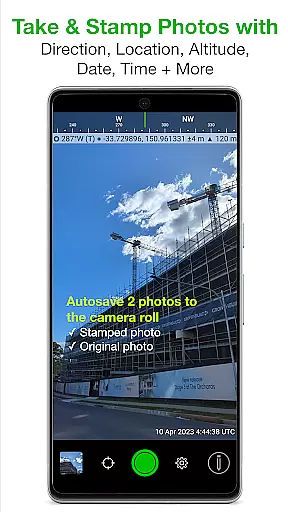
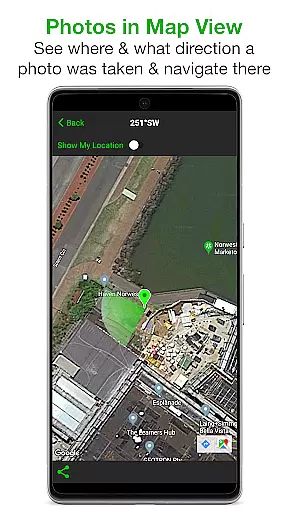
Solocator is a professional GPS camera app designed for fieldwork and photo documentation across various industries. The app allows users to overlay critical information such as location, direction, altitude, date, and time directly onto photos, making it an essential tool for professionals who require accurate and detailed image records.
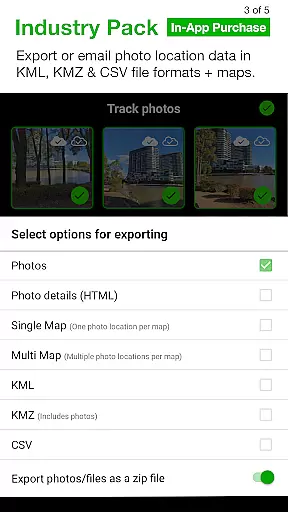
With the optional Industry Pack, Solocator extends its functionality by enabling users to capture additional field notes like project names and descriptions. Its autosave feature ensures both stamped and original images are saved, while advanced sharing options allow exporting data in multiple formats including KML, KMZ, and CSV. Whether you're documenting construction progress or conducting field surveys, Solocator provides a comprehensive solution tailored to your needs.
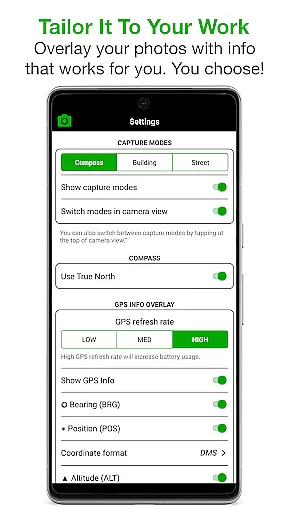
Solocator stands out with its extensive customization options for photo overlays. Users can select from a wide range of data points to stamp on their images, including GPS coordinates, compass direction, altitude, tilt and roll angles, and even street addresses when using the Industry Pack. This flexibility ensures that each photo contains exactly the information required for specific projects.
The app's camera supports both front and back cameras with standard controls like pinch zoom, self-timer, and flash. Additionally, features like Autosave, cloud storage integration, and batch editing make managing large volumes of photos effortless. With capabilities such as refining GPS locations and locking asset positions, Solocator proves indispensable for professionals working in challenging environments where precision is key.
Solocator excels in real-time capture and preview, offering users the ability to overlay critical information directly onto photos as they are taken. This feature is particularly valuable for professionals who require accurate documentation in fields such as construction, surveying, and field research.
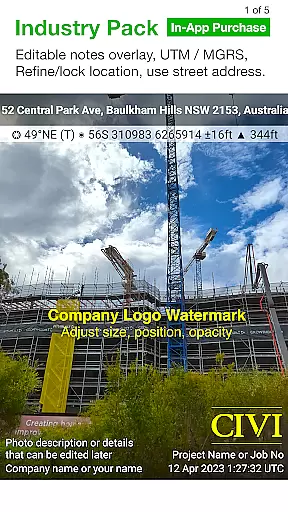
The app provides a comprehensive set of data points that can be stamped on images, including GPS coordinates, compass direction, altitude, tilt and roll angles, and more. With the optional Industry Pack, users gain access to additional fields like street address and UTM/MGRS coordinate formats, enhancing the detail and utility of each photo.
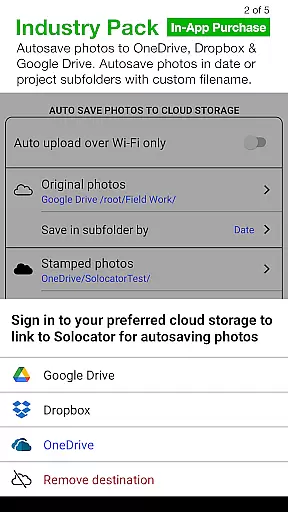
One of the standout aspects of Solocator's real-time functionality is its autosave feature. Users can automatically save two versions of each photo: one with the selected overlays and another original image without any modifications. This dual-saving process ensures that both annotated and clean copies are readily available for different use cases.
Furthermore, Solocator supports both front and back cameras, pinch zoom, self-timer, flash, and exposure controls, making it versatile for various photography needs. The intuitive interface allows users to tailor the overlay information to their specific requirements, ensuring that every photo contains the precise details needed for professional documentation.
While Solocator does not focus on AI beauty enhancements typical in portrait or social media applications, it offers a different kind of enhancement through its precise data overlays. These overlays provide a natural and authentic way to enhance the informational value of photos without altering their visual appearance.
The app's Industry Pack extends these capabilities by allowing users to add editable notes directly onto photos. Fields such as project name, description, and watermark can be customized and later modified, providing a flexible way to include relevant contextual information. This approach maintains the authenticity of the original image while adding layers of useful metadata.
Solocator also includes advanced export options that let users define custom filenames using various fields like date/time, project name, and custom text. This level of customization ensures that each photo's accompanying data is both meaningful and well-organized, contributing to a more natural workflow for professionals managing large volumes of images.
Additionally, the app's ability to refine and lock GPS locations demonstrates its commitment to accuracy and authenticity. By allowing users to adjust location data when necessary, Solocator ensures that each photo accurately reflects its geographical context, further enhancing the reliability of the captured information.
User-friendly interface
Comprehensive data overlay
Autosave functionality
Cloud storage integration
Batch editing option
Paid Industry Pack
Limited on older devices
Occasional GPS inaccuracies
Complex for beginners
Heavy file sizes

A collection of tools and reference tables for DPs, ACs, DITs and Operators.
 4.70
4.70
Application for remote controlling DSLR
3.00
Over 800 film simulation recipes for Fujifilm. Black Friday Offer!
4.0
Movie camera, supports pro recording settings for filming. Try it and be amazed!
4.50
GCamera allows all GCam features on all phone models! Better photos with GCamera
3.30
AI photo enhancer with Sora 2! Enhance, descratch, and colorize your old photos.
4.50
Fit multiple photos on one post. Create carousels & scroll layouts for Instagram
4.50
Astrophotography with your smartphone, photo live stacking and much more!
3.90
Professional camera app that brings DSLR manual photography controls to Android.
4.20
Cartoon and artistic effects for your photos and videos
4.70
Enhance, retouch & create your story - Share the moment with Photoshop Express.
4.60
Create collages easily! Nice pic collage maker & background eraser for Instagram
4.50
Effortlessly organize, view and share your photos & videos with Gallery app!
4.40
RAW video capture with advanced controls
4.40
Professional photography on your mobile phone
4.20
Luminar: Photo Editor - easy picture editing with AI
4.20
Gallery Slideshow is slideshow maker app for slideshow from your gallery photos.
3.90
Be your best in every shot! Fix, edit and retouch your face in selfies & photos.
3.70
Add a dreamy vibe to your selfies and videos with soft style filters
4.5


User Reviews