




XPlay Browser is a cutting-edge mobile application designed for users seeking a fast, private, and video-focused browsing experience. This browser stands out with its lightweight design, ensuring smooth performance even on older devices. It offers quick page loading, a clean user interface, and effortless navigation, making everyday browsing comfortable and efficient.
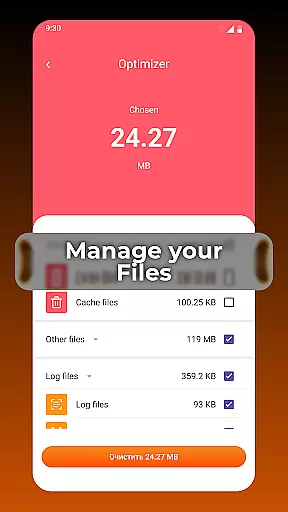
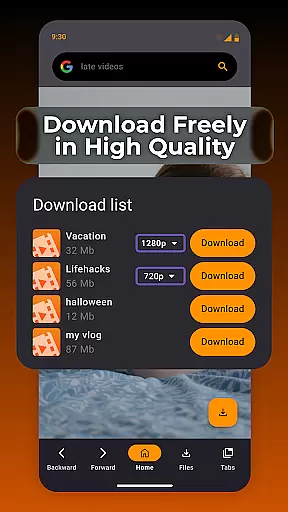
One of the standout features of XPlay Browser is its Private Browsing Mode, which ensures your privacy by not storing any history and using only essential permissions. Additionally, it allows users to download videos from supported websites directly within the app, eliminating the need for third-party applications. With smart file management tools, users can keep their device storage organized, enhancing overall efficiency.
XPlay Browser boasts an array of powerful features tailored to enhance the browsing experience. Its Fast & Smooth Browsing capability ensures that pages load quickly, providing a seamless experience regardless of the device's age. The browser's modern and clean UI contributes to a comfortable and intuitive browsing flow.
Privacy is a top priority, and XPlay Browser's Private Browsing Mode exemplifies this commitment. By not storing any history and minimizing permissions, it provides a secure environment for confidential sessions. Furthermore, the Easy Video Downloads feature allows users to save videos directly from supported websites, enabling offline viewing without the need for additional apps.
Smart File Management is another key feature, helping users maintain an organized device storage. The built-in tools review and sort files, highlighting unnecessary items to ensure the phone remains efficient. Lastly, XPlay Browser is designed to be Lightweight & Battery Efficient, running smoothly without draining the battery, thus offering a superior user experience.
Video format compatibility is a crucial feature for any video player, ensuring that users can enjoy content in various formats without technical barriers. XPlay Browser excels in this area by supporting an extensive range of video formats, making it versatile and user-friendly.
The app's advanced decoding technology allows seamless playback of both common and less-known video formats. Whether you're streaming online or playing locally stored files, XPlay Browser ensures smooth performance across different media types.
For users, this means no more frustration over unsupported files. You can download videos from supported websites and watch them offline without worrying about format issues. This flexibility enhances the overall browsing and viewing experience.
By prioritizing comprehensive video format support, XPlay Browser positions itself as an ideal choice for users seeking a reliable tool that handles all their video playback needs efficiently.
AI-powered editing features represent the cutting-edge evolution of video editing tools, enabling users to enhance their content with minimal effort. XPlay Browser incorporates intelligent editing capabilities that streamline the enhancement process, offering intuitive options even for beginners.
The browser's AI technology automatically optimizes video quality by adjusting parameters such as brightness, contrast, and sharpness. It also provides smart trimming and cropping functions, allowing users to quickly edit videos directly within the app.
This integration of AI-powered tools significantly reduces the complexity typically associated with video editing. Users can achieve professional-looking results without needing specialized skills or additional software, saving both time and resources.
With these innovative features, XPlay Browser not only simplifies video management but also empowers users to create polished content effortlessly, enhancing their digital storytelling capabilities.
Fast page loading
Private browsing
Easy video downloads
Smart file management
Battery efficient
Limited video sites
No desktop mode
Few customization options
Occasional bugs
Ads in free version

The smartest M3U IPTV Player your playlists have ever seen.
 4.3
4.3
Video Downloader is an utility that can save videos and music from web sites
4.20
KineMaster, Your Ultimate Video Editor!
4.40
Support 1000+ Video Format, Subtitle Download, mp3 & Background Play, Cast On TV
4.60
AirMirror is Receiver for Screen Mirroring and Casting from Apple Devices.
3.60
AirMirror Receiver - Screen mirroring/cast web videos to Android TV by AirPlay.
4.40
An easy-to-use and all-round screen recorder with audio
4.80
Flud is a simple and beautiful BitTorrent client for Android.
4.80
VLC for Android is the best open source video and music player, fast and easy!
4.10
All in one HD video downloader & player for multiple formats with full privacy
4.70
VLC Remote lets you control your VLC Media Player on Mac, PC or Linux.
4.60
Cast movies, tv shows and live streams to Chromecast, Roku, DLNA, Fire TV & more
4.60
Download website videos fast&privacy
4.40
Browser for Fire TV to stream webvideos, online movies, livestreams in HD
4.40
Video player with 4K & 1080P support, popup play, background play and subtitle.
4.20
Powerful, professional, versatile teleprompter. Developed by an active film crew
4.00
Connect 2 UVC devices for recording and broadcast video/audio stream
3.90
IPTV Player - Watch live TV from m3m & m3u8 playlist, stream IPTV on mobile
3.30
The essential companion to your Blue Iris PC software
2.50


User Reviews