
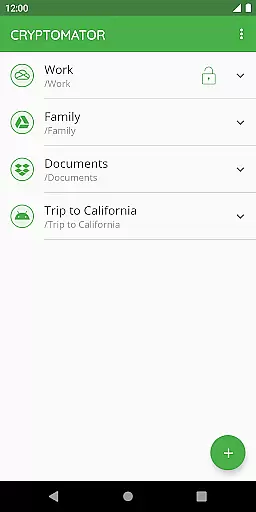
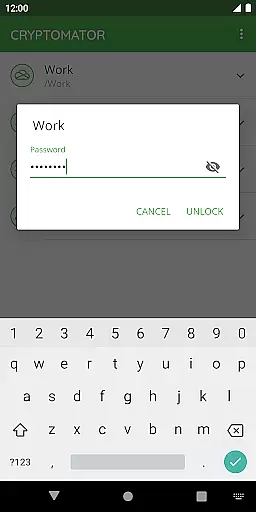
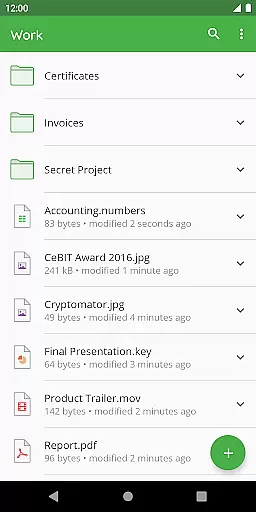
Cryptomator is a user-friendly encryption tool designed to secure your sensitive data before uploading it to cloud storage services. With its intuitive interface, users can easily create secure vaults protected by strong passwords or fingerprint authentication. This ensures complete control over your data security without relying on third-party services.
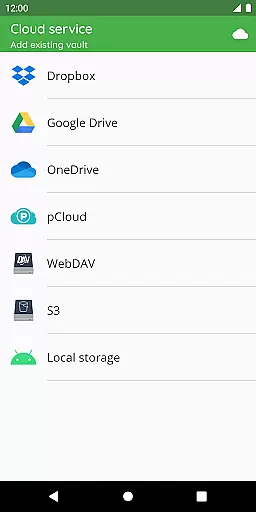
The application supports all major cloud providers including Dropbox, Google Drive, and OneDrive, as well as WebDAV-based services. Whether you're working on mobile devices or computers, Cryptomator ensures seamless access to your encrypted files across platforms. Its open-source nature allows for transparency in security practices, making it an ideal choice for privacy-conscious individuals.
By encrypting both file contents and filenames using AES-256 standards, Cryptomator provides robust protection against unauthorized access. The app also features automatic locking when idle, adding another layer of security. Suitable for personal use or small teams, this productivity app helps maintain confidentiality while leveraging the convenience of cloud storage solutions.
Cryptomator stands out with its advanced yet accessible encryption capabilities tailored for everyday users. At its core, the app employs AES-256 encryption combined with scrypt key derivation to protect your files and filenames from potential threats. This high level of encryption ensures that only authorized users holding the correct password can decrypt and access stored information.
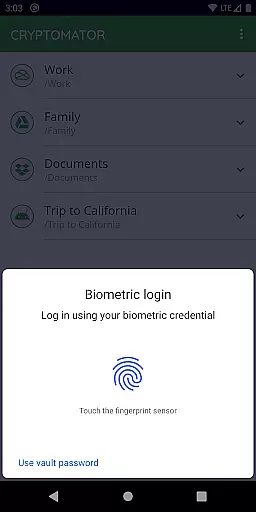
One notable feature is its compatibility with various cloud storage services such as Dropbox, Google Drive, and OneDrive. Users can create encrypted vaults directly within these platforms or local storage options like Android's internal memory. Additionally, Cryptomator integrates biometric authentication methods, allowing quick but secure access through fingerprint scanning.
Beyond technical specifications, Cryptomator fosters trust through its commitment to open-source development. Anyone can review the codebase, ensuring there are no hidden vulnerabilities or backdoors. Regular updates and active community support further enhance its reliability, making Cryptomator not just a tool but a comprehensive solution for safeguarding digital assets.
In the realm of productivity, managing tasks efficiently is paramount. Cryptomator excels by not merely organizing your files but encrypting them for secure cloud storage, ensuring both organization and security. This dual functionality simplifies your digital workflow while safeguarding your data against unauthorized access.
The application allows you to create vaults with a simple password, removing the need for additional accounts or complex configurations. This straightforward approach to task management ensures that users can focus on their core responsibilities without getting bogged down by complicated software. The ability to unlock these vaults with a fingerprint adds an extra layer of convenience, streamlining the user experience.
By integrating seamlessly with popular cloud services like Dropbox, Google Drive, and OneDrive, Cryptomator enhances your task management capabilities. It enables you to maintain a structured and secure repository of your work, accessible from any device. This compatibility ensures that no matter where you are or what device you're using, your encrypted tasks and files are just a few clicks away.
Cross-device synchronization is a critical feature for anyone relying on multiple devices for their work. Cryptomator stands out by offering reliable synchronization across all your devices, ensuring that your encrypted files are always up-to-date and accessible wherever you go. This reliability is crucial for maintaining productivity in a fast-paced environment.
With support for Androidu2019s local storage and third-party sync apps, Cryptomator provides flexibility in how your data is synchronized. Whether you're working from a mobile device or a computer, the application ensures that your vaults are consistently updated. This means you can switch between devices without worrying about data consistency or security breaches.
Furthermore, Cryptomator's automatic locking feature after sending the app to the background guarantees that your data remains protected even when moving between devices. This feature, combined with its robust encryption protocols, ensures that your information stays confidential and intact. By prioritizing both synchronization reliability and security, Cryptomator delivers a seamless and safe cross-device experience.
Strong AES-256 encryption
Easy-to-use interface
Compatible with major cloud services
Open-source transparency
Automatic security lock
No built-in cloud storage
Limited free version
Fingerprint setup complexity
Occasional sync delays
Advanced settings required

Ads Free App! Editor, Hide File, Copy, Move, Delete and Rename.. all facility av
 1.70
1.70
A simple, portable logger for POTA, SOTA, Field Day, and more
4.1
IP Camera Viewer - Android TV : RTSP Surveillance camera viewer for Android TV
4.1
Secure, open-source, SPICE and SSH Remote Desktop for QEMU KVM virtual machines
4.00
Access, manage and transfer files on Android, PC, Mac, NAS and cloud storages.
4.30
Experience and share your SolidWorks designs on your Android® phone and tablet.
2.50
Seamlessly read, manage, and organize all your PDF files solution in one place
4.40
Set up, print, and get support—in one place
4.20
Note taking, handwriting, record audio, PDF annotation, planner & journal
4.20
App lock - lock apps with fingerprint, password, pin or pattern, protect privacy
4.70
All document reader, all in one file viewer read PDF, DOCX, XLS, PPT, TXT files.
4.60
Calendar 2023 widget for Android. Appointment scheduler, planner, and reminder
4.60
Subscribe to Webcal & .ics calendars and keep them up-to-date!
4.50
Total remote control for your Android device, PC and cloud services (IFTTT)!
4.20
All in One PDF Reader: Manage, Read and Edit your Documents
4.20
Take control of your clipboard with Clipper!
3.90
A Revolutionary All-in-One Artificial Intelligence Tools
3.80
Smart PDF reader & editor to view, organize and manage PDF documents easily.
3.70
ID.me Authenticator is a simple and free Two Factor Authentication solution
3.50


User Reviews