
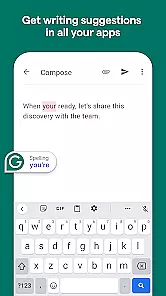
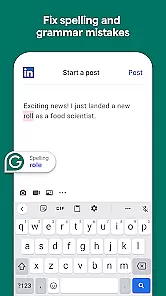
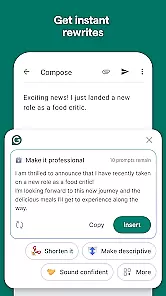
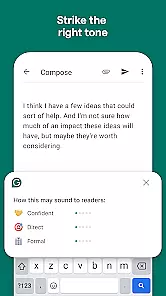
Grammarly is a productivity app designed to enhance your writing skills. It functions as an advanced text editor that checks for grammar, spelling, and punctuation errors in real-time. The app also provides style suggestions to improve clarity and engagement in your writing.
One of the standout features is its cross-platform compatibility, working seamlessly across email clients, social media, and word processors. Whether you're drafting an important email or updating your resume, Grammarly ensures your writing is professional and error-free.
This app is particularly useful for students, professionals, and content creators who need to produce high-quality written material regularly. By using Grammarly, users can save time on proofreading and focus more on the creative aspects of writing.
Grammarly offers a comprehensive suite of writing tools. Its AI-powered engine detects not only basic grammatical mistakes but also complex issues related to sentence structure and word choice. This makes it an invaluable assistant for anyone looking to refine their writing.
The app includes a plagiarism checker, which compares your text against billions of web pages to ensure originality. Additionally, Grammarly provides vocabulary enhancement suggestions, helping users expand their lexicon and avoid repetitive language patterns.
Customization options allow users to tailor the feedback according to specific writing goals such as academic, business, or creative writing. With its user-friendly interface and detailed explanations for each suggestion, Grammarly empowers writers to learn and improve continuously.
Task management is a cornerstone of productivity applications, and Grammarly excels in this area by offering users an efficient way to handle writing tasks. The app provides real-time suggestions that go beyond simple spell-checking, including grammar, punctuation, and style improvements.
Grammarly's implementation allows users to organize their writing tasks with clear categorization. Whether you're composing an email, drafting a report, or engaging in creative writing, the app ensures each task is easily identifiable and manageable.
The benefits for users are significant. With Grammarlyu2019s task management features, individuals can focus more on content creation rather than worrying about linguistic accuracy. This streamlined process saves time and enhances overall productivity.
Ultimately, Grammarly empowers its users by providing them with the tools necessary to produce high-quality written work efficiently. Its comprehensive approach to task management makes it an invaluable asset for anyone looking to improve their writing skills while maintaining peak productivity levels.
Cross-device synchronization is crucial for users who switch between multiple devices throughout their day. Grammarly ensures that all your writing tasks and preferences are seamlessly synced across your devices, providing a consistent experience whether you're using a smartphone, tablet, or desktop.
The app employs reliable cloud-based technology to maintain synchronization. Any changes made on one device are instantly reflected on others, ensuring that users have access to the most up-to-date versions of their documents and settings without any manual intervention.
This feature offers immense value to users by allowing them uninterrupted workflow. You can start editing a document on your phone during a commute and continue right where you left off on your computer at work, with all edits intact and no loss of information.
By prioritizing cross-device synchronization reliability, Grammarly not only enhances user convenience but also reinforces data integrity and availability. This robust functionality supports modern work habits, making Grammarly an essential tool for productive multitasking across different platforms.
Accurate error detection
User-friendly interface
Real-time suggestions
Plagiarism checker
Vocabulary enhancement
Premium version costly
Limited offline functionality
Occasional incorrect suggestions
Privacy concerns with data
Heavy on system resources

Secure, fast, open-source, VNC and SSH Remote Desktop for Windows, Linux and Mac
 4.70
4.70
Take control of your clipboard with Clipper!
3.90
Automates browsing any website and notifies you of important changes or events
4.30
The upgraded version of Name Wheel with AI and the power to add your own wheels.
4.2
Make your handwriting beautiful, even more than pen on paper.
3.60
PDF scanner & converter for files, photos, lottery, QR codes. One swipe away!
4.50
Find and delete junk files & block unwanted notifications & manage files
3.70
Secure, open-source, SPICE and SSH Remote Desktop for QEMU KVM virtual machines
4.00
To do list widget with a notebook organizer, checklist, simple shopping list
4.60
A simple Whisper AI keyboard for reliable speech transcription and rewording
4.60
The AI assistant that thinks with you - write, code, and solve complex tasks
4.60
Tally and goal counter for Wear OS & mobile
4.50
Send files, sync SMS, notifications & clipboard across devices via local network
4.40
When you Focus, so will your Bean in this cozy focus timer
4.30
Easily read and manage all your PDF files
4.10
* block pre-roll ads, pop-up and forced redirect ads * Samsung certification app
4.00
Mega cloud explorer plugin for Solid Explorer
3.80
Smart PDF reader & editor to view, organize and manage PDF documents easily.
3.70
Experience and share your SolidWorks designs on your Android® phone and tablet.
2.50


User Reviews