
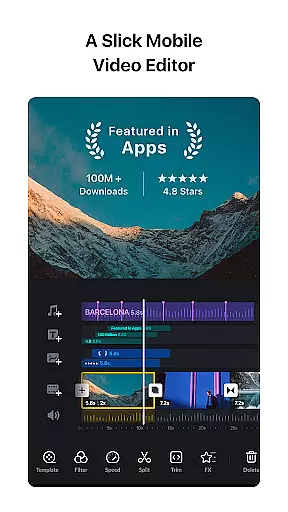
VN is a versatile video editing app that combines professional-grade features with an intuitive interface, making it suitable for both beginners and experienced editors. The app offers advanced tools such as multi-track editing, keyframe animation, and speed curve adjustments, enabling users to create high-quality videos without watermarks. With support for precise editing down to 0.05-second keyframes, VN ensures accuracy in every cut.
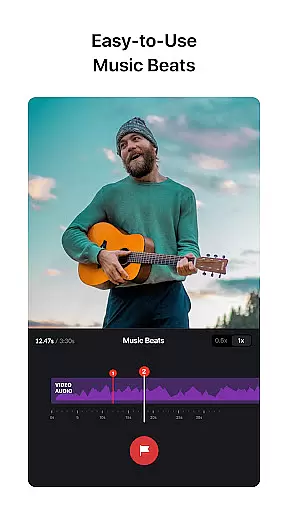
One of the standout features of VN is its ability to seamlessly integrate music beats into video projects, allowing users to align clips with audio rhythms effortlessly. Additionally, the app provides creative effects like transitions, cinematic filters, and reverse playback, enhancing visual storytelling. Users can also import custom materials via Wi-Fi or cloud services, ensuring flexibility in project creation. Whether you're crafting social media content or professional videos, VN delivers the tools needed to produce polished results.
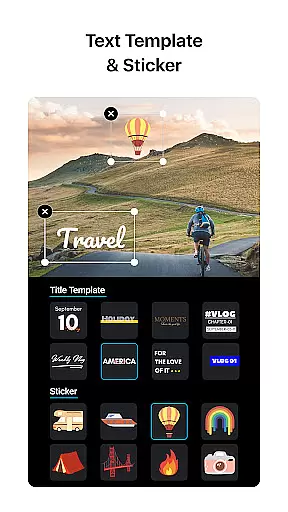
VN stands out with its comprehensive set of features designed to streamline the video editing process. Its multi-track timeline supports picture-in-picture videos, stickers, text overlays, and animations, giving creators full control over their projects. The built-in speed curve tool allows users to manipulate video pacing dynamically, while the rich library of cinematic filters helps achieve professional-grade color grading.
The app's non-destructive editing capabilities ensure that original files remain intact, even after extensive modifications. Advanced options like freeze frames, reverse effects, and customizable text templates further expand creative possibilities. Moreover, VN facilitates collaboration by enabling project transfers between devices through Google Drive or OneDrive. These robust features make VN a powerful choice for anyone looking to edit videos efficiently on mobile devices.
One of VN's standout features is its extensive video format compatibility, ensuring users can work with a wide array of file types without the need for prior conversion. This flexibility allows both amateur and professional editors to import and export videos in formats that suit their specific needs, from common MP4 files to high-quality 4K videos at 60 FPS.
The app supports non-destructive editing, which means users can make alterations to their videos without overwriting the original data. This feature is crucial for preserving the quality of the initial footage, allowing creators to experiment with different edits while always having the option to revert to the original material.
Furthermore, VN offers customizable export settings, enabling users to adjust the resolution, frame rate, and bit rate according to their preferences or platform requirements. Whether it's for YouTube, Instagram, or professional presentations, this adaptability ensures that your final product meets the highest standards of video quality and compatibility.
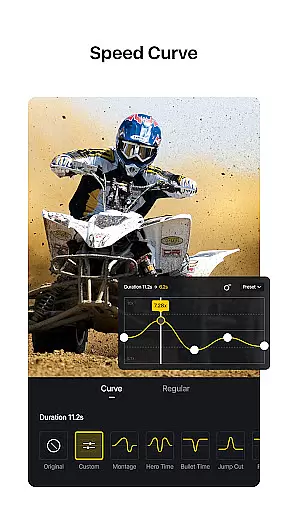
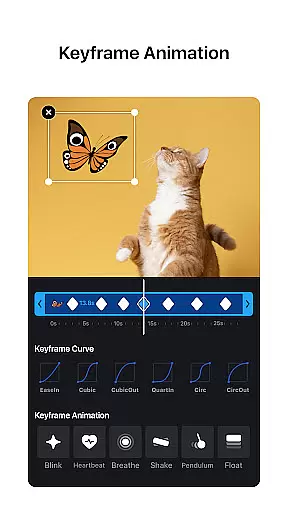
VN incorporates AI-powered editing features that significantly enhance the video creation process. Among these is the Speed Curve tool, akin to Time Remapping in Adobe Premiere Pro, which allows users to manipulate the playback speed of their videos with precision. With six preset curves available, creators can craft dynamic visual narratives that captivate audiences.
In addition to speed adjustments, VN provides an intuitive interface for music beat synchronization. Users can add markers that align video cuts with music beats, elevating the rhythm and flow of their projects. This seamless integration of audio and visual elements empowers creators to produce content that resonates emotionally with viewers.
Moreover, the app includes advanced keyframe animation and rich cinematic filters through LUT (.cube) file imports. These tools enable users to apply complex animations and color grading effects easily, resulting in professional-grade videos that stand out. By leveraging AI technology, VN simplifies sophisticated editing techniques, making them accessible to editors of all skill levels.
User-friendly interface
Professional editing tools
No watermark on exports
Supports 4K resolution
Flexible material imports
Limited advanced tutorials
Occasional performance lags
Fewer third-party integrations
Basic audio effects
Ads in free version

Video player, file manager for all formats, 4K/HD media player supports subtitle
 4.30
4.30
HD video & music player - All format support with floating & PIP mode!
3.80
Cast Videos from Web Browser, IPTV to Roku, Chromecast, DLNA, Smart TV +more
4.60
Stream high quality video from your camera over NDI protocol
4.5
Support 1000+ Video Format, Subtitle Download, mp3 & Background Play, Cast On TV
4.60
AirMirror Receiver - Screen mirroring/cast web videos to Android TV by AirPlay.
4.40
Add date and time watermark to photos and videos
4.50
Screen recorder with audio to take live videos & Screenshot in high quality!
4.70
Create, Publish & Maximize
4.70
Flud is a simple and beautiful BitTorrent client for Android.
4.80
VLC Remote lets you control your VLC Media Player on Mac, PC or Linux.
4.60
Seamlessly connect and control your smart devices, anytime, anywhere with ease.
4.60
Browser + Remote for Roku to stream webvideos, online movies and livestreams
4.60
Fast & Private HD Video Downloader with Built-in Proxy Browser and Video Player.
4.50
Fast & Private Video Downloader App. Save all videos easily from the Internet.
4.40
Movie maker & video editing app with AI effects and green screen
4.30
IPTV-Smarters Player Pro M3U - Watch Live Stream TV Channels with Chromecast
4.00
Browser for Sony TV to stream web videos, online movies and live tv
3.20
You can play SWF format file!
2.50


User Reviews